Help: SQL Server

Sharing my knowlege about SQL Server Troubleshooting Skills

  • Blog Stats

    • 2,153,598 hits
  • Select GETDATE()

    February 2014
    M T W T F S S
     12
    3456789
    10111213141516
    17181920212223
    2425262728  

Archive for February, 2014

A-Z of In-Memory OLTP : Garbage Collection (Part 1)

Posted by blakhani on February 7, 2014


We all wants our surroundings to be clean. Sometimes we put efforts to keep it clean and some times we rely on someone else to clean keep it clean. In short, none of us like garbage around us. Garbage is something which has been useful in the past but no more useful. On the same lines, computer world also has term garbage (Wikipedia) and to clean it up, there is a concept called Garbage Collection (Wikipedia). Do you know that in earlier version of SQL there was something similar? Yes, it was “ghost cleanup” back ground process. In SQL Server 2014, garbage collection is “similar” work for data in in-memory tables.

There are two kind of Garbage Collection which exists in In-Memory OLTP:

  • Garbage Collection of Rows in Memory
  • Garbage Collection of Checkpoint Files

Now you might understand why I called this post as part 1. Yes, we would start from the clean-up of rows in memory.

In earlier post, we have discussed about row structure and timestamp. If a row is deleted or updated (which is delete + insert internally) we would have different row versions. It would not be a good idea to delete them physically at the same time. Due to this we would have a number of discarded (garbage) rows in memory. To handle such discarded row versions, garbage collection process is introduced. This process periodically cleans up the rows, which are “garbage” at this point.

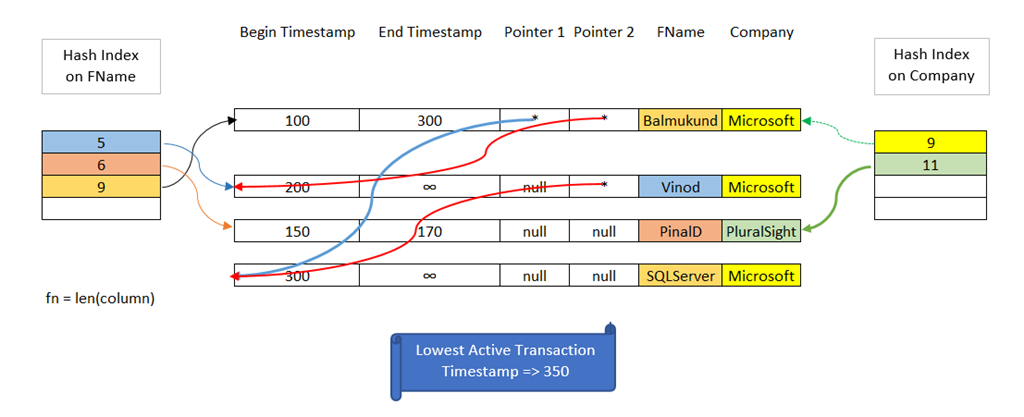
To understand below picture, I would like you to go to hash indexes (part 1 and part 2). I have done color coding to make it easy to read.
image
Image#1 Rows 1 and 4 are garbage at this point.

In above we have end timestamp available for row 1 (Balmukund, Microsoft) and row 3 (PinalD, PluralSight). Notice First and forth row – End Timestamp for Row 1 is Begin Timestamp for Row 4. This would mean that we have fired “Update” and Modified Balmukund to SQLServer at timestamp 300. On the other hand, row 3 was deleted from the system via “Delete” statement at timestamp 170. As indicated in picture, the lowest active transaction time stamp is 350, which means that there is no “active” transaction in the SQL Server whose timestamp is less than 350. Recall that the life of a row is determined by begin and end timestamp. Since all the transactions are above timestamp 350, there is no transaction which would “need” those rows. This would mean that rows 1 and 3 are eligible for the garbage collection. These rows can be removed and their memory can be released back to the system.

The garbage collection system is designed to be non-blocking, cooperative, efficient, responsive and scalable. (taken from Hekaton whitepaper). Let’s me try to explain reason of those words:

  • Non-Blocking: In some systems, when garbage collection activity starts, there is a huge work done and other “real” workload becomes to halt. This is NOT true with SQL Server In-Memory OLTP. It happens in the back ground all the time.
  • Cooperative: In SQL Server In-Memory OLTP, garbage collection is not the responsibility of dedicated system thread alone. All other users threads who are doing reading/writing of data also do a little piece of over all garbage collection work.
  • Efficient: A regular reader thread would do work if it find a row which is stale/garbage.
  • Responsive: Garbage collection process responds to memory pressure. Recall, lazywriter thread in traditional SQL world.
  • Scalable: Work of Garbage collection if shared. Any transaction which is completed would look at the queue and would de-queue the work.

All above points would be clear if you read further.

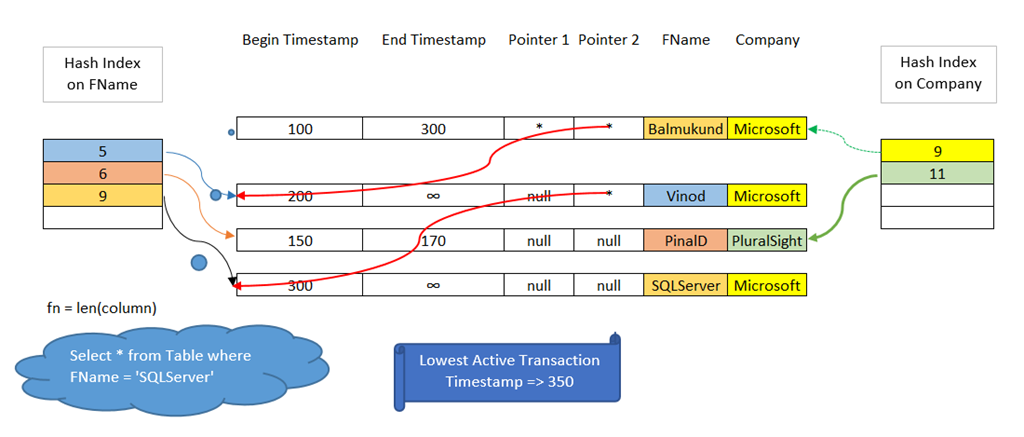
Let’s assume that there is a select statement fired which is using hash Index created on FName column (for example select * from table where FName = ‘SQLServer’). Since hash value of column is 9, it would scan all rows of the bucket. While doing that it would find a row (Balmukund, Microsoft) which is stale (Refer Image#1). The reader thread would delink that row from the chain and move forward. Note that the row is still NOT deleted from memory but a little work of garbage collection has been done. Here is the after image after select query.
image
Image#2 Cooperative work done by User thread doing scan of the bucket.

You might say that what about red chain above (bucket 9)? That would be cleaned by regular garbage collection thread if user thread is not doing it. This means that if we traverse using Index on company and scanning bucket of hash value 9, it would be delinked by user thread else system thread would do it. Below would be the final state of the system once all garbage is cleaned and memory is released.

image
Image#3 Both rows cleaned by garbage collection.

This means that garbage collection is not a discrete process in SQL Server In-Memory OLTP. It can be done by dedicated system thread and also cooperatively done by user threads. This make the garbage collection more efficient.

Hope you have learned something new today! In next blog of the series, we would see the DMVs which can be used to see garbage collection in action.

  • Cheers,
  • Balmukund Lakhani
  • Twitter @blakhani
  • Author: SQL Server 2012 AlwaysOnPaperback, Kindle
  • Posted in A - Z Series, In Memory OLTP, In-Memory OLTP, SQL Server 2014 | Tagged: , , , , , , , , , , , | 1 Comment »

    A-Z of In-Memory OLTP : Native Compilation Advisor in SSMS

    Posted by blakhani on February 4, 2014


    In our last part of A-Z Series, we learned about Memory Optimization Advisor (wizard in SSMS) which can be used to migrate disk based tables to in-memory tables. This post is dedicated to another wizard which is for stored procedure. It is important to remember that, unlike Memory Optimization Advisor, this wizard is NOT to convert regular stored procedures into natively complied stored procedure. The idea of the “Native Compilation Advisor” is to scan the code of stored procedure and give advise about what to change in the stored procedure.

    Where is the wizard?

    The “Native Compilation Advisor” wizard can be launched by right clicking the stored procedure which we wish to convert to natively complied. In below screenshot, we can notice the option difference when we right click on regular stored procedure vs. natively complied stored procedure.

    image

    Image#1 – Comparison of right click.

    What is the purpose?

    As explained earlier, this Advisor would NOT convert regular stored procedure to natively complied but provide just the advice and pointers. Let me explain them via good boy and bad boy. We would use same database which we have been using earlier. Here is the blog to get script for database and tables.

    Good Boy!

    Since we already have database SQLSeverHelp_IMO and tables (DiskBasedTable and MyFirstMemporyOptimizedTable), Let’s create regular stored procedure as below.

    -- Create regular stored procedure in database and referencing IMO table
    Use SQLSeverHelp_IMO 
    GO
    CREATE PROCEDURE [dbo].[InsertName] @iID INT, @vFName VARCHAR(20), @vLName VARCHAR(20)
    AS 
    BEGIN  
    
      INSERT INTO dbo.MyFirstMemporyOptimizedTable
      VALUES (@iID, @vFName, @vLName);
    
    END
    GO

    Now, let’s launch the wizard by right clicking on InsertName stored procedure in SQL Server Management Studio (shown in image 1). As soon as we click on Native Compilation Advisor, we get welcome screen.

    image

    Image#2 – Welcome Screen.

    As we can read on the welcome screen – “The Native Compilation Advisor will assist you to discover and evaluate Transact-SQL elements in your stored procedure that are not supported in Native Compilation”. See, I told you! Okay, Let’s hit next.

    Below screen appears and you would notice that Next button is disabled.

    image

    Image#3 – Stored Procedure Validation – no errors

    This is because there is no T-SQL element which is not supported by Natively complied stored procedures. Cancel the wizard to exit.

    Bad Boy!

    Now, I am going to create stored procedure with some (actually many) elements which are not supported by natively complied stored procedure. Please note that this is for CTP2 and things might change in RTM.

    -- Create regular stored procedure in database   
    -- with many elements not supported by natively complied stored procedures  
    USE sqlseverhelp_imo 
    
    go 
    
    IF Object_id('usp_InsertName_Errors') IS NOT NULL 
      DROP PROCEDURE usp_insertname_errors 
    
    go 
    
    CREATE PROCEDURE [dbo].[Usp_insertname_errors] 
    @iID    INT, 
    @vFName VARCHAR(20), 
    @vLName VARCHAR(20) 
    AS 
      BEGIN 
          -- four part naming   
          SELECT * 
          FROM   hk.sqlseverhelp_imo.dbo.myfirstmemporyoptimizedtable 
    
          -- three part naming 
          SELECT * 
          FROM   sqlseverhelp_imo.dbo.myfirstmemporyoptimizedtable 
    
          -- multivalued insert 
          INSERT INTO dbo.myfirstmemporyoptimizedtable 
          VALUES      (@iID, 
                       @vFName, 
                       @vLName), 
                      (@iID + 1, 
                       @vFName, 
                       @vLName) 
    
          -- Subquery 
          SELECT vfname 
          FROM   diskbasedtable 
          WHERE  iid IN (SELECT is_published 
                         FROM   sys.objects) 
    
          -- goto 
          GOTO hi 
    
          -- cursor 
          DECLARE c CURSOR FOR 
            SELECT iid, 
                   vfname 
            FROM   dbo.diskbasedtable 
    
          HI: 
    
          -- cte 
          WITH cte (i, j) 
               AS (SELECT iid, 
                          vfname 
                   FROM   dbo.diskbasedtable) 
          SELECT * 
          FROM   cte 
      END 
    
    go   
    

    if we run wizard for above stored procedure, we would have next button enabled. This is one of those next button which is not going to make your happy. Agree?

    image

    Image#4 – Stored Procedure Validation – with errors

    Fine, so there are problems. Hitting next would tell us more.

    image

    Image#5 – Final Results!

    As highlighted in image # 5 , we also have the option to “generate report” for these unsupported elements. Here is the report which I saved in html format. It gives us code, line number and they are grouped under T-SQL Element (like *, Four-part names etc.)

    Native Compilation Advisor evaluation results for [SQLSeverHelp_IMO].[usp_InsertName_Errors]

    Report Date/Time:2/3/2014 12:16 PM

    Transact-SQL Element Transact-SQL Code Line Number
    * SELECT * FROM hk.sqlseverhelp_imo.dbo.myfirstmemporyoptimizedtable 3
      SELECT * FROM sqlseverhelp_imo.dbo.myfirstmemporyoptimizedtable 7
      WITH cte (i, j) AS (SELECT iid, vfname FROM dbo.diskbasedtable) SELECT * FROM cte 37
    Four-part names hk.sqlseverhelp_imo.dbo.myfirstmemporyoptimizedtable 4
    Three-part names sqlseverhelp_imo.dbo.myfirstmemporyoptimizedtable 8
    Multi-row table-valued constructor VALUES (@iID, @vFName, @vLName), (@iID + 1, @vFName, @vLName) 12
    One-part names diskbasedtable 21
      cte 42
    IN iid IN (SELECT is_published FROM sys.objects) 22
    Subquery (SELECT is_published FROM sys.objects) 22
    GOTO GOTO hi 26
    Cursors CURSOR FOR SELECT iid, vfname FROM dbo.diskbasedtable 30
    WITH clause WITH cte (i, j) AS (SELECT iid, vfname FROM dbo.diskbasedtable) 37
      cte (i, j) AS (SELECT iid, vfname FROM dbo.diskbasedtable) 37


    Here is the link which is there in image # 5 http://go.microsoft.com/fwlink?LinkID=311587 talks about common patterns and their workarounds. (link might get change after release of the product)

    Conclusion

    Native Compilation wizard can be used to get advice from SQL Server about the changes which are needed to covert a regular stored procedure to natively compiled stored procedure. There are some common pattern of the problems where workaround can be used by following the link provided by the advisor. Conversation of stored procedure is still manual process and not as clean as Table Advisor (Memory Optimization Advisor). Using both wizards, we can get advice to take action prior to a migration. At the end I would say that this is the only wizard I have seen which doesn’t have finish button.

    Have you installed SQL Server 2012 CTP2 yet? If you haven’t yet, be sure to check out the SQL Server 2014 CTP2 so that you can follow this series and get your hands dirty.

    Stay Tuned!

  • Cheers,
  • Balmukund Lakhani
  • Twitter @blakhani
  • Author: SQL Server 2012 AlwaysOnPaperback, Kindle
  • Posted in A - Z Series, Hekaton Series, In Memory OLTP, In-Memory OLTP, SQL Server 2014 | Tagged: , , , , , , , , , , , , , | 2 Comments »