Help: SQL Server

Sharing my knowlege about SQL Server Troubleshooting Skills

  • Blog Stats

    • 2,158,207 hits
  • Select GETDATE()

    April 2026
    M T W T F S S
     12345
    6789101112
    13141516171819
    20212223242526
    27282930  

Archive for 2014

Log Shipping Message : Skipping log backup file since load delay period has not expired

Posted by blakhani on August 21, 2014


During my last visit to one of my friend’s home I was surprised to hear that he had a problem in log shipping where he wanted my help. It was a family meet-up and I never thought it would become technical. Anyways, I asked the problem and he mentioned that he has configured log-shipping for one database between two servers. He told me that he was getting some “delay” error and I asked to give the exact error message. Below is what we saw in “Restore Job history”

2014-06-21 06:14:30.45     Starting transaction log restore. Secondary ID: ‘8a3c7cae-6df2-4c6e-b528-2062d4b830f0’
2014-06-21 06:14:30.45     Retrieving restore settings. Secondary ID: ‘8a3c7cae-6df2-4c6e-b528-2062d4b830f0’
2014-06-21 06:14:30.45     Retrieved common restore settings. Primary Server: ‘SQLPAPA’, Primary Database: ‘LogShipDemo’, Backup Destination Directory: ‘E:\LS\Secondary’, File Retention Period: 4320 minute(s)
2014-06-21 06:14:30.45     Retrieved database restore settings. Secondary Database: ‘SomeName’, Restore Delay: 2, Restore All: True, Restore Mode: No Recovery, Disconnect Users: False, Last Restored File: E:\LS\Secondary\SomeName_20140621004200.trn, Block Size: Not Specified, Buffer Count: Not Specified, Max Transfer Size: Not Specified
2014-06-21 06:14:30.51     Skipping log backup file since load delay period has not expired. Secondary DB: ‘SomeName’, File: ‘E:\LS\Secondary\SomeName_20140621004231.trn’
2014-06-21 06:14:30.51     The restore operation was successful. Secondary Database: ‘SomeName’, Number of log backup files restored: 0
2014-06-21 06:14:30.51     Deleting old log backup files. Primary Database: ‘SomeName’
2014-06-21 06:14:30.51     The restore operation was successful. Secondary ID: ‘8a3c7cae-6df2-4c6e-b528-2062d4b830f0’
2014-06-21 06:14:30.51     —– END OF TRANSACTION LOG RESTORE     —–

So the question he asked were:

  • What is this "Load delay period" and what’s the meaning of the error?
  • Can we configure this somehow, somewhere?

Answer

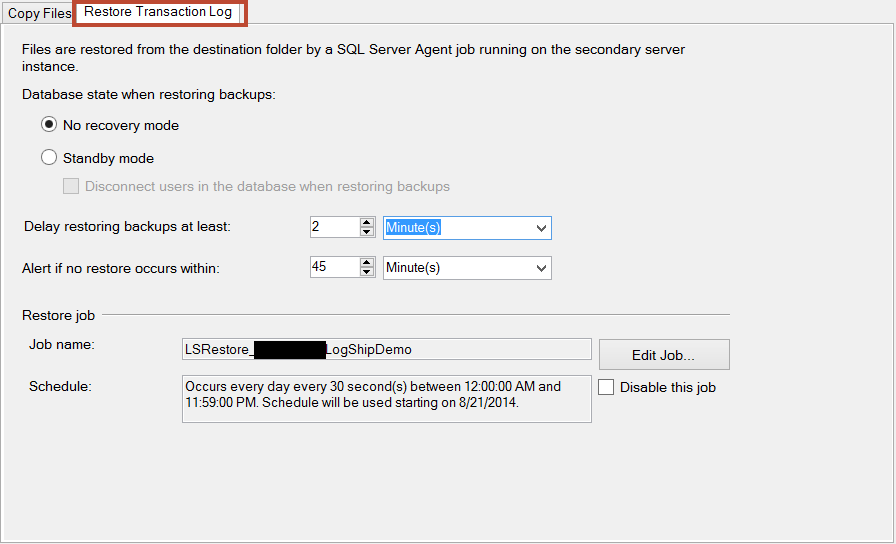
  • Load delay is a period what is given to secondary server to wait to restore the backup file. We can use this if we want to wait upon the copy job.
  • We can set this value in the SSMS
    Database > Right click > properties -> Transaction Log shipping -> Secondary databases -> Restore Transaction Log

image

If we want to check via T-SQL then we can see that in MSDB database of secondary server.

Select  secondary_database, 
        restore_delay 
from    msdb.dbo.log_shipping_secondary_databases

If the load delay is set to zero and still we are seeing a long delay in restore job picking the file to restore then next thing to check would be if there is a time difference between primary and secondary servers. Having different time zone is not a problem but but UTC time should match else we would see such problems.

Hope this helps!

  • Cheers,
  • Balmukund Lakhani
  • Twitter @blakhani
  • Author: SQL Server 2012 AlwaysOnPaperback, Kindle
  • Posted in Logshipping | Tagged: , , , | 3 Comments »

    Troubleshooting : %1 is not a valid win32 application

    Posted by blakhani on August 19, 2014


    As part of my job, a significant part of my working hours are all about troubleshooting SQL related issues. They could range from SQL installation, performance, high availability, T-SQL query and pretty much any area related to SQL Server.

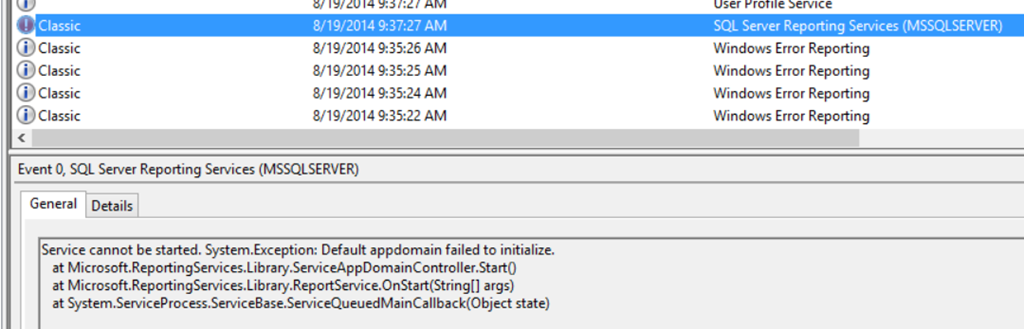
    Few days back one of my friend pinged me and told that he is not able to start “Reporting Service” service. I asked if he is seeing any error message anywhere like event logs. He shared below with me.
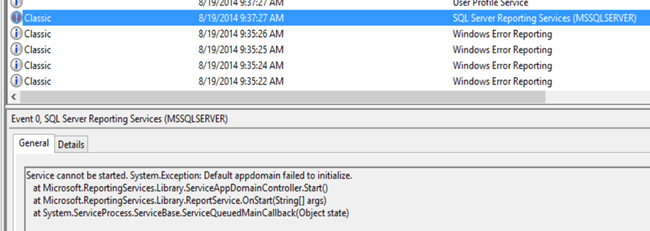
    image

    Here is the text of the message.

    Service cannot be started. System.Exception: Default appdomain failed to initialize.

       at Microsoft.ReportingServices.Library.ServiceAppDomainController.Start()

       at Microsoft.ReportingServices.Library.ReportService.OnStart(String[] args)

       at System.ServiceProcess.ServiceBase.ServiceQueuedMainCallback(Object state)

    That was not a good message to tell us what’s wrong. I researched further and found that similar to ERRORLOG in SQL Server, there are logs for Reporting Services as well. Here is the more detailed messaged in Reporting Services log.

    image

    configmanager!DefaultDomain!e10!08/16/2014-01:52:29:: e ERROR: Error loading configuration file: %1 is not a valid Win32 application

    library!DefaultDomain!e10!08/16/2014-01:52:29:: e ERROR: Throwing Microsoft.ReportingServices.Diagnostics.Utilities.ServerConfigurationErrorException: , Microsoft.ReportingServices.Diagnostics.Utilities.ServerConfigurationErrorException: The report server has encountered a configuration error.  —> System.ComponentModel.Win32Exception: %1 is not a valid Win32 application

       at Microsoft.ReportingServices.Diagnostics.SafeLibraryHandle.LoadLibrary(String libName)

       at Microsoft.ReportingServices.Diagnostics.SqlInstallation.GetSkuFromSqlBoot(String instanceId, Int32& daysLeft)

       at Microsoft.ReportingServices.Diagnostics.Sku.<>c__DisplayClass6.<GetSkuFromSqlBoot>b__5()

       at Microsoft.ReportingServices.Diagnostics.RevertImpersonationContext.<>c__DisplayClass1.<Run>b__0(Object state)

       at System.Security.SecurityContext.Run(SecurityContext securityContext, ContextCallback callback, Object state)

       at Microsoft.ReportingServices.Diagnostics.RevertImpersonationContext.Run(ContextBody callback)

       at Microsoft.ReportingServices.Diagnostics.Sku.GetSkuFromSqlBoot(String instanceId)

       at Microsoft.ReportingServices.Diagnostics.Sku.GetInstalledSku(String instanceId)

       at Microsoft.ReportingServices.Diagnostics.RSConfiguration.AdjustProperties(ConfigurationPropertyBag properties)

       at Microsoft.ReportingServices.Diagnostics.RSConfiguration.Validate(ConfigurationPropertyBag properties)

       at Microsoft.ReportingServices.Diagnostics.RSConfigurationFileManager.LoadDocument()

       at Microsoft.ReportingServices.Diagnostics.RSConfigurationFileManager.LoadConfiguration()

       — End of inner exception stack trace —;

    appdomainmanager!DefaultDomain!e10!08/16/2014-01:52:29:: e ERROR: Appdomain:1 DefaultDomain failed to initialize. Error: Microsoft.ReportingServices.Diagnostics.Utilities.ServerConfigurationErrorException: The report server has encountered a configuration error.  —> System.ComponentModel.Win32Exception: %1 is not a valid Win32 application.

    appdomainmanager!DefaultDomain!352c!08/16/2014-01:52:29:: e ERROR: Windows service failed to start. Exception: System.Exception: Default appdomain failed to initialize.

       at Microsoft.ReportingServices.Library.ServiceAppDomainController.Start()

    If you are a developer, you would know what a stack is. It goes from bottom to top and shows the section which caused the error. From the highlighted pieces it’s easy to make sense. Reporting Service is trying to get SKU (edition) which is installed on this machine using function GetInstalledSku. After that we are seeing function GetSkuFromSqlBoot which indicates that we will get information using this function. Later, we are seeing LoadLibrary and that function is raising error. Now the question is why! If we do a search on internet using Bingoogle. In general, the most possible cause of the error is corruption of the files which are needed. If we capture ProcMon while starting SSRS Service, it would be easy to find last loaded DLL and then we may need to find if it’s a correct DLL by comparing with another machine where things are working fine.

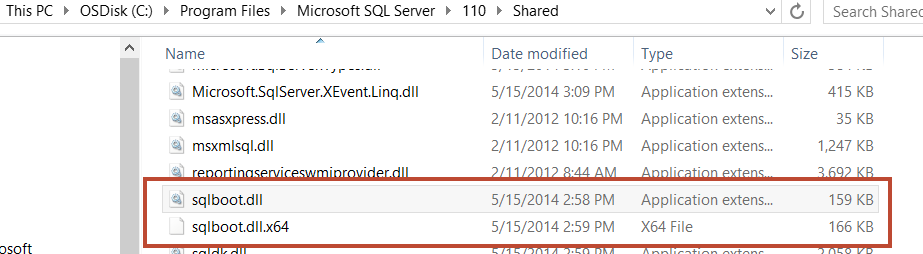
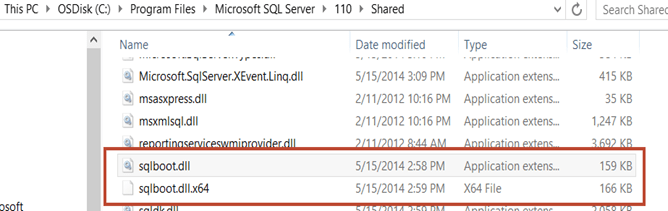
    Interesting, here is what I saw under “C:\Program Files\Microsoft SQL Server\110\Shared”
    image

    As we can see that someone has renamed the file and original file is renamed as sqlboot.dll.x64.

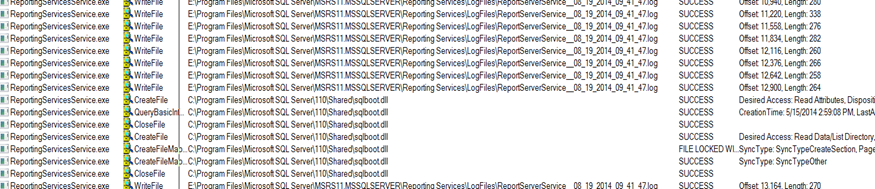
    When I captured ProcMon
    image

    And after this I saw “exit” of the threads and process.

    Another symptom on the same problem is that when he was running SQL Setup to add some component, he was getting below error

    There was a failure to calculate the default value of setting DIGITALPRODUCTID.

    and this is what we see in setup logs.

    (01) 2014-08-15 10:46:44 Slp: The following is an exception stack listing the exceptions in outermost to innermost order

    (01) 2014-08-15 10:46:44 Slp: Inner exceptions are being indented

    (01) 2014-08-15 10:46:44 Slp:

    (01) 2014-08-15 10:46:44 Slp: Exception type: Microsoft.SqlServer.Chainer.Infrastructure.CalculateSettingValueException

    (01) 2014-08-15 10:46:44 Slp:     Message:

    (01) 2014-08-15 10:46:44 Slp:         There was a failure to calculate the default value of setting DIGITALPRODUCTID.

    (01) 2014-08-15 10:46:44 Slp:     HResult : 0x85640001

    (01) 2014-08-15 10:46:44 Slp:         FacilityCode : 1380 (564)

    (01) 2014-08-15 10:46:44 Slp:         ErrorCode : 1 (0001)

    (01) 2014-08-15 10:46:44 Slp:     Data:

    (01) 2014-08-15 10:46:44 Slp:       SettingId = DIGITALPRODUCTID

    (01) 2014-08-15 10:46:44 Slp:       WatsonData = Microsoft.SqlServer.Chainer.Infrastructure.CalculateSettingValueException@1

    (01) 2014-08-15 10:46:44 Slp:     Stack:

    (01) 2014-08-15 10:46:44 Slp:         at Microsoft.SqlServer.Chainer.Infrastructure.Setting`1.CalculateValue()

    (01) 2014-08-15 10:46:44 Slp:         at Microsoft.SqlServer.Deployment.PrioritizedPublishing.PublishingQueue.CallQueuedSubscriberDelegates()

    (01) 2014-08-15 10:46:44 Slp:         at Microsoft.SqlServer.Deployment.PrioritizedPublishing.PublishingQueue.Publish(Publisher publisher)

    (01) 2014-08-15 10:46:44 Slp:         at Microsoft.SqlServer.Chainer.Infrastructure.Setting`1.set_Value(T value)

    (01) 2014-08-15 10:46:44 Slp:         at Microsoft.SqlServer.Chainer.Infrastructure.Setting`1.SetValue(Object newValue, InputSettingSource source)

    (01) 2014-08-15 10:46:44 Slp:         at Microsoft.SqlServer.Chainer.Infrastructure.InputSettingService.SetSettingValue[T](String settingName, T value, InputSettingSource source)

    (01) 2014-08-15 10:46:44 Slp:         at Microsoft.SqlServer.Configuration.Property`1.SetValueAndSource(Object value, InputSettingSource source)

    (01) 2014-08-15 10:46:44 Slp:         at Microsoft.SqlServer.Configuration.InstallWizard.InstallTypeController.SaveData()

    (01) 2014-08-15 10:46:44 Slp:         at Microsoft.SqlServer.Configuration.InstallWizardFramework.InstallWizardPageHost.PageLeaving(PageChangeReason reason)

    (01) 2014-08-15 10:46:44 Slp:         at Microsoft.SqlServer.Configuration.WizardFramework.UIHost.set_SelectedPageIndex(Int32 value)

    (01) 2014-08-15 10:46:44 Slp:         at Microsoft.SqlServer.Configuration.WizardFramework.NavigationButtons.nextButton_Click(Object sender, EventArgs e)

    (01) 2014-08-15 10:46:44 Slp:         at System.Windows.Forms.Control.OnClick(EventArgs e)

    (01) 2014-08-15 10:46:44 Slp:         at System.Windows.Forms.Button.OnMouseUp(MouseEventArgs mevent)

    (01) 2014-08-15 10:46:44 Slp:         at System.Windows.Forms.Control.WmMouseUp(Message& m, MouseButtons button, Int32 clicks)

    (01) 2014-08-15 10:46:44 Slp:         at System.Windows.Forms.Control.WndProc(Message& m)

    (01) 2014-08-15 10:46:44 Slp:         at System.Windows.Forms.ButtonBase.WndProc(Message& m)

    (01) 2014-08-15 10:46:44 Slp:         at System.Windows.Forms.Button.WndProc(Message& m)

    (01) 2014-08-15 10:46:44 Slp:         at System.Windows.Forms.Control.ControlNativeWindow.WndProc(Message& m)

    (01) 2014-08-15 10:46:44 Slp:         at System.Windows.Forms.NativeWindow.Callback(IntPtr hWnd, Int32 msg, IntPtr wparam, IntPtr lparam)

    (01) 2014-08-15 10:46:44 Slp:     Inner exception type: System.ComponentModel.Win32Exception

    (01) 2014-08-15 10:46:44 Slp:         Message:

    (01) 2014-08-15 10:46:44 Slp:                %1 is not a valid Win32 application.

    (01) 2014-08-15 10:46:44 Slp:                

    (01) 2014-08-15 10:46:44 Slp:         HResult : 0x80004005

    (01) 2014-08-15 10:46:44 Slp:         Error : 193

    (01) 2014-08-15 10:46:44 Slp:         Stack:

    (01) 2014-08-15 10:46:44 Slp:                 at Microsoft.SqlServer.Configuration.Sco.SqlbootModule.get_Handle()

    (01) 2014-08-15 10:46:44 Slp:                 at Microsoft.SqlServer.Configuration.Sco.EditionInfo.GetEditionInfo(String RegistryPath, RegistryView view, UInt32& daysLeft)

    (01) 2014-08-15 10:46:44 Slp:                at Microsoft.SqlServer.Configuration.Sco.EditionInfo.GetEditionInfo(String RegistryPath, RegistryView view)

    (01) 2014-08-15 10:46:44 Slp:                 at Microsoft.SqlServer.Configuration.SetupExtension.SqlEditionSetting`1.GetDefaultSqlEditionInfoValue()

    (01) 2014-08-15 10:46:44 Slp:                 at Microsoft.SqlServer.Configuration.SetupExtension.DigitalProductIdSetting.DefaultValue()

    (01) 2014-08-15 10:46:44 Slp:                 at Microsoft.SqlServer.Deployment.PrioritizedPublishing.PublishingQueue.CallFunctionWhileAutosubscribing[T](SubscriberDelegate subscriberDelegate, Int32 priority, AutosubscribingFunctionDelegate`1 function)

    (01) 2014-08-15 10:46:44 Slp:                 at Microsoft.SqlServer.Chainer.Infrastructure.Setting`1.CalculateValue()

    So we can clearly see that someone has messed around with the files related to SQL. Here also we are seeing SqlbootModule.

    RESOLUTION

    In this situation, I went ahead and named the files correctly and things were fixed. BUT if you get this error “%1 is not a valid Win32 application” you might need to remove and install SQL Server. It’s not always possible to find the cause with the corrupted file and reinstallation would be a faster approach.

    Hope this helps!

  • Cheers,
  • Balmukund Lakhani
  • Twitter @blakhani
  • Author: SQL Server 2012 AlwaysOnPaperback, Kindle
  • Posted in Troubleshooting | Tagged: , , | 2 Comments »

    Tips and Tricks : Move database files to new location – various approaches

    Posted by blakhani on August 14, 2014


    Recently someone ask this question to me – How would you move database files to new location with no downtime. Based on my knowledge, the downtime is needed as we need physical movement of the database files and they can’t be moved unless the handle is released by a process, which is sqlservr.exe in our case. So I provided various options to them and decided to choose the best one. Here is the database create script, in case you want to follow along the blog.

    CREATE DATABASE [SQLServerHelp]
     ON  PRIMARY 
    ( NAME = N'SQLServerHelp', FILENAME = N'C:\OldLocation\SQLServerHelp.mdf' ) LOG ON 
    ( NAME = N'SQLServerHelp_log', FILENAME = N'C:\OldLocation\SQLServerHelp_log.ldf')
    GO


    1. Detach/Attach

    This is straight forward approach where we detach the database, move physical files to new location and attach database from there. When we detach, the database would no longer be available. Here are the steps:

    --Step 1) detach the database (DOWNTIME STARTS)
    USE master
    go
    sp_detach_db 'SQLServerHelp'
    go
    
    
    -- Step 2)- move files physically to new location
    EXEC xp_cmdshell 'COPY “C:\OldLocation\SQLServerHelp.mdf” “C:\NewLocation\SQLServerHelp.mdf”'
    GO
    EXEC xp_cmdshell 'COPY “C:\OldLocation\SQLServerHelp_log.ldf” “C:\NewLocation\SQLServerHelp_log.ldf”'
    GO
    
    -- If xp_cmdshell is not enabled or you can't enable then do operating system copy and paste using Ctrl+C and Ctrl+V
    
    
    -- Step 3) attach the database (DOWNTIME COMPLETES)
    CREATE DATABASE SQLServerHelp 
    ON (FILENAME = 'C:\NewLocation\SQLServerHelp.mdf'), 
       (FILENAME = 'C:\NewLocation\SQLServerHelp_log.ldf') 
    FOR ATTACH; 


    Downtime: Starts at Detach and ends at attach. if it’s a big database then copying them is the actual unavailability of the database.

    2. Alter Database

    This is similar to detach/attach method but instead of detaching, we take database offline. Then we use ALTER DATABASE command to modify location in system catalog. Before you attempt to use this trick, save the output of below as it would be needed in step 3 

    use <database_name>
    go
    sp_helpfile
    go
    

    Here are the steps

    --Step 1) set database offline (DOWNTIME STARTS)
     
    ALTER DATABASE [SQLServerHelp]
    SET OFFLINE
    WITH ROLLBACK IMMEDIATE
    GO
    
    -- Step 2) move files physically to new location
    EXEC xp_cmdshell 'COPY “C:\OldLocation\SQLServerHelp_log.ldf” “C:\NewLocation\SQLServerHelp_log.ldf”'
    GO
    EXEC xp_cmdshell 'COPY “C:\OldLocation\SQLServerHelp.mdf” “C:\NewLocation\SQLServerHelp.mdf”'
    GO
    -- If xp_cmdshell is not enabled or you can't enable then do operating system copy and paste using Ctrl+C and Ctrl+V
    
    -- Step 3)- alter database to reflect the new location
    -- select * from sys.sysaltfiles where dbid = db_id('SQLServerHelp') can be used to get logical name used below
    
    ALTER DATABASE [SQLServerHelp] MODIFY FILE (
        NAME = 'SQLServerHelp' ,FILENAME = 'C:\NewLocation\SQLServerHelp.mdf'
        )
    GO
    ALTER DATABASE [SQLServerHelp] MODIFY FILE (
        NAME = 'SQLServerHelp_log' ,FILENAME = 'C:\NewLocation\SQLServerHelp_log.ldf'
        )
    GO
    
    -- Step 4) set database online (DOWNTIME COMPLETES)
    ALTER DATABASE [SQLServerHelp]
    SET ONLINE
    GO


    Downtime: Starts at offline and ends at online. if it’s a big database then copying them is the actual unavailability of the database.

    3. Backup/Restore

    This is little untraditional approach but you can notice that If the database size is big then above approaches (1 & 2) would need more downtime as we need to move all files to new location. This approach of backup/restore would help in files movement with less downtime. One big disadvantage of this approach is that we need additional disk space than earlier approaches. In this approach we need to have a full backup of the database which needs an additional space. Also note that we are going to have two copies of all data and log files as we don’t have choice to do Cut+Paste. Here comes the compromise between business downtime vs. storage requirement. Here are the steps. We need database to be in full recovery model because we are going to use log backup capability.

    --Step 1) take a full backup of the database 
    USE master
    go
    BACKUP DATABASE [SQLServerHelp] TO  
    DISK = N'E:\Program Files\Microsoft SQL Server\MSSQL12.SQL2014\MSSQL\Backup\SQLServerHelp.bak' 
    WITH FORMAT, INIT
    GO
    
    -- Step 2)- Restore backup as different database with files at new location with norecovery
    USE [master]
    RESTORE DATABASE [SQLServerHelp_New] FROM  
    DISK = N'E:\Program Files\Microsoft SQL Server\MSSQL12.SQL2014\MSSQL\Backup\SQLServerHelp.bak' 
    WITH NORECOVERY,
    MOVE N'SQLServerHelp' TO N'C:\NewLocation\SQLServerHelp.mdf',  
    MOVE N'SQLServerHelp_log' TO N'C:\NewLocation\SQLServerHelp_log.ldf' 
    GO
    
    
    -- Step 3) Take log backup with NORECOVERY (DOWNTIME STARTS)
    BACKUP LOG [SQLServerHelp] 
    TO  DISK = N'E:\Program Files\Microsoft SQL Server\MSSQL12.SQL2014\MSSQL\Backup\SQLServerHelp_Tail.bak' 
    WITH  NO_TRUNCATE , FORMAT, INIT,  
    NORECOVERY 
    GO
    
    -- Step 4) Restore tail log backup with RECOVERY 
    RESTORE LOG [SQLServerHelp_New] 
    FROM  DISK = N'E:\Program Files\Microsoft SQL Server\MSSQL12.SQL2014\MSSQL\Backup\SQLServerHelp_Tail.bak' 
    WITH RECOVERY
    GO
    
    -- Step 5) Drop the old database and rename the new one (DOWNTIME ENDS)
    Drop Database SQLServerHelp
    go
    sp_renamedb 'SQLServerHelp_New', 'SQLServerHelp'


    Downtime: Starts with last log backup performed using “with norecovery” and end after rename of new database to original name.

    Now you can choose option based on downtime and space availability. 

  • Cheers,
  • Balmukund Lakhani
  • Twitter @blakhani
  • Author: SQL Server 2012 AlwaysOnPaperback, Kindle
  • Posted in Tips and Tricks | Tagged: , , , , | Leave a Comment »