Help: SQL Server

Sharing my knowlege about SQL Server Troubleshooting Skills

  • Blog Stats

    • 2,156,891 hits
  • Select GETDATE()

    March 2026
    M T W T F S S
     1
    2345678
    9101112131415
    16171819202122
    23242526272829
    3031  

Archive for the ‘SQL 2014 Learning Series’ Category

SQL 2014 Learning Series # 7–New Feature – Delayed Durability (Part 1)

Posted by blakhani on May 1, 2014


SQL Server 2014 is having a lot of useful feature and some are hidden as well. I was able to learn about “delayed durability” feature while preparing my session at GIDS. Since the session is over now, it’s right time to write about this feature. First, let’s understand durability.

In general, every transaction in relational database should follow ACID properties. Atomicity, Consistency, Isolation and Durability.

image

In SQL Server, durability is maintained by writing log record of modification to transaction log “synchronously”. If write to the disk is slow (or huge data to be written) the total time of transaction would become longer and we would see WRITELOG wait for the SPID. Once log record is hardened to transaction log, client would get commit confirmation.

image

SQL Server 2014 gives DBA and Application team to achieve durability with a delay. Delayed durability may give you some performance gain at the cost of durability factor of a transaction. It is achieved by writing the log record asynchronously. Log record is still generated and kept in memory area called “Log Cache”. Only difference is that it’s written to disk with the delay. So, even if application has received confirmation from SQL about the commit, it’s not actually hardened to disk. This is what is called as “delayed” durability.  If there is a unexpected failure of SQL before the data is written to disk, the data is essentially lost.

image

I must emphasize the fact that if your application can’t afford any data loss, don’t use this feature. (I don’t have option to put red flashing light otherwise I would have done that to stress on the data loss factor). Does this mean that you have no control about the flush of the log records from log cache to disk? No, product team has thought of this and provided a extended stored procedure called sp_flush_log. I would talk more about this later.

Now since you know the fundamentals of delayed durability, let’s see how to implement it. This can be controlled at various level. We can set delayed durability at Database Level, Transaction Level and in-memory stored procedure.

Database Level

We can change the setting using SSMS as below

image

Same options are provided in T-SQL as well.

ALTER DATABASE [AdventureWorks2014]
SET DELAYED_DURABILITY = DISABLED

ALTER DATABASE [AdventureWorks2014]
SET DELAYED_DURABILITY = ALLOWED

ALTER DATABASE [AdventureWorks2014]
SET DELAYED_DURABILITY = FORCED

If we set the value to disabled at database level, it would take highest priority. This means that transaction level setting would not be honored.

Transaction Commit Level

During commit of a transaction we can specify delayed durability option as ON or OFF

COMMIT TRAN [ transaction name | @transaction name variable ] [ WITH ( DELAYED_DURABILITY = { OFF | ON })]

Natively Compiled Stored Procedure Level

To know more about natively compiled procedure, I would like you to read here. While creating natively compiled procedure, we can specify delayed durability as below.

CREATE PROCEDURE SQLServerHelp
WITH NATIVE_COMPILATION, SCHEMABINDING, EXECUTE AS OWNER
AS BEGIN ATOMIC WITH 
(
    DELAYED_DURABILITY = ON,
    TRANSACTION ISOLATION LEVEL = SNAPSHOT,
    LANGUAGE = N'English'
    …
)
END

Here is the quick chart which explains effect of settings done at database level and transaction level.

image

In next part, we would see delayed durability in action.

  • Cheers,
  • Balmukund Lakhani
  • Twitter @blakhani
  • Author: SQL Server 2012 AlwaysOnPaperback, Kindle
  • Posted in SQL 2014 Learning Series, SQL Server 2014 | Tagged: , , | 4 Comments »

    SQL 2014 Learning Series # 6 – New Feature – Incremental Statistics (Part 2)

    Posted by blakhani on April 17, 2014


    In part 1 of Incremental Statistics, we saw demo about “CREATE STATISTICS …INCREMENTAL = ON” and “UPDATE STATISTICS… RESAMPLE ON PARTITIONS(9, 10). As I mentioned in the closing note of last post, there are few more places where syntax has been enhanced. So, we would cover those in this post.

    ALTER DATABASE in SQL 2014 provides an option for auto-stats to be created on incremental basis. Here is the command.

    ALTER DATABASE [AdventureWorks2014]
     SET AUTO_CREATE_STATISTICS ON  (INCREMENTAL=ON)


    UPDATE STATISTICS also has clause INCREMENTAL ON|OFF. Why? When we specify ON, per partition statistics are recreated whereas OFF would drop existing statistics and recompute the statistics. 

    UPDATE STATISTICS Production.TransactionHistoryArchive_IncrementalDemo (IncrementalStatsDemo)
    with INCREMENTAL= OFF


    To identify whether a statistics is created as with incremental or not, we can use catalog view sys.stats. In SQL Server 2014 a new column is_incremental has been introduced.

    UPDATE STATISTICS Production.TransactionHistoryArchive_IncrementalDemo(IncrementalStatsDemo)
    with INCREMENTAL= ON
    go
    select * from sys.stats where is_incremental = 1
    go
    UPDATE STATISTICS Production.TransactionHistoryArchive_IncrementalDemo(IncrementalStatsDemo)
    with INCREMENTAL= OFF
    go
    select * from sys.stats where is_incremental = 1
    go
    

    In first select query output, we should see IncrementalStatsDemo and since we turned it off later, the second select should not show the output.

    image

    There are some error messages which you should be aware of.

    Msg 9111, Level 16, State 1, Line 1

    UPDATE STATISTICS ON PARTITIONS syntax is not supported for non-incremental statistics.

    Msg 9108, Level 16, State 1, Line 1

    This type of statistics is not supported to be incremental.

    First error is self-explanatory. If we attempt to update traditional statistics and provide partition clause, we would get first error. Second error is more generic and can be caused in various situation. Books online motioned those limitation here. I am pasting them below.

    <Snip from books online>

    Incremental stats are not supported for following statistics types:

    • Statistics created with indexes that are not partition-aligned with the base table.
    • Statistics created on AlwaysOn readable secondary databases.
    • Statistics created on read-only databases.
    • Statistics created on filtered indexes.
    • Statistics created on views.
    • Statistics created on internal tables.
    • Statistics created with spatial indexes or XML indexes.

    </Snip from books online>

    Hope this blog helped you in learning new feature.

  • Cheers,
  • Balmukund Lakhani
  • Twitter @blakhani
  • Author: SQL Server 2012 AlwaysOnPaperback, Kindle
  • Posted in SQL 2014 Learning Series, SQL Server 2014 | Tagged: , , | 4 Comments »

    SQL 2014 Learning Series # 5 – New Feature – Incremental Statistics (Part 1)

    Posted by blakhani on April 15, 2014


    Many times you might have to update the statistics (index stats or normal stats) with fullscan, either manually or via scheduled job. If the table is large then time taken would be considerably huge because it has to scan each and every record of the table. Let’s assume that we have created partitions on the table and we only modified data for one partition. Earlier version of SQL didn’t offer any choice to update statistics only for one partition. Only choice we had was “FULLSCAN”.

    To overcome this, SQL Server 2014 introduced “INCREMENTAL” keyword under Create Statistics. As per books online “When ON, the statistics created are per partition statistics. When OFF, stats are combined for all partitions. The default is OFF.”

    To have some sample data, I have downloaded base AdventureWorks sample database from: http://msftdbprodsamples.codeplex.com/downloads/get/417885

    I have restored it in SQL Server 2014 and named as AdventureWorks2014. I would be playing around with [AdventureWorks2014].[Production].[TransactionHistoryArchive] table which has transactions from 2005-05-17 to 2007-08-31. I have created quarterly partition.

    Use AdventureWorks2014;
    GO
    
    CREATE partition FUNCTION [QuarterlyDate](datetime) AS range LEFT FOR VALUES ( 
    N'2005-05-01T00:00:00', N'2005-08-01T00:00:00', N'2005-11-01T00:00:00', 
    N'2006-02-01T00:00:00', N'2006-05-01T00:00:00', N'2006-08-01T00:00:00', 
    N'2006-11-01T00:00:00', N'2007-02-01T00:00:00', N'2007-05-01T00:00:00', 
    N'2007-08-01T00:00:00', N'2007-11-01T00:00:00'); 
    GO
    
    CREATE partition scheme [TransactionDatePS] AS partition [QuarterlyDate] TO ( 
    [PRIMARY], [PRIMARY], [PRIMARY], [PRIMARY], [PRIMARY], [PRIMARY], [PRIMARY], 
    [PRIMARY], [PRIMARY], [PRIMARY], [PRIMARY], [PRIMARY]);
    GO
    
    CREATE TABLE Production.TransactionHistoryArchive_IncrementalDemo(
        TransactionID int NOT NULL,
        ProductID int NOT NULL,
        ReferenceOrderID int NOT NULL,
        ReferenceOrderLineID int NOT NULL, 
        TransactionDate datetime NOT NULL,
        TransactionType nchar(1) NOT NULL,
        Quantity int NOT NULL,
        ActualCost money NOT NULL,
        ModifiedDate datetime NOT NULL)
    ON TransactionDatePS(TransactionDate);
    GO
    

    Now, I am going to populate partitioned table. To show before and after effect, we would populate only one partition at this point. Since our PF is defined as “LFET” which mean boundary value would go to left side. If I have to populate 8th partition, the range would be TransactionDate > N’2006-11-01T00:00:00′ and TransactionDate <= N’2007-02-01T00:00:00′. Here is the query to dump data into newly created table.

    INSERT INTO Production.TransactionHistoryArchive_IncrementalDemo
    SELECT * FROM Production.TransactionHistoryArchive
    WHERE TransactionDate > N'2006-11-01T00:00:00' and 
    TransactionDate <= N'2007-02-01T00:00:00'


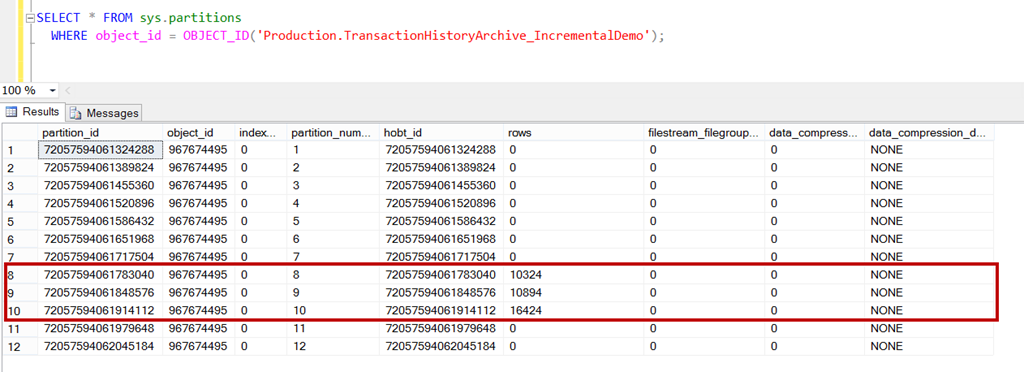
    (10324 row(s) affected). Now, let’s look at partitions

    SELECT * FROM sys.partitions
      WHERE object_id = OBJECT_ID('Production.TransactionHistoryArchive_IncrementalDemo');


    image

    As expected, we have 10324 rows in 8th partition. Use below to create “incremental” statistics. Notice that I have added new clause which is available in SQL Server 2014.

    CREATE STATISTICS IncrementalStatsDemo 
    ON Production.TransactionHistoryArchive_IncrementalDemo (TransactionDate) 
    WITH FULLSCAN, INCREMENTAL = ON;


    Execute DBCC SHOW_STATISTICS command to look at histogram

    DBCC SHOW_STATISTICS('Production.TransactionHistoryArchive_IncrementalDemo', IncrementalStatsDemo)
    with histogram
    

    image


    Added more rows to different partition

    INSERT INTO Production.TransactionHistoryArchive_IncrementalDemo
    SELECT * FROM Production.TransactionHistoryArchive
    WHERE TransactionDate > N'2007-02-01T00:00:00' and 
    TransactionDate <= N'2007-08-01T00:00:00'

    (27318 row(s) affected)

    image

    UPDATE STATISTICS Production.TransactionHistoryArchive_IncrementalDemo (IncrementalStatsDemo)
    with resample ON PARTITIONS(9, 10)

    Now, lets look at stats again.

    image

    If we compare with earlier histogram image, the highlighted range was at step 81 earlier which has moved to step 60 now and Total number of steps have increased to 192 (as compared to 81 earlier). This means that update statistics command has read those partitions which were specified (9 and 10) and merged with earlier created statistics. As per books online “ON PARTITIONS – Forces the leaf-level statistics covering the partitions specified in the ON PARTITIONS clause to be recomputed, and then merged to build the global statistics. WITH RESAMPLE is required because partition statistics built with different sample rates cannot be merged together.”

    There is more to cover because there are various syntax added on different places. In next blog, I would cover those.

    Stay tuned.

  • Cheers,
  • Balmukund Lakhani
  • Twitter @blakhani
  • Author: SQL Server 2012 AlwaysOnPaperback, Kindle
  • Posted in SQL 2014 Learning Series | Tagged: , , | 4 Comments »