Help: SQL Server

Sharing my knowlege about SQL Server Troubleshooting Skills

  • Blog Stats

    • 2,156,099 hits
  • Select GETDATE()

    February 2026
    M T W T F S S
     1
    2345678
    9101112131415
    16171819202122
    232425262728  

Archive for the ‘SQL Server 2014’ Category

SQL 2014 Learning Series # 2 – New Permission – Select All User Securables

Posted by blakhani on April 1, 2014


In my last post of SQL 2014 Learning series I have explained “Connect any database” permission. As I mentioned, this permission does not grant any permission in any database beyond connect. Someone might think, what’s the use if they are just able to expand the database but not see any database object? Here is the screenshot (which I showed in earlier blog)

As we can see above, database can be expanded but tables are not visible. The real usage of the “Connect any database” permission can be seen if it’s combined with “Select All User Securables”. You may ask, what are the situations when DBA need to give those two permissions? Imagine a situation where an auditor has been appointed to audit the databases. If you have to created auditor account (Balmukund in my example), a long way would be to create login, give permission to database and then permission to select individual tables. This permission “SELECT ALL USERS SECURABLES” is designed  to allow a user to view data in database where he can connect.

Let me give this permission to Balmukund login. I can either use Management Studio Interface or T-SQL.

image

use [master]
GO
GRANT SELECT ALL USER SECURABLES TO [Balmukund]
GO

As soon as permissions are given to Balmukund, he would be able to select data from all table in database.

image

If you notice closely, there is a lock icon on dbo.v1 under “Views”. This means that “Balmukund” would not be able to see the definition of the view. His permissions are limited to perform Select on tables and views.

Good part about this permission is that even if we create new tables in the database or even a new database, the permissions are available on new objects as well. This means that DBA need not keep giving permission on newly created table and he can have sound sleep. After taking above screenshot, I created new database (yeah, that’s the name as well) and a new table. Select permissions are automatically available to Balmukund.

image

Hope this post was helpful.

  • Cheers,
  • Balmukund Lakhani
  • Twitter @blakhani
  • Author: SQL Server 2012 AlwaysOnPaperback, Kindle
  • Posted in SQL 2014 Learning Series, SQL Server 2014 | Tagged: , , | 3 Comments »

    SQL 2014 Learning Series # 1 – New Permission – Connect any database

    Posted by blakhani on March 27, 2014


    Finally, I was able to get the RTM bits of SQL Server 2014 and installed it on my laptop. Since there are lots of new things, I thought of sharing this with community. I will write them under “SQL 2014 Learning Series”

    First thing first.. Here is the @@version for SQL 2014 on my laptop.

    Microsoft SQL Server 2014 – 12.0.2000.8 (X64)
        Feb 20 2014 20:04:26
        Copyright (c) Microsoft Corporation
        Enterprise Edition: Core-based Licensing (64-bit) on Windows NT 6.3 <X64> (Build 9600: ) (Hypervisor)


    After installing SQL Server 2014, I wanted to check what’s newly added in security layer of SQL Server. So I compared the permission available under server level and found three new permissions in SQL Server 2014

    image

    My default instance is SQL 2012 and I can see 31 permission whereas SQL 2014 has 34 permissions. These permissions are listed under Server properties >  permissions tab.

    image

    Here is the list

    • CONNECT ANY DATABASE
    • IMPERSONATE ANY LOGIN
    • SELECT ALL USER SECURABLES.

    In this blog, we would see use of “Connect any database” . Let me create a SQL login Balmukund on my SQL Instance. Here is the command I have used

    USE [master]
    GO
    CREATE LOGIN [Balmukund] WITH PASSWORD=N'@Very$tr0ngP@$$w0rd'
    GO


    Now, If I login with the account and try to expand user database, I will get the error.

    image

    This is what we have seen in earlier version of SQL as well. Unless we add user to the database, it would not be possible to expand database.

    Let’s give new permission to that login.

    use [master]
    GO
    GRANT CONNECT ANY DATABASE TO [Balmukund]
    GO


    Once permission is given, Balmukund should be able to expand database. But wait.. can he see all objects as well?

    image

    Balmukund is unable to see the objects. This is also mentioned in books online “Does not grant any permission in any database beyond connect”

    You may ask… what’s the use? All we are avoiding is just the error message? Well, there have been ask from customers to provide “Read-Only” or “Auditor” role for SQL Server. Combining this with other new permission can help in achieving that. The cool thing about this permission is that it will also allow logins to connect to databases that would be created in the future.

    In next blog, I will show you demo about other new permissions.

  • Cheers,
  • Balmukund Lakhani
  • Twitter @blakhani
  • Author: SQL Server 2012 AlwaysOnPaperback, Kindle
  • Posted in SQL 2014 Learning Series, SQL Server, SQL Server 2014 | Tagged: , , , , , | 4 Comments »

    A-Z of In-Memory OLTP : Enhancement in Catalog Views

    Posted by blakhani on February 20, 2014


    During my interaction with customers, catalog views and DMV words are used interchangeably. In reality, there is a difference between the two. Till SQL Server 2000, there were system table like sysdatabases, sysobjects etc. SQL 2005 and above the new concept of catalog view was introduced which is replacement of system tables. It is the way to see the catalog metadata of SQL Server. The data showed in the catalog view is physically stored on the disk. On the other hand, DMV is a dynamic management view. It’s similar to sysprocesses which we have used in SQL 2000. As soon as query is fired, the data is read from memory structures and showed in row-column format.

    In this blog, I’ll try to show the changes to existing catalog view to support In-Memory OLTP (code name Hekaton)

    sys.tables

    There are few new columns introduced in sys.tables to get details about In-Memory Tables.

    Column Name Values
    durability  0 = SCHEMA_AND_DATA
    1 = SCHEMA_ONLY
    durability_desc  Description of value in durability Column
    is_memory_optimized  1 – Yes, 0 – No


    In my database, I have created two tables; One disk based and one in-memory optimized.

    SELECT name
        ,durability
        ,durability_desc
        ,is_memory_optimized
    FROM sys.tables

    image


    sys.table_types

    There is a new column is_memory_optimized is introduced. I would create a type using below T-SQL taken from Books online

    Use SQLSeverHelp_IMO
    go
    CREATE TYPE dbo.SalesOrderDetailsType AS TABLE
    (
           so_id int NOT NULL,
           lineitem_id int NOT NULL,
           product_id int NOT NULL,
           unitprice money NOT NULL,
    
           PRIMARY KEY NONCLUSTERED (so_id,lineitem_id)
    ) WITH (MEMORY_OPTIMIZED=ON)
    GO
    

    Now, look at catalog view.

    select  name, is_memory_optimized 
    from    sys.table_types
    

    image

    sys.indexes

    With the introduction of Hash Indexes, there is new value for type_desc column as shown below.

     SELECT object_name(object_id) TableName
        ,name 'IndexName'
        ,type_desc
    FROM sys.indexes
    WHERE object_id IN (
            SELECT object_id
            FROM sys.tables
            WHERE is_memory_optimized = 1
            )


    image

    sys.index_columns

    No Change in the columns but it’s important to note that since there is no sorting order in HASH Indexes, the column is_descending_key is shown as 0 which is ignorable.

    sys.data_spaces

    New values available in type column as below.

    Column Name Values
    type  FX = Memory-optimized tables filegroup
    type_desc  MEMORY_OPTIMIZED_DATA_FILEGROUP


    use SQLSeverHelp_IMO
    go
    select  * 
    from    sys.data_spaces
    

    image


    sys.sql_modules

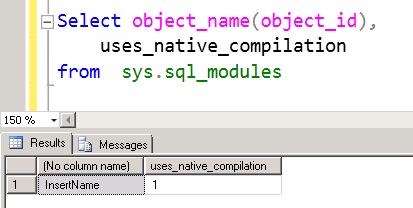
    A new column uses_native_compilation has been added to identify if it’s a natively compiled procedure. Same is true for sys.all_sql_modules as well. We already have a proc in the database.

    Select object_name(object_id), 
        uses_native_compilation  
    from  sys.sql_modules 
    

    image


    In next post, we would explore DMVs related to In-Memory OLTP.


  • Cheers,
  • Balmukund Lakhani
  • Twitter @blakhani
  • Author: SQL Server 2012 AlwaysOnPaperback, Kindle
  • Posted in A - Z Series, In Memory OLTP, In-Memory OLTP, SQL Server 2014 | Tagged: , , , , , , , , , , , , | Leave a Comment »