Help: SQL Server

Sharing my knowlege about SQL Server Troubleshooting Skills

  • Blog Stats

    • 2,153,613 hits
  • Select GETDATE()

    December 2025
    M T W T F S S
    1234567
    891011121314
    15161718192021
    22232425262728
    293031  

Archive for the ‘SQL Server’ Category

SQL Server Internals : What is TUF File in SQL Server?

Posted by blakhani on July 24, 2014


While answering on few forums I have realized that there are some variation of same question which I used in title of the blog.

  • What is .TUF file in Log Shipping?
  • I deleted TUF file, any problem?
  • I am not using log-shipping, still I see a TUF file.
  • What is the location of TUF file in log shipping?

TUF file stands for Transaction Undo File in SQL Server. I will try to explain little more so that you can understand the usage and importance of it.

When we perform a restore of database backup files, we have three options.

  • with recovery – database would be recovered and no further backups can be applied.
  • with norecovery – database would not be recovered and further backups can be restored. NOT be accessible to users for read operations.
  • with standby– database would not be recovered and further backups can be restored. Accessible to users for read operations.

If SQL has to allow read operation to users, it has to show only those committed data. Let’s assume a scenario to understand better.

  1. Created Employee Table.
  2. Inserted 5 employees and transaction committed.
  3. Took full backup which got completed. (F1)
  4. Started Transaction and Inserted 5 more employees
  5. Took Transaction log backup and completed (T1)
  6. Committed Transaction which was started in step 4.
  7. Took Transaction log backup and completed (T2)

If we perform restore operation of F1, we have to use either norecovery or standby because if we use “with recovery”, we won’t be able to restore other backups. Lets assume that we use “with standby”. This time a TUF file is created but would not contain much information because there is no uncommitted transaction when backup was taken. Since we are able to open database, we should be able to see 5 employee. So far, we are clear. Next, if we go ahead and apply T1 with standby and then open the database, should we see those new 5 records also? No, we should not because they were part of a transaction that was uncommitted when T1 was completed. The information stays in TUF file. When the next transaction log backup T2 is restored, SQL Server would use this TUF file along with T2 to roll forward that particular transaction. So we need both the files during restore. Now you can imagine a situation and implication of missing a TUF file. Yes, you would not be able to restore the log backups chain and need a fresh backup to be taken.

In log shipping scenario if we choose “Standby” option for the secondary server then the transaction log backup file would be restored in standby mode. As discussed earlier, this would need a TUF file to be generated automatically. The location of this file is not configurable and it has been changed in few versions of SQL. Refer KB 

Now a major question would be, how can I find the location of the TUF file given in last restore? I use a little trick here. If you are aware of default trace feature in SQL Server, you might know the restore command is logged into default trace. I have taken this idea from Standard Reports in SSMS.

declare @enable int;
select @enable = convert(int, value_in_use) from sys.configurations where name = 'default trace enabled' 
print 'default trace is NOT enabled.'
if @enable = 1  
begin 
        declare @curr_tracefilename varchar(500);
        declare @base_tracefilename varchar(500);
        declare @status int; 
        declare @indx int;   
        declare @temp_trace table ( 
                Error int
        ,       StartTime datetime
        ,       HostName sysname collate database_default null
        ,       ApplicationName sysname collate database_default  null
        ,       LoginName sysname collate database_default null
        ,       Severity int
        ,       DatabaseName sysname collate database_default null
        ,       TextData nvarchar(max) collate database_default 
        ); 
        
        select @status=status, @curr_tracefilename=path from sys.traces where is_default = 1 ;
        set @curr_tracefilename = reverse(@curr_tracefilename) 
        select @indx  = patindex('%\%', @curr_tracefilename)  
        set @curr_tracefilename = reverse(@curr_tracefilename) 
        set @base_tracefilename = left( @curr_tracefilename,len(@curr_tracefilename) - @indx) + '\log.trc'; 

        
        select  StartTime
        ,        TextData  
        ,       HostName
        ,       ApplicationName
        ,       LoginName
        ,       DatabaseName    
        from ::fn_trace_gettable( @base_tracefilename, default ) 
        where EventClass = 115
        and TextData like '%Restore%Standby%' 
        and ServerName = @@servername
        order by StartTime

end


Here is the output from my SQL Instance.

image

If the undo file is missing, SQL Server would raise below message. Note that TUF extension is not mandatory.

Msg 3013, Level 16, State 1, Line 8

RESTORE LOG is terminating abnormally.

Msg 3441, Level 17, State 1, Line 8

During startup of warm standby database ‘TestBackup’ (database ID 6), its standby file (‘E:\Program Files\Microsoft SQL Server\MSSQL12.SQL2014\MSSQL\Backup\TestBackup_RollbackUndo_2014-07-24_06-58-39.bak’) was inaccessible to the RESTORE statement. The operating system error was ‘2(The system cannot find the file specified.)’. Diagnose the operating system error, correct the problem, and retry startup.


Hope this clears some questions you might had before reading this blog. For more, you can post comment and I shall try to answer.

  • Cheers,
  • Balmukund Lakhani
  • Twitter @blakhani
  • Author: SQL Server 2012 AlwaysOnPaperback, Kindle
  • Posted in backup, Restore, SQL Server | Tagged: , , | 16 Comments »

    Help : Getting error “Unable to create a restore plan due to break in the LSN chain”

    Posted by blakhani on May 29, 2014


    “All characters appearing in this blog are fictitious. Any resemblance to real persons, living or dead, is purely coincidental… except me”

    <Tring…Tring>
    Peter: Hello Balmukund
    Me: Hey Peter. How are you?
    Peter: Not so good. Having some trouble with a critical server.
    Me: Yeah, I knew that you would call me when there is an issue with critical server. <laugh> Go ahead and explain me the issue.
    Peter: I am not able to restore the transaction log backup and getting error “Unable to create a restore plan due to break in the LSN chain”

    Me: Wow. Never heard of “restore plan” error. hang on a second.. let me open my laptop.
    Peter: Sure.
    Me: Okay. What was the error again? unable.. restore plan..?
    Peter: Unable to create a restore plan due to break in the LSN chain.
    Me: Well, interestingly, I don’t see that error in sys.messages table in SQL Server Instance.
    Peter: but it coming in SQL Server.
    Me: Where exactly you are seeing this error? Tell me exact steps.
    Peter: I am seeing that error in Management Studio. I am using SQL Server 2012 Instance and SQL Server 2012 management studio to restore backups. I have restored one full backup and now want to restore next log backup.
    Me: And there is no real break in the chain?
    Peter: Yes. I have taken them manually, one after another.
    Me: Okay. Would you mind sending me screenshot and complete error via email. I am on my laptop right now. Let’s fix it right away.
    Peter: Sure. <1 min silence> Sent.
    Me. Okay. Let me received it and meantime I am searching. <30 second silence>  Okay. Got the email.

    image

    Unable to create restore plan due to break in the LSN chain. (Microsoft.SqlServer.SmoExtended)
    ——————————
    For help, click: http://go.microsoft.com/fwlink?ProdName=Microsoft+SQL+Server&ProdVer=11.0.3000.0+((SQL11_PCU_Main).121019-1325+)&LinkId=20476
    ——————————
    Program Location:
       at Microsoft.SqlServer.Management.Smo.DatabaseRestorePlanner.SelectBackupSetsForPlan(RestorePlan plan)
       at Microsoft.SqlServer.Management.Smo.DatabaseRestorePlanner.CreateRestorePlan(RestoreOptions ro)
       at Microsoft.SqlServer.Management.RelationalEngineTasks.RestoreDatabaseDialogController.<>c__DisplayClass2.<CreateRestorePlan>b__1(IBackgroundOperationContext backgroundContext)

    Me: Okay. that’s SMO error and that’s why I don’t see it in sys.messages. It is failing while creating restore plan to show in UI.
    Peter: Aha. So, what should I do.
    Me: T-SQL would work for sure. can you use “Restore log from disk = ‘Path’ command?
    Peter: Ahem.. any other way.. You know how much T-SQL.
    Me: Let me see. <1 min silence> I believe you have used “restore database” UI? Correct?
    Peter: Yes.
    Me: Okay. I can see that this is an issue filed in SQL 2012 management studio. (reference)
    Peter: Is it fixed?
    Me: Yeah, fixed in SQL 2014 Management studio already.
    Peter: So what should I do?
    Me: You have many options now.
    1) Use SQL 2014 SSMS
    2) Use “restore files and filegroups”

    image

    3) Use different restore option in UI

    image

    4) Drop the database and restore both backups together (full and log) in same UI. Haven’t you heard of recovery advisor? I will send you link later.
    5) and last option, which you won’t like is T-SQL.

    Peter: Wow. So many solutions to one simple problem. You are a Gem!
    Me: You are so kind. Thanks.
    Peter: Okay. Let me do restore now. My manager is pinging me to fix this ASAP.
    Me: Sure. Talk to you later. Bye.
    Peter: Bye

    Like the story? Make a comment.

  • Cheers,
  • Balmukund Lakhani
  • Twitter @blakhani
  • Author: SQL Server 2012 AlwaysOnPaperback, Kindle
  • Posted in SQL Server | Tagged: , , , , | Leave a Comment »

    Myths of SQL Server: Rollback Service Pack with Resource Database? (MSSQLSystemResource)

    Posted by blakhani on April 10, 2014


    I have been doing a lot of community activities and lately I have learnt that there is a lot of confusion about resource database. I am going to burst major myth which I mentioned in title.

    First, let’s understand why there was a new “hidden” system database introduced in SQL 2005. I am not sure if you have ever seen SQL 2000 Service Pack setup screens. Here is the of the screen where system objects are modified.

    image

    Prior to SQL 2005, all system objects were in master database and they were open for end user to alter by changing “allow updates” configuration using sp_configure. To safe guard system objects from modification (which might cause unexpected behaviors) product modification has been made and system objects definition is moved to a new hidden databases called “resource” database. Another reason of having resource database is to avoid running script to modify system objects during patching of SQL. Rather than running ALTER commands, just replace resource database file. I must point out that running script is one of many steps during upgrade process. (Keep this in mind as I am going to come back to this point later). During patching process (service pack or major product release) SQL Server setup used to drop and create thousands of system objects. It might take around 10 minutes and during that time SQL server is unavailable for production usage. Resource database is introduced to reduce the down time because script execution is now changed to a file copy of resource database.

    Here are some properties of this database.

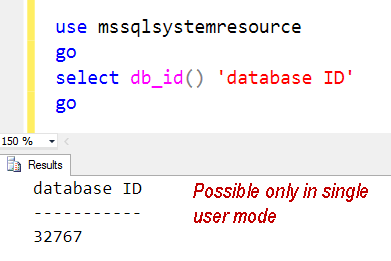
    • Database ID = 32767
    • Database name = MSSQLSystemResource
    • Data file name = mssqlsystemresource.mdf
    • Log file name = mssqlsystemresource.ldf
    • State = Read Only / Hidden
    • Contains = Pre-created system T-SQL code like Stored procedures, extended procedures, catalog views
    • Does NOT contain user data or user metadata.

    Since it’s a hidden database, we can’t view the objects located in the database. There are two ways to do that (and this is strictly for learning purpose) In real time, you never have to worry about this database.

    • Start SQL in Single User Mode (Refer earlier blog)
    • Attach the MDF and LDF file as user database.

    image

    There has been changes done in various SQL version about the physical location of the files. Since they are MDF and LDF, initially they were kept in DATA folder, along with master database files. but then there have been problems when DBA used to move master database to new location and service pack used to fail. Customers also showed their concern about backup of this database (as the files are visible in data folder). In SQL 2008 onwards, location has been changed and it is now kept in the same location where sqlservr.exe resides.

    SQL Version Location
    SQL Server 2000 No Resource Database
    SQL Server 2005 <drive>:\Program Files\Microsoft SQL Server\MSSQL.<ID>\MSSQL\Data\
    SQL Server 2008 <drive>:\Program Files\Microsoft SQL Server\MSSQL10.<instance_id>\MSSQL\Binn\
    SQL Server 2008 R2 <drive>:\Program Files\Microsoft SQL Server\MSSQL10_50.<instance_id>\MSSQL\Binn\
    SQL Server 2012 <drive>:\Program Files\Microsoft SQL Server\MSSQL11.<instance_id>\MSSQL\Binn\
    SQL Server 2014 <drive>:\Program Files\Microsoft SQL Server\MSSQL12.<instance_id>\MSSQL\Binn\


    For all practical purposes we should treat resource database files as binaries/DLLs. Since we have MDF and LDF files, we have been calling it as database. Now, if it’s a DLL, how to get version of current resource database? There are two ways.

    SELECT SERVERPROPERTY('ResourceVersion') 'Resource Version';
    GO
    

      image

      SQL Server ERRORLOG also shows this information.

      SNAGHTML388a8a6

      Now comes the real conversation.

      DBA: Can I use the resource database to uninstall service pack?

      Balmukund: can you please explain more?

      DBA: I have taken copy of mdf and ldf files before applying 2008 service pack 1. After patching is complete, I want to rollback SP1.

      Balmukund: Okay. how would you do it?

      DBA: Stop SQL services, keep back the old files of mssqlsystemresource and start SQL services.

      Balmukund: Oh no. That’s not something you should do. Those files are just like a DLL of a huge SQL Product. By replacing file you would introduce version mismatch between SQLServr.exe and Resource database.

      DBA: But I learned that resource database can be used to rollback service pack.

      Balmukund: No, that information is not correct. During the whole upgrade process replacing file is just one of the step. Who would take care of unregistering DLLs, keeping back old version of files etc?

      DBA: So, I can’t uninstall a Service Pack?

      Balmukund: I didn’t say that. Starting with service packs (Service Pack 1) in SQL Server 2008 you can uninstall them from Add/Remove Programs like any other update. Till SQL 2005, only way was uninstall SQL completely and reinstall again (Refer KB http://support.microsoft.com/kb/314823)

      DBA: What you would be if resource database is lost?

      Balmukund: There are two possible options. First and the easiest one is to copy the resource database files from another instance that is the same version, service pack, cumulative update (patch level is very important). Second option is to rebuild system databases. http://msdn.microsoft.com/en-us/library/dd207003.aspx

      I truly hope this blog uncovers few facts about hidden database.

    • Cheers,
    • Balmukund Lakhani
    • Twitter @blakhani
    • Author: SQL Server 2012 AlwaysOnPaperback, Kindle
    • Posted in SQL Myths, SQL Server | Tagged: , , , , | 3 Comments »