Help: SQL Server

Sharing my knowlege about SQL Server Troubleshooting Skills

  • Blog Stats

    • 2,153,616 hits
  • Select GETDATE()

    December 2025
    M T W T F S S
    1234567
    891011121314
    15161718192021
    22232425262728
    293031  

Archive for the ‘SQL Server’ Category

SQL 2014 Learning Series # 1 – New Permission – Connect any database

Posted by blakhani on March 27, 2014


Finally, I was able to get the RTM bits of SQL Server 2014 and installed it on my laptop. Since there are lots of new things, I thought of sharing this with community. I will write them under “SQL 2014 Learning Series”

First thing first.. Here is the @@version for SQL 2014 on my laptop.

Microsoft SQL Server 2014 – 12.0.2000.8 (X64)
    Feb 20 2014 20:04:26
    Copyright (c) Microsoft Corporation
    Enterprise Edition: Core-based Licensing (64-bit) on Windows NT 6.3 <X64> (Build 9600: ) (Hypervisor)


After installing SQL Server 2014, I wanted to check what’s newly added in security layer of SQL Server. So I compared the permission available under server level and found three new permissions in SQL Server 2014

image

My default instance is SQL 2012 and I can see 31 permission whereas SQL 2014 has 34 permissions. These permissions are listed under Server properties >  permissions tab.

image

Here is the list

  • CONNECT ANY DATABASE
  • IMPERSONATE ANY LOGIN
  • SELECT ALL USER SECURABLES.

In this blog, we would see use of “Connect any database” . Let me create a SQL login Balmukund on my SQL Instance. Here is the command I have used

USE [master]
GO
CREATE LOGIN [Balmukund] WITH PASSWORD=N'@Very$tr0ngP@$$w0rd'
GO


Now, If I login with the account and try to expand user database, I will get the error.

image

This is what we have seen in earlier version of SQL as well. Unless we add user to the database, it would not be possible to expand database.

Let’s give new permission to that login.

use [master]
GO
GRANT CONNECT ANY DATABASE TO [Balmukund]
GO

Once permission is given, Balmukund should be able to expand database. But wait.. can he see all objects as well?

image

Balmukund is unable to see the objects. This is also mentioned in books online “Does not grant any permission in any database beyond connect”

You may ask… what’s the use? All we are avoiding is just the error message? Well, there have been ask from customers to provide “Read-Only” or “Auditor” role for SQL Server. Combining this with other new permission can help in achieving that. The cool thing about this permission is that it will also allow logins to connect to databases that would be created in the future.

In next blog, I will show you demo about other new permissions.

  • Cheers,
  • Balmukund Lakhani
  • Twitter @blakhani
  • Author: SQL Server 2012 AlwaysOnPaperback, Kindle
  • Posted in SQL 2014 Learning Series, SQL Server, SQL Server 2014 | Tagged: , , , , , | 4 Comments »

    Troubleshooting : Msg 3201 – Cannot open backup device .. Operating system error 3(The system cannot find the path specified.)

    Posted by blakhani on March 13, 2014


    Data recovery is a time consuming and expensive process. Taking regular backups can save a lot of time as well as make sure that the data can be restored in the case of disaster. There could be many situation where backup of the database taken in SQL Server might fail with 3201 error. The text of error id as below (you can use sys.messages catalog view to get it)

    Cannot open backup device ‘%ls’. Operating system error %ls.

    Same message is applicable for restore as well, it’s all about unable to open device. If we notice %ls is placeholder which would be inserted when message is raised. Some sample errors are as below.

    Message # 1

    Msg 3201, Level 16, State 1, Line 1
    Cannot open backup device ‘E:\Backup\SQLServerHelp.bak’. Operating system error 3(The system cannot find the path specified.).

    Cause: Backup folder not created on E Drive.

    Message # 2

    Msg 3201, Level 16, State 1, Line 1
    Cannot open backup device ‘C:\SQLServerHelp.bak’. Operating system error 5(Access is denied.).

    Cause: SQL Server Service account is not having permission on root of C Drive.

    Message # 3

    Msg 3201, Level 16, State 2, Line 1
    Cannot open backup device ‘\\NetworkShare\Backup\SQLServerHelp.BAK’. Operating system error 53(error not found).

    This one is interesting because it doesn’t tell the exact message for OS error 53. Sometime this could happen with any other OS error as well. Refer my earlier post here where I showed how to get text for an operating system error number. 53 = The network path was not found.

    Cause: Network Path: \\NetworkShare\Backup was incorrect.

    OK. Let me stop here.. I didn’t plan to discuss all the possible errors but this blog is to present one interesting scenario which helped me uncovering an operating system concept.

    Let’s create a database using below script.

    Create Database [SQL Server Help ]

    Once database is created I have created maintenance plan to take full backup of the database.

    image

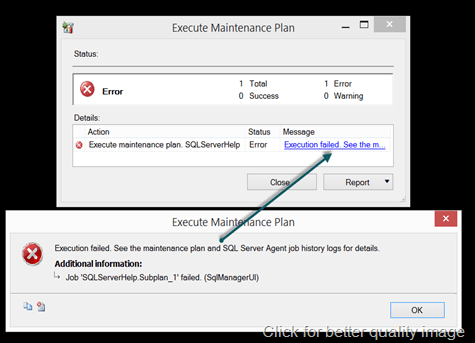
    When I executed above maintenance plan, it failed with error:
    image

    TITLE: Execute Maintenance Plan

    ——————————

    Execution failed. See the maintenance plan and SQL Server Agent job history logs for details.

    ——————————

    ADDITIONAL INFORMATION:

    Job ‘SQLServerHelp.Subplan_1’ failed. (SqlManagerUI)

    ——————————

    BUTTONS:

    OK

    ——————————

    If we look at the folder, the folder got created but backup failed. Looked into ERRORLOG and found below

    2014-03-13 06:20:31.66 spid65      Error: 18204, Severity: 16, State: 1.

    2014-03-13 06:20:31.66 spid65      BackupDiskFile::CreateMedia: Backup device ‘E:\Program Files\Microsoft SQL Server\MSSQL11.MSSQLSERVER\MSSQL\Backup\SQL Server Help \SQL Server Help _backup_2014_03_13_062031_6415729.bak’ failed to create. Operating system error 3(The system cannot find the path specified.).

    2014-03-13 06:20:31.66 Backup      Error: 3041, Severity: 16, State: 1.

    2014-03-13 06:20:31.66 Backup      BACKUP failed to complete the command BACKUP DATABASE SQL Server Help . Check the backup application log for detailed messages.

    when I looked at folder structure, I found that there is a folder “SQL Server Help” got created under “E:\Program Files\Microsoft SQL Server\MSSQL11.MSSQLSERVER\MSSQL\Backup” but still backup was failing. I ran profiler to see the command being fired.

    BACKUP DATABASE [SQL Server Help ] 
    TO  DISK = N'E:\Program Files\Microsoft SQL Server\MSSQL11.MSSQLSERVER\MSSQL\Backup\SQL Server Help \SQL Server Help _backup_2014_03_13_062920_6305771.bak' 
    WITH NOFORMAT, NOINIT,  NAME = N'SQL Server Help _backup_2014_03_13_062920_6305771', 
    SKIP, REWIND, NOUNLOAD,  STATS = 10


    When I executed the command, it failed with below error.

    Msg 3201, Level 16, State 1, Line 1

    Cannot open backup device ‘E:\Program Files\Microsoft SQL Server\MSSQL11.MSSQLSERVER\MSSQL\Backup\SQL Server Help \SQL Server Help _backup_2014_03_13_062920_6305771.bak’. Operating system error 3(The system cannot find the path specified.).

    Msg 3013, Level 16, State 1, Line 1

    BACKUP DATABASE is terminating abnormally.


    Again, something wrong with the path where I am taking backup. Do you see any problem in above message. Look closer.. there is a space at the end in the folder name where backup is attempted. “SQL Server Help “. If you try to create a folder with the whitespace at the end, operating system would trim the space at the end. This is documented here

    The root cause of my problem was name of the database where I have added an space at the end intentionally. Go back and have a look at create database statement which I have used. I also participated in this discussion where same problem was posted long back.

    Hope you have learned something new!

  • Cheers,
  • Balmukund Lakhani
  • Twitter @blakhani
  • Author: SQL Server 2012 AlwaysOnPaperback, Kindle
  • Posted in Error, SQL Server | Tagged: , , , , , , , , , | 8 Comments »

    Troubleshooting: Cannot execute as the database principal and Property Owner is not available for Database

    Posted by blakhani on March 4, 2014


    No one likes errors in the world. As a part of my work with Microsoft SQL Support Services, I get to see various errors, find cause and provide solution to get rid of them. Today someone reported below error to me.

    Cannot execute as the database principal because the principal "dbo" does not exist, this type of principal cannot be impersonated, or you do not have permission.

    This error message was caused because SQL Server was not able to find context information for the security logon we were attempting to impersonate. In this case it was “dbo”. Going with common sense, I went ahead to check the owner of the database, which is generally visible in database > right click > properties. As soon as I attempted it, I was welcomed with next error message.

    image

    TITLE: Microsoft SQL Server Management Studio
    ——————————
    Cannot show requested dialog.
    ——————————
    ADDITIONAL INFORMATION:
    Cannot show requested dialog. (SqlMgmt)
    ——————————
    Property Owner is not available for Database ‘[SQLServerHelp]’. This property may not exist for this object, or may not be retrievable due to insufficient access rights.  (Microsoft.SqlServer.Smo)
    For help, click: http://go.microsoft.com/fwlink?ProdName=Microsoft+SQL+Server&ProdVer=10.50.1746.0+((KJ_RTM_QFE-CU).101005-1216+)&EvtSrc=Microsoft.SqlServer.Management.Smo.ExceptionTemplates.PropertyCannotBeRetrievedExceptionText&EvtID=Owner&LinkId=20476
    ——————————
    BUTTONS:
    OK
    —————————— 
     

    Okay. This is an interesting message. Notice the exception event source is “PropertyCannotBeRetrievedExceptionText” and exception event id “Owner”. The message means that on SMO, the value of “owner” property is not available. This means something is not right with owner of the database?

    Next step was to find out who the current owner (without management studio). There are multiple ways to do it.

    • sp_helpdb

    image

    • sp_helpdb ‘DatabaseName’

    image

    • T-SQL which is used by sp_helpdb
    select name, isnull(suser_sname(sid),'~~UNKNOWN~~'), 
    convert(nvarchar(11), crdate),
    dbid, cmptlevel from master.dbo.sysdatabases


    image

    As we can see above, “~~UNKNOWN~~” is not something which is not expected and that’s the reason SSMS was showing exception to get owner property.

    How to fix it?

    Of course, change the owner of the database so that value of SID column holds valid SID. Since we are not able to use UI, we have to use sp_changedbowner (change db owner with no spaces). This has be to run in the context of the database which has problem, as shown below. I have given sa as an example for my database.

    image

    Root Cause/Repro of the issue

    If a database is owned by a login, we would not be able to drop the login. The possible situation which I can think of are:

    • Database owned by windows login which was part of any Windows Group. And now, windows account was deleted from active directory. 
    • Database was restored and domain controller was not available to resolve the SID to a validate login.

    In my repro, I was able to get into same situation by step 1.

    Important: I was NOT able to reproduce the “property owner” error in SQL Server 2014 Management Studio. It doesn’t throw exception of owner property and it can be blank in the UI.

    image

    This also means that owner can be changed via management studio by going to Properties  > Files tab.

    image

    Hope you have learned something new.

  • Cheers,
  • Balmukund Lakhani
  • Twitter @blakhani
  • Author: SQL Server 2012 AlwaysOnPaperback, Kindle
  • Posted in Error, SQL Server, SSMS | Tagged: , , , , , | Leave a Comment »