As part of my job, a significant part of my working hours are all about troubleshooting SQL related issues. They could range from SQL installation, performance, high availability, T-SQL query and pretty much any area related to SQL Server.
Few days back one of my friend pinged me and told that he is not able to start “Reporting Service” service. I asked if he is seeing any error message anywhere like event logs. He shared below with me.
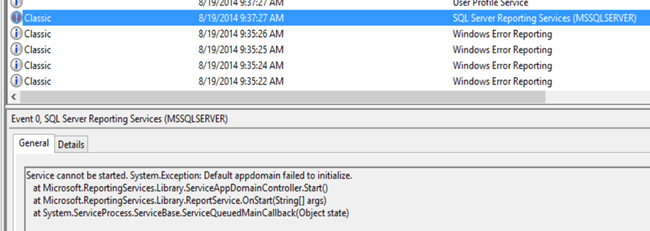
Here is the text of the message.
Service cannot be started. System.Exception: Default appdomain failed to initialize.
at Microsoft.ReportingServices.Library.ServiceAppDomainController.Start()
at Microsoft.ReportingServices.Library.ReportService.OnStart(String[] args)
at System.ServiceProcess.ServiceBase.ServiceQueuedMainCallback(Object state)
That was not a good message to tell us what’s wrong. I researched further and found that similar to ERRORLOG in SQL Server, there are logs for Reporting Services as well. Here is the more detailed messaged in Reporting Services log.

configmanager!DefaultDomain!e10!08/16/2014-01:52:29:: e ERROR: Error loading configuration file: %1 is not a valid Win32 application
library!DefaultDomain!e10!08/16/2014-01:52:29:: e ERROR: Throwing Microsoft.ReportingServices.Diagnostics.Utilities.ServerConfigurationErrorException: , Microsoft.ReportingServices.Diagnostics.Utilities.ServerConfigurationErrorException: The report server has encountered a configuration error. —> System.ComponentModel.Win32Exception: %1 is not a valid Win32 application
at Microsoft.ReportingServices.Diagnostics.SafeLibraryHandle.LoadLibrary(String libName)
at Microsoft.ReportingServices.Diagnostics.SqlInstallation.GetSkuFromSqlBoot(String instanceId, Int32& daysLeft)
at Microsoft.ReportingServices.Diagnostics.Sku.<>c__DisplayClass6.<GetSkuFromSqlBoot>b__5()
at Microsoft.ReportingServices.Diagnostics.RevertImpersonationContext.<>c__DisplayClass1.<Run>b__0(Object state)
at System.Security.SecurityContext.Run(SecurityContext securityContext, ContextCallback callback, Object state)
at Microsoft.ReportingServices.Diagnostics.RevertImpersonationContext.Run(ContextBody callback)
at Microsoft.ReportingServices.Diagnostics.Sku.GetSkuFromSqlBoot(String instanceId)
at Microsoft.ReportingServices.Diagnostics.Sku.GetInstalledSku(String instanceId)
at Microsoft.ReportingServices.Diagnostics.RSConfiguration.AdjustProperties(ConfigurationPropertyBag properties)
at Microsoft.ReportingServices.Diagnostics.RSConfiguration.Validate(ConfigurationPropertyBag properties)
at Microsoft.ReportingServices.Diagnostics.RSConfigurationFileManager.LoadDocument()
at Microsoft.ReportingServices.Diagnostics.RSConfigurationFileManager.LoadConfiguration()
— End of inner exception stack trace —;
appdomainmanager!DefaultDomain!e10!08/16/2014-01:52:29:: e ERROR: Appdomain:1 DefaultDomain failed to initialize. Error: Microsoft.ReportingServices.Diagnostics.Utilities.ServerConfigurationErrorException: The report server has encountered a configuration error. —> System.ComponentModel.Win32Exception: %1 is not a valid Win32 application.
appdomainmanager!DefaultDomain!352c!08/16/2014-01:52:29:: e ERROR: Windows service failed to start. Exception: System.Exception: Default appdomain failed to initialize.
at Microsoft.ReportingServices.Library.ServiceAppDomainController.Start()
If you are a developer, you would know what a stack is. It goes from bottom to top and shows the section which caused the error. From the highlighted pieces it’s easy to make sense. Reporting Service is trying to get SKU (edition) which is installed on this machine using function GetInstalledSku. After that we are seeing function GetSkuFromSqlBoot which indicates that we will get information using this function. Later, we are seeing LoadLibrary and that function is raising error. Now the question is why! If we do a search on internet using Bingoogle. In general, the most possible cause of the error is corruption of the files which are needed. If we capture ProcMon while starting SSRS Service, it would be easy to find last loaded DLL and then we may need to find if it’s a correct DLL by comparing with another machine where things are working fine.
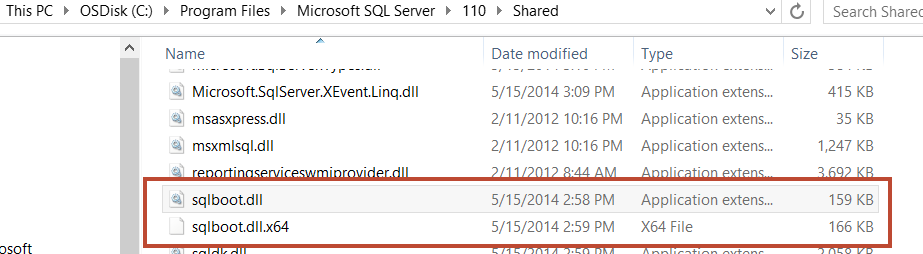
Interesting, here is what I saw under “C:\Program Files\Microsoft SQL Server\110\Shared”
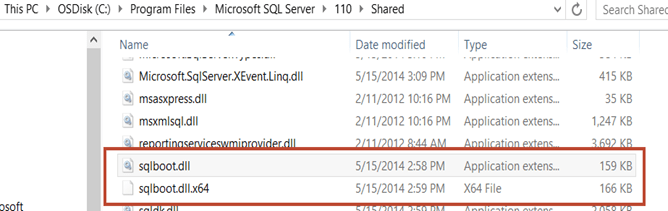
As we can see that someone has renamed the file and original file is renamed as sqlboot.dll.x64.
When I captured ProcMon
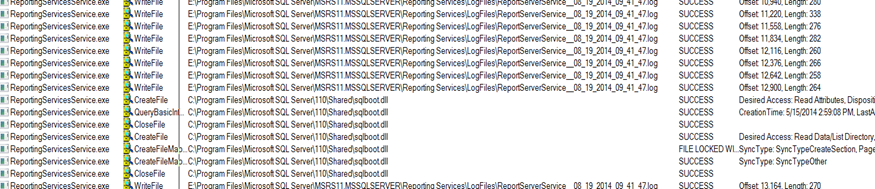
And after this I saw “exit” of the threads and process.
Another symptom on the same problem is that when he was running SQL Setup to add some component, he was getting below error
There was a failure to calculate the default value of setting DIGITALPRODUCTID.
and this is what we see in setup logs.
(01) 2014-08-15 10:46:44 Slp: The following is an exception stack listing the exceptions in outermost to innermost order
(01) 2014-08-15 10:46:44 Slp: Inner exceptions are being indented
(01) 2014-08-15 10:46:44 Slp:
(01) 2014-08-15 10:46:44 Slp: Exception type: Microsoft.SqlServer.Chainer.Infrastructure.CalculateSettingValueException
(01) 2014-08-15 10:46:44 Slp: Message:
(01) 2014-08-15 10:46:44 Slp: There was a failure to calculate the default value of setting DIGITALPRODUCTID.
(01) 2014-08-15 10:46:44 Slp: HResult : 0x85640001
(01) 2014-08-15 10:46:44 Slp: FacilityCode : 1380 (564)
(01) 2014-08-15 10:46:44 Slp: ErrorCode : 1 (0001)
(01) 2014-08-15 10:46:44 Slp: Data:
(01) 2014-08-15 10:46:44 Slp: SettingId = DIGITALPRODUCTID
(01) 2014-08-15 10:46:44 Slp: WatsonData = Microsoft.SqlServer.Chainer.Infrastructure.CalculateSettingValueException@1
(01) 2014-08-15 10:46:44 Slp: Stack:
(01) 2014-08-15 10:46:44 Slp: at Microsoft.SqlServer.Chainer.Infrastructure.Setting`1.CalculateValue()
(01) 2014-08-15 10:46:44 Slp: at Microsoft.SqlServer.Deployment.PrioritizedPublishing.PublishingQueue.CallQueuedSubscriberDelegates()
(01) 2014-08-15 10:46:44 Slp: at Microsoft.SqlServer.Deployment.PrioritizedPublishing.PublishingQueue.Publish(Publisher publisher)
(01) 2014-08-15 10:46:44 Slp: at Microsoft.SqlServer.Chainer.Infrastructure.Setting`1.set_Value(T value)
(01) 2014-08-15 10:46:44 Slp: at Microsoft.SqlServer.Chainer.Infrastructure.Setting`1.SetValue(Object newValue, InputSettingSource source)
(01) 2014-08-15 10:46:44 Slp: at Microsoft.SqlServer.Chainer.Infrastructure.InputSettingService.SetSettingValue[T](String settingName, T value, InputSettingSource source)
(01) 2014-08-15 10:46:44 Slp: at Microsoft.SqlServer.Configuration.Property`1.SetValueAndSource(Object value, InputSettingSource source)
(01) 2014-08-15 10:46:44 Slp: at Microsoft.SqlServer.Configuration.InstallWizard.InstallTypeController.SaveData()
(01) 2014-08-15 10:46:44 Slp: at Microsoft.SqlServer.Configuration.InstallWizardFramework.InstallWizardPageHost.PageLeaving(PageChangeReason reason)
(01) 2014-08-15 10:46:44 Slp: at Microsoft.SqlServer.Configuration.WizardFramework.UIHost.set_SelectedPageIndex(Int32 value)
(01) 2014-08-15 10:46:44 Slp: at Microsoft.SqlServer.Configuration.WizardFramework.NavigationButtons.nextButton_Click(Object sender, EventArgs e)
(01) 2014-08-15 10:46:44 Slp: at System.Windows.Forms.Control.OnClick(EventArgs e)
(01) 2014-08-15 10:46:44 Slp: at System.Windows.Forms.Button.OnMouseUp(MouseEventArgs mevent)
(01) 2014-08-15 10:46:44 Slp: at System.Windows.Forms.Control.WmMouseUp(Message& m, MouseButtons button, Int32 clicks)
(01) 2014-08-15 10:46:44 Slp: at System.Windows.Forms.Control.WndProc(Message& m)
(01) 2014-08-15 10:46:44 Slp: at System.Windows.Forms.ButtonBase.WndProc(Message& m)
(01) 2014-08-15 10:46:44 Slp: at System.Windows.Forms.Button.WndProc(Message& m)
(01) 2014-08-15 10:46:44 Slp: at System.Windows.Forms.Control.ControlNativeWindow.WndProc(Message& m)
(01) 2014-08-15 10:46:44 Slp: at System.Windows.Forms.NativeWindow.Callback(IntPtr hWnd, Int32 msg, IntPtr wparam, IntPtr lparam)
(01) 2014-08-15 10:46:44 Slp: Inner exception type: System.ComponentModel.Win32Exception
(01) 2014-08-15 10:46:44 Slp: Message:
(01) 2014-08-15 10:46:44 Slp: %1 is not a valid Win32 application.
(01) 2014-08-15 10:46:44 Slp:
(01) 2014-08-15 10:46:44 Slp: HResult : 0x80004005
(01) 2014-08-15 10:46:44 Slp: Error : 193
(01) 2014-08-15 10:46:44 Slp: Stack:
(01) 2014-08-15 10:46:44 Slp: at Microsoft.SqlServer.Configuration.Sco.SqlbootModule.get_Handle()
(01) 2014-08-15 10:46:44 Slp: at Microsoft.SqlServer.Configuration.Sco.EditionInfo.GetEditionInfo(String RegistryPath, RegistryView view, UInt32& daysLeft)
(01) 2014-08-15 10:46:44 Slp: at Microsoft.SqlServer.Configuration.Sco.EditionInfo.GetEditionInfo(String RegistryPath, RegistryView view)
(01) 2014-08-15 10:46:44 Slp: at Microsoft.SqlServer.Configuration.SetupExtension.SqlEditionSetting`1.GetDefaultSqlEditionInfoValue()
(01) 2014-08-15 10:46:44 Slp: at Microsoft.SqlServer.Configuration.SetupExtension.DigitalProductIdSetting.DefaultValue()
(01) 2014-08-15 10:46:44 Slp: at Microsoft.SqlServer.Deployment.PrioritizedPublishing.PublishingQueue.CallFunctionWhileAutosubscribing[T](SubscriberDelegate subscriberDelegate, Int32 priority, AutosubscribingFunctionDelegate`1 function)
(01) 2014-08-15 10:46:44 Slp: at Microsoft.SqlServer.Chainer.Infrastructure.Setting`1.CalculateValue()
So we can clearly see that someone has messed around with the files related to SQL. Here also we are seeing SqlbootModule.
RESOLUTION
In this situation, I went ahead and named the files correctly and things were fixed. BUT if you get this error “%1 is not a valid Win32 application” you might need to remove and install SQL Server. It’s not always possible to find the cause with the corrupted file and reinstallation would be a faster approach.
Hope this helps!
Cheers,
Balmukund Lakhani
Twitter @blakhani
Author: SQL Server 2012 AlwaysOn – Paperback, Kindle




 Help: SQL Server