Help: SQL Server

Sharing my knowlege about SQL Server Troubleshooting Skills

  • Blog Stats

    • 2,153,606 hits
  • Select GETDATE()

    December 2025
    M T W T F S S
    1234567
    891011121314
    15161718192021
    22232425262728
    293031  

Posts Tagged ‘database’

A-Z of In-Memory OLTP : What’s new in Execution Plan

Posted by blakhani on January 21, 2014


I still remember the day when I was interviewed for my job with Microsoft. It was kind of a discussion about SQL Sever internals rather than interview. Of course, we had discussion about SQL Server Performance Tuning as well. Interviewer asked – “If there is a query taking very long time to execute, what would you do?” I tried few answers like blocking, resource bottleneck and also said that we can look at the execution plan. I was aware of few bad operators in execution plan and I explained those. Anyways, after 2 hours of discussion, the interviewer was satisfied that I know SQL Server features. I also got feedback that more than current knowledge, I have passion to learn, help someone and share my knowledge. End result – I was hired! After joining Microsoft SQL Support team, I am learning since day 1 and learning and sharing never stopped for me. Performance tuning has been my favorite and I would still love to see execution plans to learn more about query execution.

In this blog of A-Z of In-Memory OLTP Series, we would talk about execution plan related changes with respect to In-Memory OLTP.

Limitation on Natively Compiled Stored Procedure

If we try to get execution plan of any natively complied stored procedure via SSMS using “Include Actual Execution Plan” and executing it; it won’t work. There is no plan in procedure cache for natively compiled stored procedures. Even if we try set statistics profile on, it won’t work.

image

Only way to get query plan for natively compiled procedure is to get estimated plan. That can be done using TSQL “set showplan_xml on” statement or via SSMS “Display Estimated Execution Plan”. This restriction is not applicable for TSQL statements touching in-memory tables and we can get actual plan as well.

How to Identify which In-Memory Index is being used?

We have earlier created table called MyFirstMemporyOptimizedTable with Primary Key (with hash index) and another Hash Index. There is another type of non-clustered index in-memory world called range index, which we would cover later in the series. We would create MySecondMemporyOptimizedTable with range index and I’ve highlighted below.

CREATE TABLE [dbo].[MyFirstMemporyOptimizedTable]
(
    [iID] [int] NOT NULL,
    [vFName] [varchar](20) COLLATE Latin1_General_100_BIN2 NOT NULL,
    [vLName] [varchar](20) COLLATE Latin1_General_100_BIN2 NOT NULL

INDEX [imo_idx_vFname] NONCLUSTERED HASH 
(
    [vFName]
)WITH ( BUCKET_COUNT = 1048576),
CONSTRAINT [imo_pk_iID] PRIMARY KEY NONCLUSTERED HASH 
(
    [iID]
)WITH ( BUCKET_COUNT = 1048576)
)WITH ( MEMORY_OPTIMIZED = ON , DURABILITY = SCHEMA_AND_DATA )

GO

CREATE TABLE [dbo].[MySecondMemporyOptimizedTable]
(
    [iID] [int] NOT NULL,
    [vFName] [varchar](20) COLLATE Latin1_General_100_BIN2 NOT NULL,
    [vLName] [varchar](20) COLLATE Latin1_General_100_BIN2 NOT NULL

INDEX [imo2_idx_vFname] NONCLUSTERED  
(
    [vFName]
),
CONSTRAINT [imo2_pk_iID] PRIMARY KEY NONCLUSTERED HASH 
(
    [iID]
)WITH ( BUCKET_COUNT = 1048576)
)WITH ( MEMORY_OPTIMIZED = ON , DURABILITY = SCHEMA_AND_DATA )

Hash Index

Below query is going to use Hash index

select count(*) 
from MyFirstMemporyOptimizedTable
where iID = 0


And we would see Index Seen with “NonClusteredHash” keyword, which denoted hash index being used.

image

If we look at “storage” for the “Index Seek” operator, it would be “MemoryOptimized”

image

Range Index

Here is a query for Range Index for second table

select count(*) 
from MySecondMemporyOptimizedTable
where vFName= 'Balmukund'


image

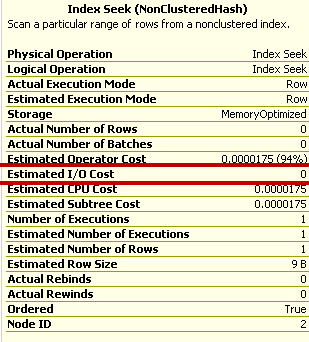
Estimated I/O Cost is zero

We can also notice that Estimated I/O Cost is zero. Of course it would be zero as table is residing in memory.
image

NoParallelForMemoryOptimizedTables is a reason for non-parallelized plan

While looking at XML plan of the query, I noticed something new and I have drawn a box.

image

NonParallelPlanReason="NoParallelForMemoryOptimizedTables" This would mean that in-memory table operations would not go for parallelism.

Hope you have learned something new today.

  • Cheers,
  • Balmukund Lakhani
  • Twitter @blakhani
  • Author: SQL Server 2012 AlwaysOnPaperback, Kindle
  • Posted in A - Z Series, In Memory OLTP, In-Memory OLTP, SQL Server 2014 | Tagged: , , , , , , , , , , , , , , , | 2 Comments »

    A-Z of In-Memory OLTP : Monitoring Memory Usage

    Posted by blakhani on January 16, 2014


    Monitoring is a human nature to be safe and avoid and unexpected failure. Whenever we drive a car at high speed, its human nature to have a look at speedometer. Whenever you go to visit doctor, he would do some monitoring of certain parameters and then ask relevant question to troubleshoot the problem which you tell him. (Oh God! Troubleshooting has become part of my examples, even for doctor!)

    In SQL Server, how do you normally monitor space used by a table? Generally we use sp_spaceused and provide table name which gives good amount of details. But interestingly enough, the store procedure would NOT work for in-memory tables as shown below.

    select count(*) as 'count' 
    from [dbo].[MyFirstMemporyOptimizedTable]
    go
    sp_spaceused 'MyFirstMemporyOptimizedTable'
    go


    image

    Our table MyFirstMemporyOptimizedTable has good amount of rows and can’t be using zero space as reported by sp_spaceused. In order to get the memory used by in-memory tables, we need to use another DMV called dm_db_xtp_table_memory_stats. Now, how do I write a query? I generally look for the UI interface or standard report which gives me the data and then use profiler to find the nicely formatted query.

    I was able to find a standard report for memory usage of in-memory tables called “Memory Usage By Memory Optimized Objects” as shown below.

    image

    I launched the report and captured profiler to get the query. Here is the query which can get us the data for all IMO tables in the database. (captured by profiler, not written by me)

     SELECT t.object_id
        ,t.NAME
        ,ISNULL((
                SELECT CONVERT(DECIMAL(18, 2), (TMS.memory_used_by_table_kb) / 1024.00)
                ), 0.00) AS table_used_memory_in_mb
        ,ISNULL((
                SELECT CONVERT(DECIMAL(18, 2), (TMS.memory_allocated_for_table_kb - TMS.memory_used_by_table_kb) / 1024.00)
                ), 0.00) AS table_unused_memory_in_mb
        ,ISNULL((
                SELECT CONVERT(DECIMAL(18, 2), (TMS.memory_used_by_indexes_kb) / 1024.00)
                ), 0.00) AS index_used_memory_in_mb
        ,ISNULL((
                SELECT CONVERT(DECIMAL(18, 2), (TMS.memory_allocated_for_indexes_kb - TMS.memory_used_by_indexes_kb) / 1024.00)
                ), 0.00) AS index_unused_memory_in_mb
    FROM sys.tables t
    INNER JOIN sys.dm_db_xtp_table_memory_stats TMS ON (t.object_id = TMS.object_id)

    Here is the output:

    image

    If we look at report, we would get exactly same output but in more “presentable” format as below.

    image

    If we look at the bottom area of report, it’s the output of earlier query.

    If you find other ways to monitor the memory usage, write it in comment section and share with the world.

  • Cheers,
  • Balmukund Lakhani
  • Twitter @blakhani
  • Author: SQL Server 2012 AlwaysOnPaperback, Kindle
  • Posted in A - Z Series, Hekaton Series, In Memory OLTP, In-Memory OLTP | Tagged: , , , , , , , , , , , , , , , , | 1 Comment »

    A-Z of In-Memory OLTP : Hash Indexes (Part 2)

    Posted by blakhani on January 14, 2014


    Imagine that you are standing in front of a multistoried apartment and don’t know the apartment where you friend resides (find 1 out of 100). It would be tough to knock each and every door to check if the house belongs to your friend (perform a Scan). What if there is a directory (Index) with the security guard having name and apartment number? Easy? Each of the apartment is a row and you know the predicate (where clause). Indexes in any technology (and real life as well) are used for faster access to the data.

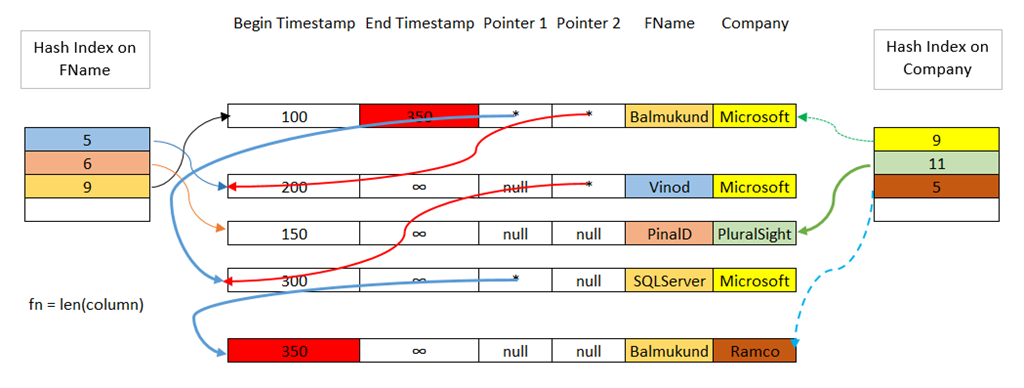
    In the previous post of the A-Z Series, we have seen how a single hash index looks like and learned about hash collision. In this post let’s go one step further understand how two hash indexes on the same table would look like. To make picture more intuitive, I have added color to the column matching with the bucket they belong to. Same as earlier, I am using LEN function as hash function.

    image

    Along with earlier index on fName column, we now have another on Company column. If we try to compare above image with single hash index image in previous blog, it’s clear that now we have “Pointer 2 added” in the row header area of the row (read here). As we can see above, we have three rows falling into same bucket for company column. The bucket of hash index would point to first row of hash bucket <Balmukund, Microsoft>. Due to collision on company Microsoft, there would be chain pointers in the existing row to point to next row of the same bucket (red color arrows in above image)

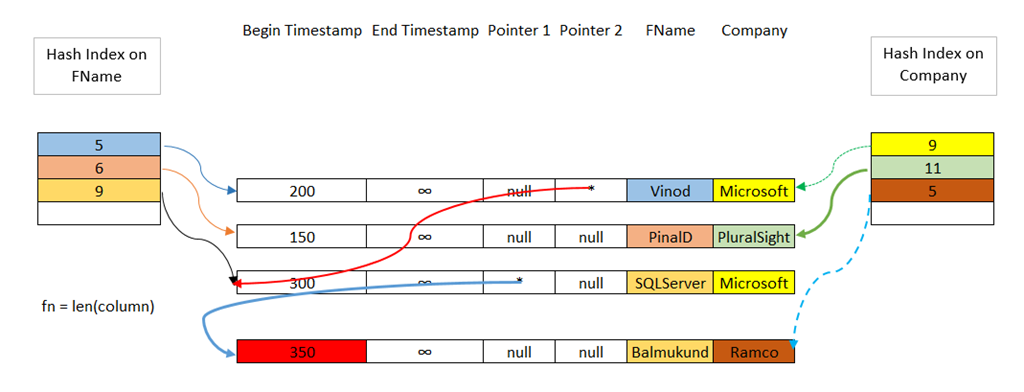
    In above picture, we have assumed that there is no deletion happened and that’s why we see ∞ (infinity) in End Timestamp for all four rows. This means that all rows are valid for timestamp 300 onwards (begin timestamp is max 300). If delete or update (=delete + insert) happens for a row then as described in earlier blog, the timestamp would be closed for deleted data and new row would be created with new begin timestamp. Lets assume that we fired a update statement to modify Balmukund’s company to Ramco at time stamp 350. We would put end timestamp as 350 for <Balmukund, Microsoft> row and insert new row with <Balmukund , Ramco>. All pointers need modification. Since LEN(Ramco) = 5 and there is no hash collision, new pointer is added.

    image

    Later when garbage collection happens, first row <Balmukund, Microsoft> would be removed and pointer would be modified.

    image

    You may ask – Is there any way to find how many hash buckets we have and do we have collision? Yes, of course! SQL Server has DMV dm_db_xtp_hash_index_stats available to help us investigate. Let’s use the script to understand this concept.

    -- Create database with IMO Filegroup, If exists drop it.
    Use Master
    go
    If db_id('SQLSeverHelp_IMO') is NOT NULL
    drop database SQLSeverHelp_IMO
    GO
    CREATE DATABASE SQLSeverHelp_IMO 
        ON PRIMARY (
        NAME = [SQLSeverHelp_IMO_data]
        ,FILENAME = 'C:\IMO_Database\SQLSeverHelp_IMO.mdf'
        )
        
        ,FILEGROUP [SQLSeverHelp_IMO_FG] CONTAINS MEMORY_OPTIMIZED_DATA ( 
        NAME = [SQLSeverHelp_IMO_dir]
        ,FILENAME = 'C:\IMO_Database\SQLSeverHelp_IMO_dir'
        ) 
        
        LOG ON (
        NAME = [SQLSeverHelp_IMO_log]
        ,Filename = 'C:\IMO_Database\SQLSeverHelp_IMO_log.ldf'
        ) 
        COLLATE Latin1_General_100_BIN2 
    GO
    -- Create table in database
    -- use the database which is already created
    Use SQLSeverHelp_IMO
    GO
    CREATE TABLE MyFirstMemporyOptimizedTable
    (
        iID INT NOT NULL,
        vFName VARCHAR(20) NOT NULL,
        vLName VARCHAR(20) NOT NULL,
        CONSTRAINT imo_pk_iID primary key NONCLUSTERED HASH (iID) WITH (BUCKET_COUNT = 200),
        index imo_idx_vFname  NONCLUSTERED HASH (vFName) WITH (BUCKET_COUNT = 200)
    ) WITH (MEMORY_OPTIMIZED = ON, DURABILITY = SCHEMA_AND_DATA)
    GO


    I have given bucket count as 200. can you guess how much bucket SQL Sever is going to create? If you can’t answer then you have not read part 1 of hash indexes, which I mentioned in beginning. SQL is going to put 256 buckets for both indexes. Let’s verify!

    Select  name 'Index Name', 
            object_name( object_id) 'Table Name',
            bucket_count 'Number of Buckets'
    from    sys.hash_indexes
    order by 2, 1 asc

    Index Name        Table Name                     Number of Buckets

    —————– —————————— —————–

    imo_idx_vFname    MyFirstMemporyOptimizedTable   256

    imo_pk_iID        MyFirstMemporyOptimizedTable   256

    (2 row(s) affected)

    Let’s insert 90000 rows in the table using natively complied procedure as below.

    Use SQLSeverHelp_IMO 
    GO
    CREATE PROCEDURE [dbo].[InsertName] 
      WITH 
        NATIVE_COMPILATION, 
        SCHEMABINDING, 
        EXECUTE AS OWNER
    AS 
    BEGIN ATOMIC 
      WITH 
    (TRANSACTION ISOLATION LEVEL = SNAPSHOT,
     LANGUAGE = 'us_english')
     
    DECLARE @counter INT 
    SET @counter = 1
    
    WHILE @counter <= 90000 
      BEGIN 
          INSERT INTO dbo.MyFirstMemporyOptimizedTable 
          VALUES      (@counter, 
                       'SQLServer-Help.com', 
                       'Balmukund Lakhani');
          INSERT INTO dbo.MyFirstMemporyOptimizedTable 
          VALUES      (@counter + 1, 
                       'ExtremeExperts.com', 
                       'Vinod Kumar M');
          INSERT INTO dbo.MyFirstMemporyOptimizedTable 
          VALUES      (@counter + 2, 
                       'Blogs.msdn.com', 
                       'Balmukund Lakhani') 
    
          SET @counter = @counter + 3 
      END
    END
    GO
    
    exec InsertName
    go


    Now, let’s examine hash index statistics.

    SELECT Object_name(his.object_id)        'Table Name', 
           idx.name                            'Index Name', 
           total_bucket_count                'total buckets', 
           empty_bucket_count                'empty buckets',            
           total_bucket_count - empty_bucket_count as 'used buckets', 
           avg_chain_length                    'avg chain length', 
           max_chain_length                    'max chain length', 
           90000                                   as 'Rows - hardcoded value' 
    FROM   sys.dm_db_xtp_hash_index_stats as his 
           JOIN sys.indexes as idx 
             ON his.object_id = idx.object_id 
                AND his.index_id = idx.index_id;   
    

    Table Name                      Index Name       total buckets  empty buckets  used buckets  avg chain length  max chain length Rows – hardcoded value

    ——————————- —————- ————– ————– ————- —————– —————  ———————-

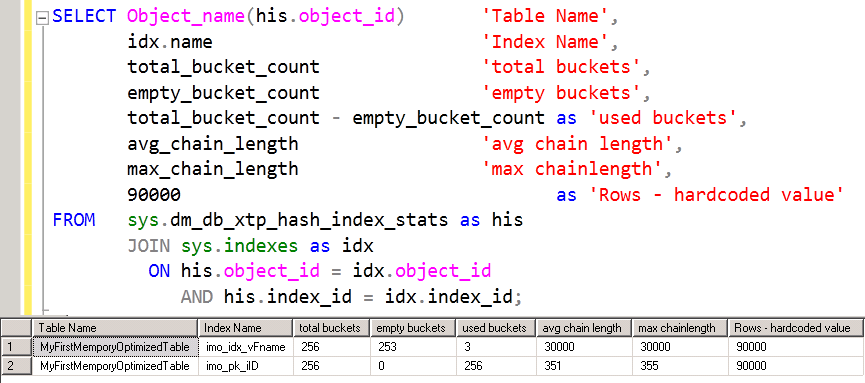
    MyFirstMemporyOptimizedTable    imo_idx_vFname   256            253            3             30000             30000            90000

    MyFirstMemporyOptimizedTable    imo_pk_iID       256            0              256           351               355              90000

    (2 row(s) affected)

    image

    Chain length in conjunction with buckets in the output tells that for index imo_idx_vFname, we have only three bucket and each bucket has 30000 entries. If we go back and examine the stored procedure, we are inserting only three values in loop of 30000 for vFName column. Whereas for the other index imo_pk_iID, we don’t have any free bucket and chain length is more for each bucket. This is the right candidate for more number of buckets.  Typical value of bucket count is between 1 to 2 times of distinct values on that column. Remember that bucket count can’t be change on the fly – whole table needs to be dropped and recreated.

    Books online references:sys.dm_db_xtp_hash_index_stats and Determining the Correct Bucket Count for Hash Indexes

    Hope you have already downloaded SQL 2014 CTP2 and following this series with me!

  • Cheers,
  • Balmukund Lakhani
  • Twitter @blakhani
  • Author: SQL Server 2012 AlwaysOnPaperback, Kindle
  • Posted in A - Z Series, Hekaton Series, In Memory OLTP, In-Memory OLTP, SQL Server 2014 | Tagged: , , , , , , , , , , , , , , , | 7 Comments »