Help: SQL Server

Sharing my knowlege about SQL Server Troubleshooting Skills

  • Blog Stats

    • 2,153,607 hits
  • Select GETDATE()

    December 2025
    M T W T F S S
    1234567
    891011121314
    15161718192021
    22232425262728
    293031  

Posts Tagged ‘inmemory oltp’

A-Z of In-Memory OLTP : Durable vs. Non-durable tables

Posted by blakhani on January 28, 2014


Can you think of a situation where you don’t want to log anything in SQL Server and you are OK even if data is lost? What comes to your mind? Staging tables used in loading phase of Data warehouses? ASP Session state? Temporary logging tables?

If you have such situations where data is temporary and you are OK to lose the data due to SQL Server restart then you can think of non-durable tables in SQL Server in-memory OLTP. By default, tables are durable. We have briefly discussed here in earlier blog of this series. This is defined by DURABILITY parameter during created table syntax. This indicates whether we want data in the table to be persisted when database is restarted (via offline/online, SQL Service restart or SQL crash). Non durable tables would have SCHEMA_ONLY as the value passed to the durability parameter. Note that these tables are different from the temporary table which we create in tempdb (#table and ##table). One major difference is that tempdb tables are not memory optimized and they won’t be able to survive after restart, including schema.

We have already discussed “How In-Memory Table is durable” in this blog. Since transaction logging is not done for non-durable table, the data insertion is faster (actually much.. much faster) than durable table, of course at the cost of data durability. Let’s have a look at them in action. We would created two tables with same schema, one being durable (SCHEMA_AND_DATA durability) and another being non-durable (SCHEMA_DURABILITY)

-- Create database with IMO Filegroup, If exists drop it.
Use Master
go
If db_id('SQLSeverHelp_IMO') is NOT NULL
drop database SQLSeverHelp_IMO
GO
CREATE DATABASE SQLSeverHelp_IMO 
    ON PRIMARY (
    NAME = [SQLSeverHelp_IMO_data]
    ,FILENAME = 'C:\IMO_Database\SQLSeverHelp_IMO.mdf'
    )
    
    ,FILEGROUP [SQLSeverHelp_IMO_FG] CONTAINS MEMORY_OPTIMIZED_DATA ( 
    NAME = [SQLSeverHelp_IMO_dir]
    ,FILENAME = 'C:\IMO_Database\SQLSeverHelp_IMO_dir'
    ) 
    
    LOG ON (
    NAME = [SQLSeverHelp_IMO_log]
    ,Filename = 'C:\IMO_Database\SQLSeverHelp_IMO_log.ldf'
    ) 
GO


-- In-Memory table, Durable
Use SQLSeverHelp_IMO
GO
CREATE TABLE DurableInMemoryOptimizedTable
(
iID INT NOT NULL PRIMARY KEY NONCLUSTERED HASH WITH (BUCKET_COUNT = 100000),
vFName VARCHAR(20) NOT NULL,
vLName VARCHAR(20) NOT NULL
) WITH (MEMORY_OPTIMIZED = ON, DURABILITY = SCHEMA_AND_DATA)
GO

-- In-Memory table, non-durable
Use SQLSeverHelp_IMO
GO
CREATE TABLE NonDurableInMemoryOptimizedTable
(
iID INT NOT NULL PRIMARY KEY NONCLUSTERED HASH WITH (BUCKET_COUNT = 100000),
vFName VARCHAR(20) NOT NULL,
vLName VARCHAR(20) NOT NULL
) WITH (MEMORY_OPTIMIZED = ON, DURABILITY = SCHEMA_ONLY)
GO

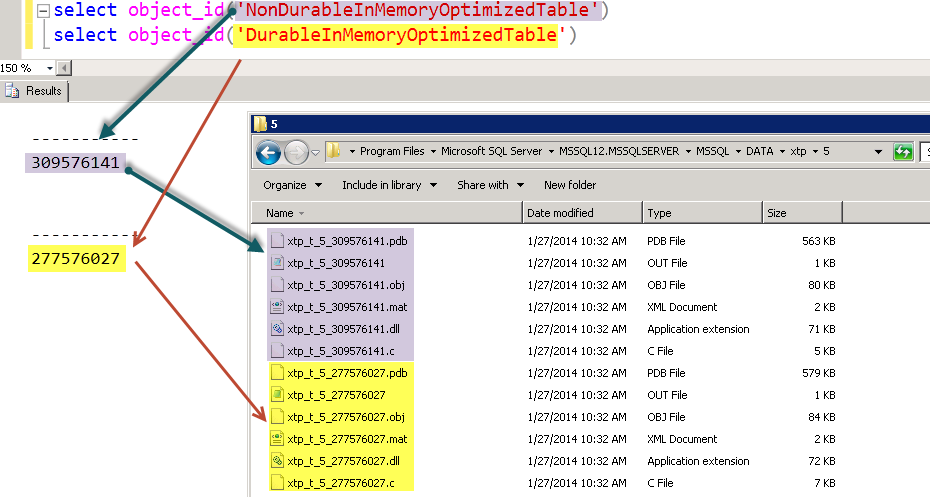
Since both tables are memory optimized, both would have their own DLLs generated. We have discussed DLLs for table in earlier blog here.
image

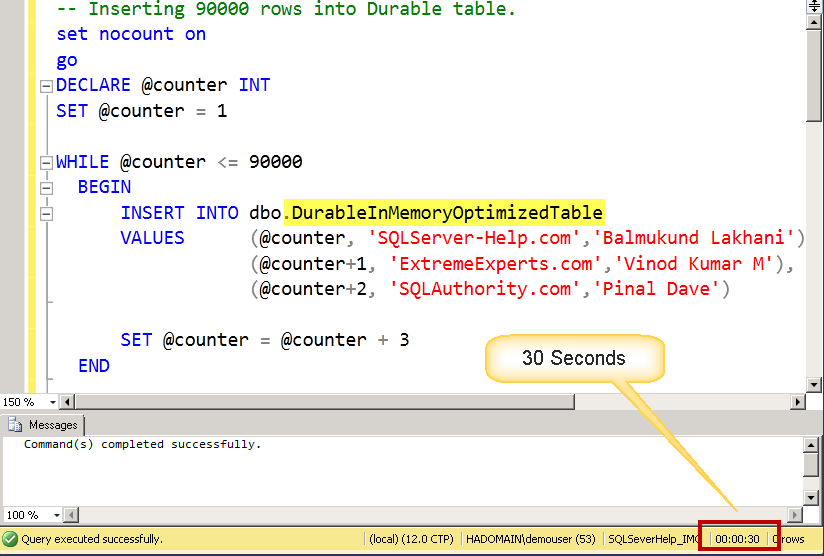
Let’s load same amount of data in both tables. I have randomly selected 90000 rows (multiple of three – as I have to insert three important names). First I am inserting into Durable table using below script.

-- Inserting 90000 rows into Durable table.
set nocount on
go
DECLARE @counter INT 
SET @counter = 1

WHILE @counter <= 90000 
  BEGIN 
      INSERT INTO dbo.DurableInMemoryOptimizedTable 
      VALUES      (@counter, 'SQLServer-Help.com','Balmukund Lakhani'),
                  (@counter+1, 'ExtremeExperts.com','Vinod Kumar M'),
                  (@counter+2, 'SQLAuthority.com','Pinal Dave') 

      SET @counter = @counter + 3
  END
image

as we can see it was around 30 seconds on my VM. and now.. non-durable table using below script.

set nocount on
go
DECLARE @counter INT 
SET @counter = 1

WHILE @counter <= 90000 
  BEGIN 
      INSERT INTO dbo.NonDurableInMemoryOptimizedTable 
      VALUES      (@counter, 'SQLServer-Help.com','Balmukund Lakhani'),
                  (@counter+1, 'ExtremeExperts.com','Vinod Kumar M'),
                  (@counter+2, 'SQLAuthority.com','Pinal Dave') 

      SET @counter = @counter + 3
  END
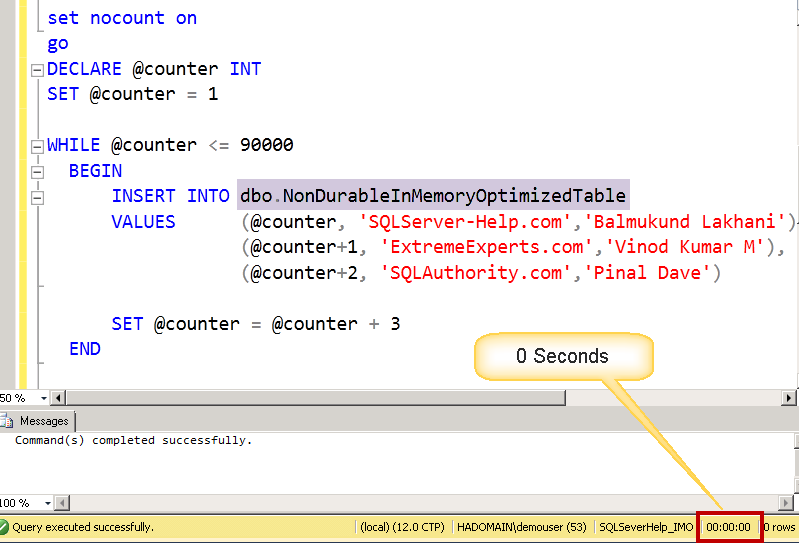
image

How much time do you see in above screen shot? zero ?Trust me, it was almost instantaneous! You don’t trust me? Let count rows from both the tables.

-- Verify data is present in both tables.
select COUNT(*) from NonDurableInMemoryOptimizedTable
go
select COUNT(*) from DurableInMemoryOptimizedTable
go

image

Still don’t trust me? Try yourself!

Now, the test of survival! I would take database offline and bring it online. For SCHEMA_ONLY durable table, the data would be cleaned, but schema would remain. Let’s test.

-- take database offline and bring online.
Use Master
go
ALTER DATABASE SQLSeverHelp_IMO SET OFFLINE WITH ROLLBACK IMMEDIATE
GO
ALTER DATABASE SQLSeverHelp_IMO SET ONLINE
GO
-- count the rows again
USE SQLSeverHelp_IMO
go
select COUNT(*) from NonDurableInMemoryOptimizedTable
go
select COUNT(*) from DurableInMemoryOptimizedTable
go

image

As expected, rows in NonDurableInMemoryOptimizedTable couldn’t survive database restart.

To summarize, for non durable table only schema (table definition) would be available after restart/reboot/crash. In other words, it’s a permanent table with temporary data (consistent till restart). Non-durable table are faster in data loading at the cost of data durability. They would be a perfect fit for certain requirements need but useless for others. You MUST evaluate and understand risk of non durable tables before putting them in production. 

Hope you have learned something new.

  • Cheers,
  • Balmukund Lakhani
  • Twitter @blakhani
  • Author: SQL Server 2012 AlwaysOnPaperback, Kindle
  • Posted in A - Z Series, In Memory OLTP, In-Memory OLTP, SQL Server 2014 | Tagged: , , , , , , , , , , , , , , , , | 5 Comments »

    A-Z of In-Memory OLTP : Usage of sys.dm_exec_query_stats and sys.dm_exec_procedure_stats

    Posted by blakhani on January 23, 2014


    Have you ever played any game where crime has occurred in past and you need to look at evidences to find out who was criminal? Any post-mortem needs data collected during past. In SQL Server world DBAs are detectives where they sometime needs post-mortem about performance issue reported on server. To equip them SQL Server provides the statistics about the query and being is constantly gathered once they are executed. As long as plan is there is cache, we can use stats DMVs (sys.dm_exec_query_stats and sys.dm_exec_procedure_stats) to find the time taken by query and resources taken in the past. If you try to find query to find Top 10 CPU / IO consumers in the past, you will easily get query.

    There is a little difference in this behavior when it comes to In-Memory OLTP. The gathering of execution stats collection is off by default. Here is the quick repro about what I mean. I have created two procedures to do same task.

    One is interoperable.

    Create Procedure [dbo].[SelectName_traditional]
    @iID int
    
    as Select vFName,vLName from dbo.MyFirstMemporyOptimizedTable
      where iID = @iID
    GO
    

    and another is natively compiled

    CREATE PROCEDURE [dbo].[SelectName_Native] @iID INT
      WITH 
        NATIVE_COMPILATION,  SCHEMABINDING,  EXECUTE AS OWNER
    AS 
    BEGIN ATOMIC 
      WITH 
    (TRANSACTION ISOLATION LEVEL = SNAPSHOT, LANGUAGE = 'us_english')  Select vFName,vLName from dbo.MyFirstMemporyOptimizedTable
      where iID = @iID
    
    END


    Let’s execute both stored procedure 10 times using below code

    exec SelectName_traditional 1
    go 10
    exec SelectName_Native 1
    go 10


    If I look at stats DMV, I would see information only for “SelectName_traditional” procedure as below. Here is the query for query_stats DMV

    SELECT 
    QT.TEXT AS STATEMENT_TEXT,
    QP.QUERY_PLAN,
    QS.TOTAL_WORKER_TIME AS CPU_TIME
    FROM SYS.DM_EXEC_QUERY_STATS QS
    CROSS APPLY SYS.DM_EXEC_SQL_TEXT (QS.SQL_HANDLE) AS QT
    CROSS APPLY SYS.DM_EXEC_QUERY_PLAN (QS.PLAN_HANDLE) AS QP
    where QT.TEXT like '%MyFirstMemporyOptimizedTable%'


    image

    Here is the query for procedure_stats DMV

    select object_id,
    object_name(object_id) as 'object name',
    cached_time,last_execution_time,
    execution_count,total_worker_time,
    last_worker_time,min_worker_time,
    max_worker_time,total_elapsed_time,
    last_elapsed_time,min_elapsed_time,
    max_elapsed_time 
    from sys.dm_exec_procedure_stats
    where database_id=db_id('SQLSeverHelp_IMO') 
    

    image

    As we can see above that there is no entry for SelectName_Native.

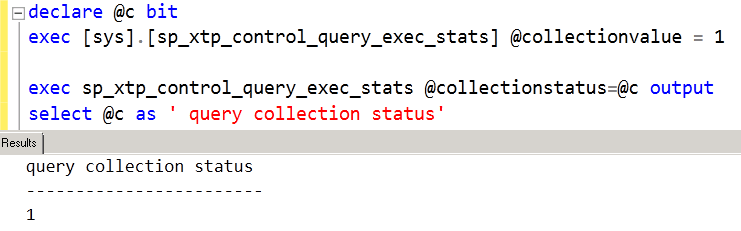
    Above confirms that, by default collection is off as its recommended to turn on stats collection only for a limited amount of time as needed for troubleshooting. This is done to minimize the performance impact on the production workload due to stats collection. We can turn on (and turn off as well) the collection of statistics by running below “control” procedures. One procedure is for collection at query level (within natively complied procedure) and other is at procedure level.

    sys.sp_xtp_control_query_exec_stats: Here is the tooltip shown in SSMS.

    image


    sys.sp_xtp_control_proc_exec_stats:Here is the tooltip shown in SSMS.

    image

    As you would notice via tool tip that “query” stats can be turned on for a specific database id and object id, which gives us granular control of data collection. Once they are turned on, we can see the entry in statistics DMVs.

    image

    I have done DBCC FREEPROCCACHE and ran the same batch again to execute both procedure 10 times. Here is the result of earlier query for procedure stats DMV.

    image

    Now we can see two rows. Notice Zero values in various columns. Let’s do the same for query level.

    image 

    and look at query stats DMV now..

    image

    Now, we can see new row for natively complied procedure as well.

    Few important notes, based on my learning on CTP2.

    1. the changes done via control procedures are reverted back to OFF after restart.
    2. DBCC FREEPROCCACHE doesn’t impact the entry shown for natively complied procedures in stats DMV as they are not in procedure cache.
    3. CPU, IO column value would be zero for natively compiled procedures.
    4. Turning off the control procedures doesn’t remove the value. Only way to remove them is either drop and recreate the procedure or restart.

    Hope you have learned something new today.

  • Cheers,
  • Balmukund Lakhani
  • Twitter @blakhani
  • Author: SQL Server 2012 AlwaysOnPaperback, Kindle
  • Posted in A - Z Series, In Memory OLTP, In-Memory OLTP, SQL Server 2014 | Tagged: , , , , , , , , , , , , , , , , , | 5 Comments »

    A-Z of In-Memory OLTP : What’s new in Execution Plan

    Posted by blakhani on January 21, 2014


    I still remember the day when I was interviewed for my job with Microsoft. It was kind of a discussion about SQL Sever internals rather than interview. Of course, we had discussion about SQL Server Performance Tuning as well. Interviewer asked – “If there is a query taking very long time to execute, what would you do?” I tried few answers like blocking, resource bottleneck and also said that we can look at the execution plan. I was aware of few bad operators in execution plan and I explained those. Anyways, after 2 hours of discussion, the interviewer was satisfied that I know SQL Server features. I also got feedback that more than current knowledge, I have passion to learn, help someone and share my knowledge. End result – I was hired! After joining Microsoft SQL Support team, I am learning since day 1 and learning and sharing never stopped for me. Performance tuning has been my favorite and I would still love to see execution plans to learn more about query execution.

    In this blog of A-Z of In-Memory OLTP Series, we would talk about execution plan related changes with respect to In-Memory OLTP.

    Limitation on Natively Compiled Stored Procedure

    If we try to get execution plan of any natively complied stored procedure via SSMS using “Include Actual Execution Plan” and executing it; it won’t work. There is no plan in procedure cache for natively compiled stored procedures. Even if we try set statistics profile on, it won’t work.

    image

    Only way to get query plan for natively compiled procedure is to get estimated plan. That can be done using TSQL “set showplan_xml on” statement or via SSMS “Display Estimated Execution Plan”. This restriction is not applicable for TSQL statements touching in-memory tables and we can get actual plan as well.

    How to Identify which In-Memory Index is being used?

    We have earlier created table called MyFirstMemporyOptimizedTable with Primary Key (with hash index) and another Hash Index. There is another type of non-clustered index in-memory world called range index, which we would cover later in the series. We would create MySecondMemporyOptimizedTable with range index and I’ve highlighted below.

    CREATE TABLE [dbo].[MyFirstMemporyOptimizedTable]
    (
        [iID] [int] NOT NULL,
        [vFName] [varchar](20) COLLATE Latin1_General_100_BIN2 NOT NULL,
        [vLName] [varchar](20) COLLATE Latin1_General_100_BIN2 NOT NULL
    
    INDEX [imo_idx_vFname] NONCLUSTERED HASH 
    (
        [vFName]
    )WITH ( BUCKET_COUNT = 1048576),
    CONSTRAINT [imo_pk_iID] PRIMARY KEY NONCLUSTERED HASH 
    (
        [iID]
    )WITH ( BUCKET_COUNT = 1048576)
    )WITH ( MEMORY_OPTIMIZED = ON , DURABILITY = SCHEMA_AND_DATA )
    
    GO
    
    CREATE TABLE [dbo].[MySecondMemporyOptimizedTable]
    (
        [iID] [int] NOT NULL,
        [vFName] [varchar](20) COLLATE Latin1_General_100_BIN2 NOT NULL,
        [vLName] [varchar](20) COLLATE Latin1_General_100_BIN2 NOT NULL
    
    INDEX [imo2_idx_vFname] NONCLUSTERED  
    (
        [vFName]
    ),
    CONSTRAINT [imo2_pk_iID] PRIMARY KEY NONCLUSTERED HASH 
    (
        [iID]
    )WITH ( BUCKET_COUNT = 1048576)
    )WITH ( MEMORY_OPTIMIZED = ON , DURABILITY = SCHEMA_AND_DATA )


    Hash Index

    Below query is going to use Hash index

    select count(*) 
    from MyFirstMemporyOptimizedTable
    where iID = 0


    And we would see Index Seen with “NonClusteredHash” keyword, which denoted hash index being used.

    image

    If we look at “storage” for the “Index Seek” operator, it would be “MemoryOptimized”

    image

    Range Index

    Here is a query for Range Index for second table

    select count(*) 
    from MySecondMemporyOptimizedTable
    where vFName= 'Balmukund'


    image

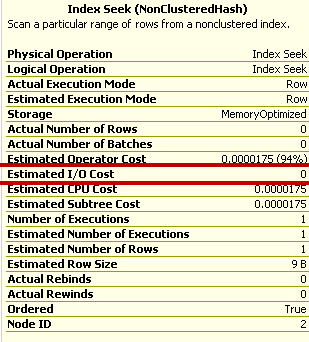
    Estimated I/O Cost is zero

    We can also notice that Estimated I/O Cost is zero. Of course it would be zero as table is residing in memory.

    image

    NoParallelForMemoryOptimizedTables is a reason for non-parallelized plan

    While looking at XML plan of the query, I noticed something new and I have drawn a box.

    image

    NonParallelPlanReason="NoParallelForMemoryOptimizedTables" This would mean that in-memory table operations would not go for parallelism.

    Hope you have learned something new today.

  • Cheers,
  • Balmukund Lakhani
  • Twitter @blakhani
  • Author: SQL Server 2012 AlwaysOnPaperback, Kindle
  • Posted in A - Z Series, In Memory OLTP, In-Memory OLTP, SQL Server 2014 | Tagged: , , , , , , , , , , , , , , , | 2 Comments »