Help: SQL Server

Sharing my knowlege about SQL Server Troubleshooting Skills

  • Blog Stats

    • 2,154,410 hits
  • Select GETDATE()

    January 2026
    M T W T F S S
     1234
    567891011
    12131415161718
    19202122232425
    262728293031  

Posts Tagged ‘SQL 2014 Learning Series’

SQL 2014 Learning Series # 5 – New Feature – Incremental Statistics (Part 1)

Posted by blakhani on April 15, 2014


Many times you might have to update the statistics (index stats or normal stats) with fullscan, either manually or via scheduled job. If the table is large then time taken would be considerably huge because it has to scan each and every record of the table. Let’s assume that we have created partitions on the table and we only modified data for one partition. Earlier version of SQL didn’t offer any choice to update statistics only for one partition. Only choice we had was “FULLSCAN”.

To overcome this, SQL Server 2014 introduced “INCREMENTAL” keyword under Create Statistics. As per books online “When ON, the statistics created are per partition statistics. When OFF, stats are combined for all partitions. The default is OFF.”

To have some sample data, I have downloaded base AdventureWorks sample database from: http://msftdbprodsamples.codeplex.com/downloads/get/417885

I have restored it in SQL Server 2014 and named as AdventureWorks2014. I would be playing around with [AdventureWorks2014].[Production].[TransactionHistoryArchive] table which has transactions from 2005-05-17 to 2007-08-31. I have created quarterly partition.

Use AdventureWorks2014;
GO

CREATE partition FUNCTION [QuarterlyDate](datetime) AS range LEFT FOR VALUES ( 
N'2005-05-01T00:00:00', N'2005-08-01T00:00:00', N'2005-11-01T00:00:00', 
N'2006-02-01T00:00:00', N'2006-05-01T00:00:00', N'2006-08-01T00:00:00', 
N'2006-11-01T00:00:00', N'2007-02-01T00:00:00', N'2007-05-01T00:00:00', 
N'2007-08-01T00:00:00', N'2007-11-01T00:00:00'); 
GO

CREATE partition scheme [TransactionDatePS] AS partition [QuarterlyDate] TO ( 
[PRIMARY], [PRIMARY], [PRIMARY], [PRIMARY], [PRIMARY], [PRIMARY], [PRIMARY], 
[PRIMARY], [PRIMARY], [PRIMARY], [PRIMARY], [PRIMARY]);
GO

CREATE TABLE Production.TransactionHistoryArchive_IncrementalDemo(
    TransactionID int NOT NULL,
    ProductID int NOT NULL,
    ReferenceOrderID int NOT NULL,
    ReferenceOrderLineID int NOT NULL, 
    TransactionDate datetime NOT NULL,
    TransactionType nchar(1) NOT NULL,
    Quantity int NOT NULL,
    ActualCost money NOT NULL,
    ModifiedDate datetime NOT NULL)
ON TransactionDatePS(TransactionDate);
GO

Now, I am going to populate partitioned table. To show before and after effect, we would populate only one partition at this point. Since our PF is defined as “LFET” which mean boundary value would go to left side. If I have to populate 8th partition, the range would be TransactionDate > N’2006-11-01T00:00:00′ and TransactionDate <= N’2007-02-01T00:00:00′. Here is the query to dump data into newly created table.

INSERT INTO Production.TransactionHistoryArchive_IncrementalDemo
SELECT * FROM Production.TransactionHistoryArchive
WHERE TransactionDate > N'2006-11-01T00:00:00' and 
TransactionDate <= N'2007-02-01T00:00:00'

(10324 row(s) affected). Now, let’s look at partitions

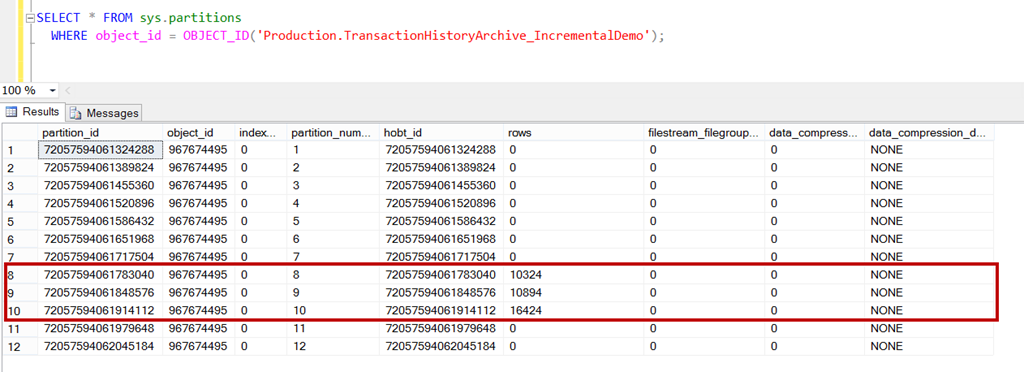
SELECT * FROM sys.partitions
  WHERE object_id = OBJECT_ID('Production.TransactionHistoryArchive_IncrementalDemo');


image

As expected, we have 10324 rows in 8th partition. Use below to create “incremental” statistics. Notice that I have added new clause which is available in SQL Server 2014.

CREATE STATISTICS IncrementalStatsDemo 
ON Production.TransactionHistoryArchive_IncrementalDemo (TransactionDate) 
WITH FULLSCAN, INCREMENTAL = ON;

Execute DBCC SHOW_STATISTICS command to look at histogram

DBCC SHOW_STATISTICS('Production.TransactionHistoryArchive_IncrementalDemo', IncrementalStatsDemo)
with histogram

image


Added more rows to different partition

INSERT INTO Production.TransactionHistoryArchive_IncrementalDemo
SELECT * FROM Production.TransactionHistoryArchive
WHERE TransactionDate > N'2007-02-01T00:00:00' and 
TransactionDate <= N'2007-08-01T00:00:00'

(27318 row(s) affected)
image

UPDATE STATISTICS Production.TransactionHistoryArchive_IncrementalDemo (IncrementalStatsDemo)
with resample ON PARTITIONS(9, 10)

Now, lets look at stats again.

image

If we compare with earlier histogram image, the highlighted range was at step 81 earlier which has moved to step 60 now and Total number of steps have increased to 192 (as compared to 81 earlier). This means that update statistics command has read those partitions which were specified (9 and 10) and merged with earlier created statistics. As per books online “ON PARTITIONS – Forces the leaf-level statistics covering the partitions specified in the ON PARTITIONS clause to be recomputed, and then merged to build the global statistics. WITH RESAMPLE is required because partition statistics built with different sample rates cannot be merged together.”

There is more to cover because there are various syntax added on different places. In next blog, I would cover those.

Stay tuned.

  • Cheers,
  • Balmukund Lakhani
  • Twitter @blakhani
  • Author: SQL Server 2012 AlwaysOnPaperback, Kindle
  • Posted in SQL 2014 Learning Series | Tagged: , , | 4 Comments »

    SQL 2014 Learning Series # 4 – New Feature – Buffer Pool Extension

    Posted by blakhani on April 8, 2014


    Today I am going to pick up another new feature of SQL Server 2014 called as Buffer Pool Extension (a.k.a. BPE).  As the name suggests, this feature allows DBA to extend buffer pool beyond the size of the memory allocated to SQL Server. Buffer pool is biggest chunk of memory allocated in SQL Server process. BPE can use nonvolatile storage devices (like SSD) for increasing amount of memory available for buffer pool consumers. This allows usage of SSD as an intermediate buffer pool pages which would help in getting price advantage over the memory increase on the server. Adding storage device on server is less invasive as compare to adding memory and fetching a page from SSD is faster than fetching it from data file. You can think of this as pagefile for SQL buffer pool only.

    Steps to configure:

    To enable the feature we need provide file path and the size. That’s it? Well, keep in mind that size of BPE should be more than current memory allocation, else we would get below error
    Msg 868, Level 16, State 1, Line 40
    Buffer pool extension size must be larger than the current memory allocation threshold 12784 MB. Buffer pool extension is not enabled.

    Due to above check, I have reduced max server memory on my SQL instance so that I can create the demo.

    EXEC sys.sp_configure N'show advanced options', N'1'  
    GO
    RECONFIGURE WITH OVERRIDE
    GO
    EXEC sys.sp_configure N'max server memory (MB)', N'1024'
    GO
    RECONFIGURE WITH OVERRIDE
    GO
    EXEC sys.sp_configure N'show advanced options', N'0'  
    GO
    RECONFIGURE WITH OVERRIDE
    GO
    

    using above commands, now the max server memory if 1 GB. Then I ran below command to create BPE file of 2 GB (to avoid error 868)

    ALTER SERVER CONFIGURATION 
    SET BUFFER POOL EXTENSION 
    ON ( FILENAME = 'F:\BufferPoolExtensionDemo\BPE.bpe' ,SIZE = 2 GB) 
    

    To get configuration information

    Select * from sys.dm_os_buffer_pool_extension_configuration


    image

    Read state_description carefully. It says “BUFFER POOL EXTENSION CLEAN PAGE CACHING ENABLED”. Clean page is a page in SQL memory which has no write pending. It’s generally the page which has been read from data file and no transaction has done the update of that page. Any modification to clean page would make it “dirty page”, which means there is some write on the page which is not yet written to the data file. Only clean pages can be stored in BPE file.

    As per whitepaper mentioned in blog “The dual write design is that dirty pages evicted from the buffer pool are written both to the SSD and to the database on disks; in effect, treating the SSD as a “write-through” cache for dirty pages”

    image


    Where is my page? memory or BPE file?

    To identify that, we can use DMV sys.dm_os_buffer_descriptors which has additional column introduced called is_in_bpool_extension. Here is the query to show such pages.

    Select    *
    from    sys.dm_os_buffer_descriptors
    where    is_in_bpool_extension = 1


    What if you want to change the file size of BPE? In case we want to change the configuration, the only option is to disable and enable the configuration. There is no ALTER command to modify it. Here is the command to turn it off.

    ALTER SERVER CONFIGURATION
    SET BUFFER POOL EXTENSION OFF


    If we query sys.dm_os_buffer_pool_extension_configuration again, we’ll see new information on our buffer pool extension.

     image


    To monitor. Below XEvents are available in SQL Server 2014 to monitor the functionality of BPE

    sqlserver.buffer_pool_extension_pages_written
    sqlserver.buffer_pool_extension_pages_read
    sqlserver.buffer_pool_extension_pages_evicted
    sqlserver.buffer_pool_eviction_thresholds_recalculated

    Here are various messages which contains text buffer pool extension. (taken from sys.messages catalog view)

    Buffer pool extension “%.*ls” has been initialized successfully with size is %I64d MB.
    Failed to create buffer pool extension of size %I64d MB on path “%.*ls”.
    Buffer pool extension configuration “%.*ls” is in wrong format. The format should be “<extension directory>,<size in GB>”.
    Buffer pool extension size must be larger than the physical memory size %I64d MB. Buffer pool extension is not enabled.
    Attempt to disable buffer pool extension when in state %ls is not allowed.
    Attempt to enable buffer pool extension when in state %ls is not allowed.
    Attempting to allocate %1ld BUF for buffer pool extension for a maximum of %2ld page descriptors.
    Buffer pool extension is only supported on Standard and Enterprise Editions of SQL Server.
    Buffer pool extension is not supported on the %ls architecture.
    Buffer pool extension has been disabled successfully. Deleting buffer pool extension “%.*ls”.
    Buffer pool extension size must be larger than the current memory allocation threshold %I64d MB. Buffer pool extension is not enabled.
    Buffer pool extension “%.*ls” cannot be closed because %ld asynchronous I/Os are outstanding.
    Could not change the value of the ‘BPoolExtensionPath’ property. Operating system error %ls

    Important Points:

    • Since BPE files stores only clean pages, there is no risk of data loss in event of loss of extension file or device which stores the file.
    • Available in Enterprise (developer and evaluation) and standard edition feature. Note that this is only for 64 bit SQL Server.

    I would not recommend putting BPE on spinning media. Since I don’t have SSD, I have used F drive but that should NOT be done in production.

    For more information on the buffer pool extension, please read book online topic Buffer Pool Extension.

    Hope this is helpful.

  • Cheers,
  • Balmukund Lakhani
  • Twitter @blakhani
  • Author: SQL Server 2012 AlwaysOnPaperback, Kindle
  • Posted in SQL 2014 Learning Series, SQL Server 2014 | Tagged: , , , | 6 Comments »

    SQL 2014 Learning Series # 3 – New Feature – Backup Encryption

    Posted by blakhani on April 3, 2014


    Before we jump into the new feature, lets have a look at behavior in previous version. Same simulation can be done on SQL Server 2014 as well.

    1. Create Database
    2. Create table in the database and insert some rows.
    3. Take backup of the database and check if we are able to see those rows in the backup.

    Here are the commands which we can run to achieve this.

    Create database [SQLServerHelp]
    go
    use [SQLServerHelp]
    go
    Create Table MyData (i int, j char(100));
    go
    insert into MyData values (1, 'See this data')
    go
    backup database SQLServerHelp to Disk = 'E:\Tools\SQLServerHelp.bak'
    go


    I have opened the backup file with one of the text editor and I can search for the row which I inserted. Note that opening big file in text editors may take a lot of time and file may become unusable for SQL Server. PLEASE DON’T TRY THIS ON PRODCUTION DATABASE BACKUP. I have highlighted the row which was inserted via above script. (1, ‘See this data’)

    image

    The way to avoid above situation is that encrypt the database use TDE or encrypt the column using column encryption. Please read below

    http://technet.microsoft.com/en-us/library/cc278098(v=SQL.100).aspx (Database Encryption in SQL Server 2008 Enterprise Edition)

    There are some overhead involved with above techniques and you may want to make sure that only backup is encrypted and you are OK if MDF file has data in readable format. To solve this, SQL Server 2014 has new feature called backup encryption. You can read more on books online

    Let’s look at steps involved.

    Create database master key for the master database.

    USE master;
    GO
    CREATE MASTER KEY ENCRYPTION BY PASSWORD = 'SQLServer-Help@123';
    GO

    Create a Backup Certificate

    Use Master
    GO
    CREATE CERTIFICATE BackupEncryptCert
       WITH SUBJECT = 'SQL Backup Encryption Certificate';
    GO


    Take a backup: This can be done by SSMS UI or T-SQL

    image

    T-SQL

    BACKUP DATABASE [SQLServerHelp] TO  DISK = N'E:\Tools\Encrypted_SQLServerHelp.bak' WITH NOFORMAT, NOINIT,  
    NAME = N'SQLServerHelp-Full Database Backup', SKIP, NOREWIND, NOUNLOAD,  STATS = 10, ENCRYPTION(ALGORITHM = AES_128, SERVER CERTIFICATE = [BackupEncryptCert])
    GO


    Here is the message which we can see as output in SSMS when we run T-SQL.

    image

    Here is the complete text of highlighted warning.

    “Warning: The certificate used for encrypting the database encryption key has not been backed up. You should immediately back up the certificate and the private key associated with the certificate. If the certificate ever becomes unavailable or if you must restore or attach the database on another server, you must have backups of both the certificate and the private key or you will not be able to open the database.”

    It’s clear that to restore this backup, we need to backup certificate. Going back to original problem, I tried searching for the text in new backup file but can’t find it. If you look at screenshot, it’s clear that it’s more unreadable.

    image

    As Vinod (b|t) mentioned in his blog, we can see complete message in ERRORLOG (this is also an enhancement in SQL Server 2014)

    2014-04-03 06:36:42.780 Backup       Database backed up. Database: SQLServerHelp, creation date(time): 2014/04/01(10:15:50), pages dumped: 307, first LSN: 34:24:37, last LSN: 34:56:1, number of dump devices: 1, device information: (FILE=1, TYPE=DISK: {‘E:\Tools\SQLServerHelp.bak’}). This is a

    2014-04-03 06:36:42.810 Backup       BACKUP DATABASE successfully processed 298 pages in 0.212 seconds (10.981 MB/sec).

    2014-04-03 07:25:49.220 Backup       Database backed up. Database: SQLServerHelp, creation date(time): 2014/04/01(10:15:50), pages dumped: 307, first LSN: 34:168:37, last LSN: 34:200:1, number of dump devices: 1, device information: (FILE=1, TYPE=DISK: {‘E:\Tools\Encrypted_SQLServerHelp.bak’}

    2014-04-03 07:25:49.240 Backup       BACKUP DATABASE successfully processed 298 pages in 0.228 seconds (10.211 MB/sec).

    It’s clear that second one took little more time. I am guessing this is because of encryption as all other factors are same.

    Hope you have learned something new today!

    Edit (9 April 2014) – Vinod (b|t) wrote a blog on restoring such backups. http://blogs.extremeexperts.com/2014/04/09/sql-server-2014-restoring-encrypted-backups/


  • Cheers,
  • Balmukund Lakhani
  • Twitter @blakhani
  • Author: SQL Server 2012 AlwaysOnPaperback, Kindle
  • Posted in SQL 2014 Learning Series, SQL Server 2014 | Tagged: , , , , , | 1 Comment »