Help: SQL Server

Sharing my knowlege about SQL Server Troubleshooting Skills

  • Blog Stats

    • 2,156,868 hits
  • Select GETDATE()

    March 2026
    M T W T F S S
     1
    2345678
    9101112131415
    16171819202122
    23242526272829
    3031  

Posts Tagged ‘SQL Server 2014’

A-Z of In-Memory OLTP : Enhancement in Catalog Views

Posted by blakhani on February 20, 2014


During my interaction with customers, catalog views and DMV words are used interchangeably. In reality, there is a difference between the two. Till SQL Server 2000, there were system table like sysdatabases, sysobjects etc. SQL 2005 and above the new concept of catalog view was introduced which is replacement of system tables. It is the way to see the catalog metadata of SQL Server. The data showed in the catalog view is physically stored on the disk. On the other hand, DMV is a dynamic management view. It’s similar to sysprocesses which we have used in SQL 2000. As soon as query is fired, the data is read from memory structures and showed in row-column format.

In this blog, I’ll try to show the changes to existing catalog view to support In-Memory OLTP (code name Hekaton)

sys.tables

There are few new columns introduced in sys.tables to get details about In-Memory Tables.

Column Name Values
durability  0 = SCHEMA_AND_DATA
1 = SCHEMA_ONLY
durability_desc  Description of value in durability Column
is_memory_optimized  1 – Yes, 0 – No


In my database, I have created two tables; One disk based and one in-memory optimized.

SELECT name
    ,durability
    ,durability_desc
    ,is_memory_optimized
FROM sys.tables

image


sys.table_types

There is a new column is_memory_optimized is introduced. I would create a type using below T-SQL taken from Books online

Use SQLSeverHelp_IMO
go
CREATE TYPE dbo.SalesOrderDetailsType AS TABLE
(
       so_id int NOT NULL,
       lineitem_id int NOT NULL,
       product_id int NOT NULL,
       unitprice money NOT NULL,

       PRIMARY KEY NONCLUSTERED (so_id,lineitem_id)
) WITH (MEMORY_OPTIMIZED=ON)
GO

Now, look at catalog view.

select  name, is_memory_optimized 
from    sys.table_types

image

sys.indexes

With the introduction of Hash Indexes, there is new value for type_desc column as shown below.

 SELECT object_name(object_id) TableName
    ,name 'IndexName'
    ,type_desc
FROM sys.indexes
WHERE object_id IN (
        SELECT object_id
        FROM sys.tables
        WHERE is_memory_optimized = 1
        )

image

sys.index_columns

No Change in the columns but it’s important to note that since there is no sorting order in HASH Indexes, the column is_descending_key is shown as 0 which is ignorable.

sys.data_spaces

New values available in type column as below.

Column Name Values
type  FX = Memory-optimized tables filegroup
type_desc  MEMORY_OPTIMIZED_DATA_FILEGROUP


use SQLSeverHelp_IMO
go
select  * 
from    sys.data_spaces

image


sys.sql_modules

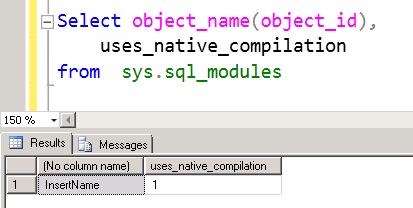
A new column uses_native_compilation has been added to identify if it’s a natively compiled procedure. Same is true for sys.all_sql_modules as well. We already have a proc in the database.

Select object_name(object_id), 
    uses_native_compilation  
from  sys.sql_modules 

image


In next post, we would explore DMVs related to In-Memory OLTP.


  • Cheers,
  • Balmukund Lakhani
  • Twitter @blakhani
  • Author: SQL Server 2012 AlwaysOnPaperback, Kindle
  • Posted in A - Z Series, In Memory OLTP, In-Memory OLTP, SQL Server 2014 | Tagged: , , , , , , , , , , , , | Leave a Comment »

    A-Z of In-Memory OLTP : Performance Monitor Counters

    Posted by blakhani on February 13, 2014


    Have you ever had a chance to see how athletes train? The coach is constantly watching the stopwatch while the athletes make multiple runs. The stopwatch is used to check the performance of students as they perform the run. In a similar way, SQL Server In-Memory OLTP performance can be monitored using Performance Monitor (PerfMon). In this blog we will discuss about some of the performance counters we can use to monitor various parameters of In-Memory OLTP.

    We must call out a difference between the way In-Memory OLTP counters (also known as XTP) vs. traditional counters are laid out in perfmon. If we look at earlier performance counters, the object is Instance specific and under that we have counter (Refer Image#1)

    image
    Image#1 Layout of Traditional SQL Counters

    On the other hand, for XTP the counter objects are listed first and under that we have instance names listed. (Refer Image#2)

    image
    Image#2 Layout of XTP related SQL Counters

    On my machine I only have one default instance and that’s why we see only MSSQLSERVER under “Instance of selected object”. In CTP2, we can see below performance monitor objects.

    XTP Cursors
    XTP Garbage Collection
    XTP Phantom Processor
    XTP Transaction Log
    XTP Transactions

    The list of various counters can be achieved using below SQL Server query.

    SELECT * 
    FROM sys.dm_os_performance_counters 
    WHERE object_name LIKE '%xtp%'
    

    image
    Image#3 SQL query to get list of XTP related SQL Counters

    The meaning of various counters is available on books online.

    To demonstrate one of the theory which we learned earlier, we would use “XTP Transaction Log” counter for demo. In this blog about transaction logging concepts, we read “Transaction log records are written only if the transaction on in-memory table is committed. This would mean that no UNDO information would be logged“.

    Here is the information about counters under “XTP Transaction Log” taken from book online

    Counter

    Description

    Log bytes written/sec

    The number of bytes written to the SQL Server transaction log by the XTP engine (on average), per second.

    Log records written/sec

    The number of records written to the SQL Server transaction log by the XTP engine (on average), per second.


    Here is the script which we can run and capture perform at the same time.

    Select Getdate() AS 'begin of Transaction 1'
    INSERT INTO [dbo].[MyFirstMemporyOptimizedTable]
        ([iID],[vFName],[vSite])
         VALUES
        (1,'Balmukund','SQLServer-Help.com')
    Select Getdate() AS 'End of Transaction 1'
    
    BEGIN TRAN
    Select Getdate()  AS 'begin of Transaction 2'
    INSERT INTO [dbo].[MyFirstMemporyOptimizedTable]
        ([iID],[vFName],[vSite])
         VALUES
        (2,'Balmukund','SQLServer-Help.com')
    -- Wait for 10 second
    waitfor delay '00:00:10'
    COMMIT TRAN
    Select Getdate()  AS 'commit of Transaction 2'
    
    BEGIN TRAN
    Select Getdate() AS 'begin of Transaction 3'
    INSERT INTO [dbo].[MyFirstMemporyOptimizedTable]
        ([iID],[vFName],[vSite])
         VALUES
        (3,'Balmukund','SQLServer-Help.com')
    -- Wait for 10 second
    waitfor delay '00:00:10'
    ROLLBACK TRAN
    Select Getdate() AS 'rollback of Transaction 3'


    Here is the output and perfmon data.

    image

    Image#4 perfmon counter and transaction

    Here are the conclusion we can make from the graph.

    • Logging is done at commit time of transaction. We introduced 10 second delay in our script and due to that second spike appears.
    • For uncommitted/rollback of transaction nothing is logged in transaction log.  

    Stay tune for learning more on Hekaton / In-Memory OLTP.

  • Cheers,
  • Balmukund Lakhani
  • Twitter @blakhani
  • Author: SQL Server 2012 AlwaysOnPaperback, Kindle
  • Posted in A - Z Series, In Memory OLTP, In-Memory OLTP, SQL Server 2014 | Tagged: , , , , , , , , , , , , , , , | Leave a Comment »

    A-Z of In-Memory OLTP : Garbage Collection (Part 2)

    Posted by blakhani on February 11, 2014


    In the previous blog of A-Z Series, we started learning about garbage collection; we have learned theory about garbage collection of stale rows in SQL Server In-Memory OLTP tables. If you have not read that, I would like you to start from part 1. There are below DMVs available to check the work done by garbage collection system.

    • sys.dm_xtp_gc_stats
    • sys.dm_xtp_gc_queue_stats
    • sys.dm_db_xtp_gc_cycle_stats – Database Level

    Before we move any forward, there is another important concept which would help in reading DMV data which is called as “generation”. We can think of generation as queue. There are 16 queues (generations) available in SQL Server 2014 CTP2. Generation queue holds the transaction which have generated versions. As per Kalen’s whitepaper, this number (16) can be changed later. The details of generation queue can be seen by DMV sys.dm_db_xtp_gc_cycle_stats. We would also see another queue which is equal to number of schedulers/cores on the machine. This GC worker queue contains the actual work which is queued by garbage collection process and statistics can be seen by DMV sys.dm_xtp_gc_queue_stats.

    On periodic basis, the transactions which have generated version is moved to the generation queue. GC threads picks up transaction from generation queues and keep them in GC worker queue. The frequency of checking completed transaction is 1 minute, which can be more aggressive if more transactions are waiting to be processed. Once the work is queued, the user threads can co-operate with main GC thread and clean the garbage which is kept in worker queue.

    Let’s see this in action. For demo purpose, I have created a wide-column table with around 30K rows. Here is the script which can be used.

    -- Create database with IMO Filegroup, If exists drop it.
    Use Master
    go
    If db_id('SQLSeverHelp_IMO') is NOT NULL
    drop database SQLSeverHelp_IMO
    GO
    CREATE DATABASE SQLSeverHelp_IMO 
        ON PRIMARY (
        NAME = [SQLSeverHelp_IMO_data]
        ,FILENAME = 'C:\IMO_Database\SQLSeverHelp_IMO.mdf'
        )
        
        ,FILEGROUP [SQLSeverHelp_IMO_FG] CONTAINS MEMORY_OPTIMIZED_DATA ( 
        NAME = [SQLSeverHelp_IMO_dir]
        ,FILENAME = 'C:\IMO_Database\SQLSeverHelp_IMO_dir'
        ) 
        
        LOG ON (
        NAME = [SQLSeverHelp_IMO_log]
        ,Filename = 'C:\IMO_Database\SQLSeverHelp_IMO_log.ldf'
        ) 
        COLLATE Latin1_General_100_BIN2 
    GO
    
    
    -- Create table in database
    -- use the database which is already created
    Use SQLSeverHelp_IMO
    GO
    CREATE TABLE MyFirstMemporyOptimizedTable
    (
    iID INT NOT NULL,
    vFName CHAR(900) NOT NULL,
    vSite CHAR(7000) NOT NULL,
    CONSTRAINT imo_pk_iID primary key NONCLUSTERED HASH (iID) WITH (BUCKET_COUNT = 1048576),
    index imo_idx_vFname  NONCLUSTERED HASH (vFName) WITH (BUCKET_COUNT = 8)
    ) WITH (MEMORY_OPTIMIZED = ON, DURABILITY = SCHEMA_AND_DATA)
    GO
    
    
    Use SQLSeverHelp_IMO 
    GO
    CREATE PROCEDURE [dbo].[InsertName] 
      WITH 
        NATIVE_COMPILATION, 
        SCHEMABINDING, 
        EXECUTE AS OWNER
    AS 
    BEGIN ATOMIC 
      WITH 
    (TRANSACTION ISOLATION LEVEL = SNAPSHOT,
     LANGUAGE = 'us_english')
     
    DECLARE @counter INT 
    SET @counter = 1
    
    WHILE @counter <= 30000
      BEGIN 
          INSERT INTO dbo.MyFirstMemporyOptimizedTable 
          VALUES      (@counter, 
                       'SQLServer-Help.com', 
                       'Balmukund Lakhani');
          INSERT INTO dbo.MyFirstMemporyOptimizedTable 
          VALUES      (@counter + 1, 
                       'ExtremeExperts.com', 
                       'Vinod Kumar M');
          INSERT INTO dbo.MyFirstMemporyOptimizedTable 
          VALUES      (@counter + 2, 
                       'SQLAuthority.Com', 
                       'Pinal Dave') 
    
          SET @counter = @counter + 3 
      END
    END
    GO
    
    exec InsertName
    go


    After creating the objects and pumping the data, I have recycled SQL Services to clear the data in DMVs. It’s worth mentioning that this should not be done with production server. Post restart, I waited for some time so that sys.dm_db_xtp_gc_cycle_stats has some rows. Recall that GC thread starts at approximately 1 min. I have not done any transaction and that’s why “base_generation” stays as 1. We can also see 16 generations as column in each row.

    USE    SQLSeverHelp_IMO
    go
    select    * 
    from    sys.dm_db_xtp_gc_cycle_stats
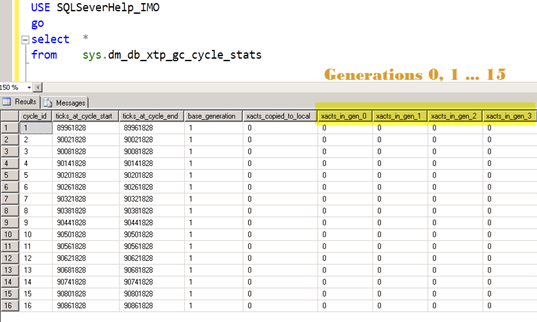
    image

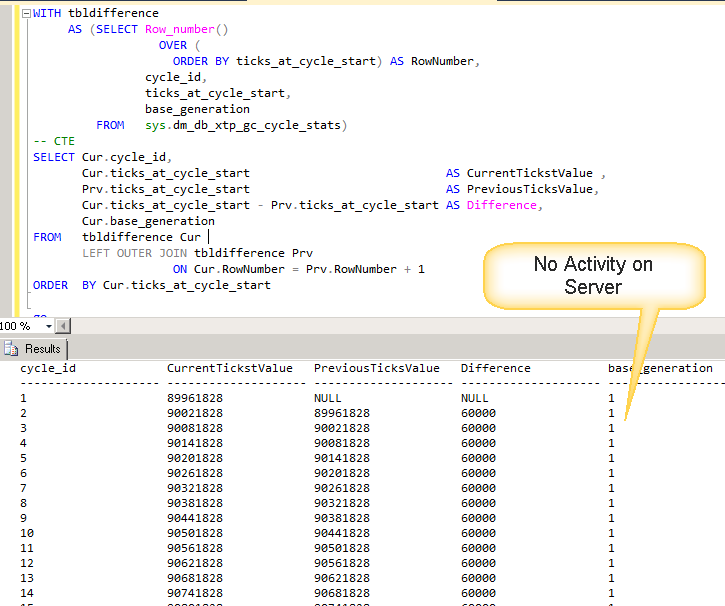
    Each row corresponds to one cycle when GC has scanned committed transactions. If we try to see the difference between start of two rows, its 60000 ticks which is 60 seconds. I have used CTE in below query to find the same.
    WITH tbldifference 
         AS (SELECT Row_number() 
                      OVER ( 
                        ORDER BY ticks_at_cycle_start) AS RowNumber, 
                    cycle_id, 
                    ticks_at_cycle_start, 
                    base_generation 
             FROM   sys.dm_db_xtp_gc_cycle_stats)
    -- CTE 
    SELECT Cur.cycle_id, 
           Cur.ticks_at_cycle_start                            AS CurrentTickstValue , 
           Prv.ticks_at_cycle_start                            AS PreviousTicksValue, 
           Cur.ticks_at_cycle_start - Prv.ticks_at_cycle_start AS Difference, 
           Cur.base_generation 
    FROM   tbldifference Cur 
           LEFT OUTER JOIN tbldifference Prv 
                        ON Cur.RowNumber = Prv.RowNumber + 1 
    ORDER  BY Cur.ticks_at_cycle_start  
     
    image
     
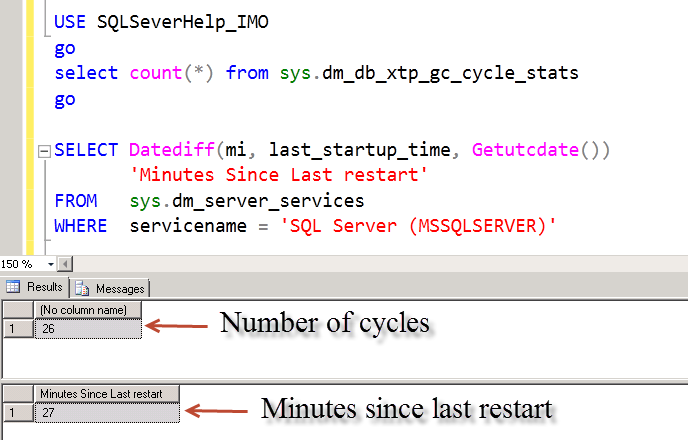
    If we check server startup time in minutes and number of cycles, they would be same.
    USE SQLSeverHelp_IMO
    go
    select count(*) from sys.dm_db_xtp_gc_cycle_stats
    go
    
    SELECT Datediff(mi, last_startup_time, Getutcdate()) 
           'Minutes Since Last restart' 
    FROM   sys.dm_server_services 
    WHERE  servicename = 'SQL Server (MSSQLSERVER)' 
    
     
    image
     
    Based on above, its clear that cycle is running every minute. We have not performed any update or delete to generate stale rows so far. Here is the memory used by table. Query available here.
    image
     
    Now, let’s generate garbage rows and check the DMVs again. We are going to delete 1000 rows.
     
    DECLARE @i INT 
    SET @i = 1 
    WHILE ( @i <= 1000 ) 
      BEGIN 
          DELETE FROM MyFirstMemporyOptimizedTable 
          WHERE  vFName = 'SQLServer-Help.com' 
                 AND iID <= @i * 3 
          SET @i = @i + 1 
      END   


    As soon as rows are deleted, we would start seeing activity on garbage collection. If we can same query to find cycles again, here is the output
     

    cycle_id             CurrentTickstValue   PreviousTicksValue   Difference           base_generation

    ——————– ——————– ——————– ——————– ——————–

    …. Truncated for clarity….

    41                   92361828             92301828             60000                1

    42                   92421828             92361828             60000                1

    43                   92481828             92421828             60000                1

    44                   92504781             92481828             22953                1

    45                   92564781             92504781             60000                993

    46                   92565281             92564781             500                  993

    47                   92625281             92565281             60000                993

    48                   92685281             92625281             60000                993

    49                   92745281             92685281             60000                993

    50                   92805281             92745281             60000                993

    (50 row(s) affected)

     
    As we can see above that cycle have become more aggressive (less than 60 seconds) as we did a lot of transaction. Also notice that base generation moves in multiple of 16 (explained earlier) 993-1 = 992 = 62*16. I have to do minimum 16 transactions to increase the base generation.
     
    Now, let’s look at output of DMV sys.dm_xtp_gc_queue_stats
     
    image
    We can see that work was enqueued, got dequeued and current_queue_length is zero. This means there is no garbage data in the queue. Let’s check memory usage of table.
    image
    This means garbage collection has done it’s work and free’ed up memory used by table as unused memory has increased.
     
    We would continue to explore more on garbage collection in next blog as well.
     
     
  • Cheers,
  • Balmukund Lakhani
  • Twitter @blakhani
  • Author: SQL Server 2012 AlwaysOnPaperback, Kindle
  • Posted in A - Z Series, In Memory OLTP, In-Memory OLTP, SQL Server 2014 | Tagged: , , , , , , , , , , , | Leave a Comment »