Help: SQL Server

Sharing my knowlege about SQL Server Troubleshooting Skills

  • Blog Stats

    • 2,153,618 hits
  • Select GETDATE()

    December 2025
    M T W T F S S
    1234567
    891011121314
    15161718192021
    22232425262728
    293031  

Archive for the ‘In Memory OLTP’ Category

A-Z of In-Memory OLTP : How In-Memory Table is made durable – Transaction Logging Concepts

Posted by blakhani on December 26, 2013


If you ever visit a bank and do some financial transaction, you would notice that bank employee would note the information about the transaction in some format (paper based or electronic based). In the same way for SQL Server logging of transaction is needed. Hence, transaction log (also known as T-Log) file is an integral part of database. For the RDBMS to be durable, logging of transaction is done before making any modification. If an in-memory table is defined as “durable” then logging has to be done for the table. The logging of transaction is done differently for in-memory tables and that’s why I am dedicating a blog post only on this topic in A-Z Series.

There are few major differences between transaction logging of disk based tables versus in-memory tables. I would list them out here:

  • Multiple changes in table are merged into single log record.
  • Log records are not generated for any modification of Index. The index on the table is rebuild during startup of the database.
  • Transaction log records are written only if the transaction on in-memory table is committed. This would mean that no UNDO information would be logged.

Due to all above, the amount of information logged into transaction log is less and also efficient as compared to disk based tables. This makes in-memory OLTP scalable and high performance engine.

Let’s understand each point by demo(s).

Multiple changes in table are merged into single log record

To check this behavior, we could create two identical tables – Disk based and In-Memory table. Here is the script which can be used. This is the same script which you might have seen earlier in this blog.
-- Create database with IMO Filegroup, If exists drop it.
Use Master
go
If db_id('SQLSeverHelp_IMO') is NOT NULL
drop database SQLSeverHelp_IMO
GO
CREATE DATABASE SQLSeverHelp_IMO 
    ON PRIMARY (
    NAME = [SQLSeverHelp_IMO_data]
    ,FILENAME = 'C:\IMO_Database\SQLSeverHelp_IMO.mdf'
    )
    
    ,FILEGROUP [SQLSeverHelp_IMO_FG] CONTAINS MEMORY_OPTIMIZED_DATA ( 
    NAME = [SQLSeverHelp_IMO_dir]
    ,FILENAME = 'C:\IMO_Database\SQLSeverHelp_IMO_dir'
    ) 
    
    LOG ON (
    NAME = [SQLSeverHelp_IMO_log]
    ,Filename = 'C:\IMO_Database\SQLSeverHelp_IMO_log.ldf'
    ,SIZE = 102400KB 
    ) 
GO


-- Create table in database

-- Normal (disk based) table
Use SQLSeverHelp_IMO 
go
CREATE TABLE DiskBasedTable
(
iID INT NOT NULL PRIMARY KEY NONCLUSTERED,
vFName CHAR(20) NOT NULL,
vLName CHAR(20) NOT NULL
)
GO

-- In-Memory table
Use SQLSeverHelp_IMO
GO
CREATE TABLE MyFirstMemporyOptimizedTable
(
iID INT NOT NULL PRIMARY KEY NONCLUSTERED HASH WITH (BUCKET_COUNT = 100000),
vFName CHAR(20) NOT NULL,
vLName CHAR(20) NOT NULL
) WITH (MEMORY_OPTIMIZED = ON, DURABILITY = SCHEMA_AND_DATA)
GO

Now, I am going to insert 100 rows in Disk based table.

-- Insert into Disk Based Table
begin tran
DECLARE @counter INT 
SET @counter = 1 
WHILE @counter <= 100
  BEGIN 
      INSERT INTO DiskBasedTable 
      VALUES      (@counter, 'SQLServer-Help.com','Balmukund Lakhani')
      SET @counter = @counter + 1 
  END
 commit tran

Let’s examine the transaction log by well-known, undocumented (and unsupported command) fn_dblog

SELECT *
FROM sys.fn_dblog(NULL, NULL)
WHERE PartitionId IN (
        SELECT partition_id
        FROM sys.partitions
        WHERE object_id = object_id('DiskBasedTable')
        )
ORDER BY [Current LSN] ASC;
GO

As shown below, we can see 200 rows for our table (DiskBasedTable). LOP_INSERT_ROWS operation is logged for HEAP and INDEX. Since we have inserted 100 rows, it has caused 200 log records i.e. two per row. In Operation column – LOP stands for logical operation.

image

-- Total size of ALL Log Records 
SELECT sum([Log Record Length])
FROM sys.fn_dblog(NULL, NULL)
WHERE PartitionId IN (
        SELECT partition_id
        FROM sys.partitions
        WHERE object_id = object_id('DiskBasedTable')
        )

Above query shows output as 26000= ~25 KB. Now, we will do the same insert operation for in-memory table (MyFirstMemporyOptimizedTable) and look at log records.

begin tran
DECLARE @counter INT 
SET @counter = 1
WHILE @counter <= 100
  BEGIN 
      INSERT INTO MyFirstMemporyOptimizedTable
      VALUES      (@counter, 'SQLServer-Help.com','Balmukund Lakhani')
      SET @counter = @counter + 1 
  END
 commit tran
Let’s examine log records for this operation. I am showing only top 3 records which are relevant for our discussion.
SELECT *
FROM sys.fn_dblog(NULL, NULL)
ORDER BY [Current LSN] ASC
GO
 
image

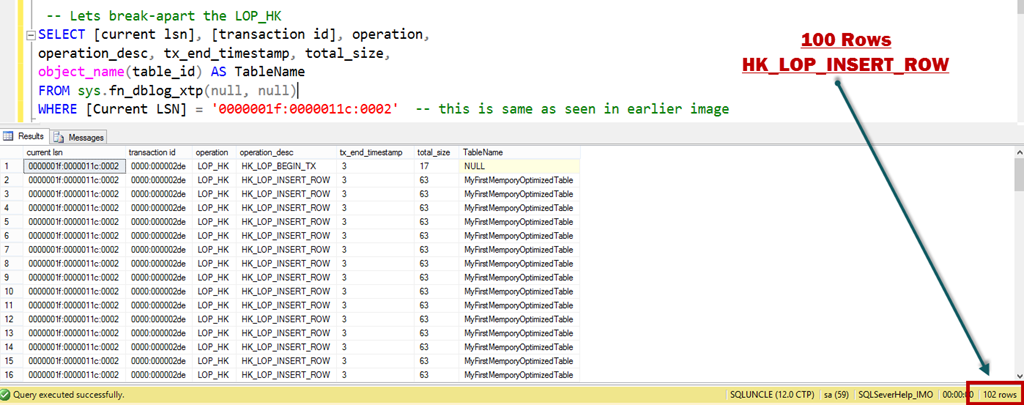
As we can see above that we have total three log records for 100 rows inserted. Have a look at length of the LOP_HK log record, its ~6 KB. We can use another undocumented function fn_dblog_xtp to crack-open that record. HK in the operation column is the artifact of feature’s code name Hekaton.

 -- Lets break-apart the LOP_HK
SELECT [current lsn], [transaction id], operation,
operation_desc, tx_end_timestamp, total_size,
object_name(table_id) AS TableName
FROM sys.fn_dblog_xtp(null, null)
WHERE [Current LSN] = '0000001f:0000011c:0002'  -- this is same as seen in earlier image

Here is the output in SSMS:
image

Top and bottom (Row # 1 and Row # 102) rows are HK_LOP_BEGIN_TX and HK_LOP_COMMIT_TX. HK_LOP_INSERT_ROW is seen 100 times. Above proves the concept that amount of data logged for in-memory table is lesser as compared to disk-based tables.

Log records are not generated for any modification of Index

In last screenshot, we can see that we don’t have any log records which contains information about index modification as oppose to disk-based table where we saw LCK_INDEX_LEAF.

Transaction log records are written only if the transaction on in-memory table is committed

For In-Memory OLTP transactions, log records are generated only at commit time. As oppose to disk-based table, in-memory OLTP doesn’t follow write-ahead logging (WAL) protocol. Not using WAL protocol makes it highly efficient. To prove this point, we would create a transaction and roll it back. We would again use fn_dblog and count the number of rows.

Select count(*) from fn_dblog(null, null)
go
-- 1406 Rows
begin tran
update DiskBasedTable 
set vFName =
'ExtremeExperts.com' where iID = 10 rollback tran go Select count(*) from fn_dblog(null, null) go Select * from fn_dblog(null, null) order by [Current LSN] desc

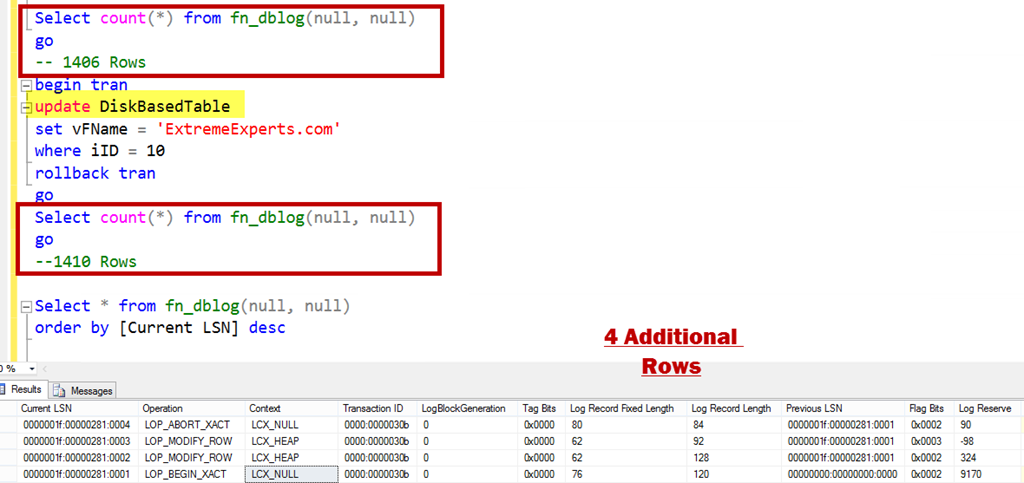
Below is an update which was rolled back and it has generated 4 log records.
image

LOP_BEGIN_XACT stands for begin transaction and LOP_ABORT_XACT stands for rollback/abort of transaction. Now, let’s do the same operation for in-memory table.
Select count(*) from fn_dblog(null, null)
go
-- 1410 Rows
begin tran
update MyFirstMemporyOptimizedTable WITH (SNAPSHOT)
set vFName = 'ExtremeExperts.com'
where iID = 10
rollback tran
go
Select count(*) from fn_dblog(null, null)
go
--1410 Rows
image

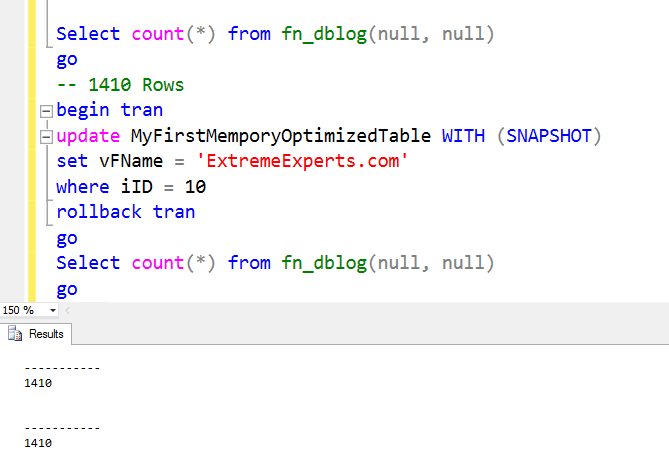
Before and after rows in transaction log file is same (i.e. 1410) which means no additional rows are generated for a uncommitted transaction, if it’s done for in-memory table.

I hope that now you are clear about the difference in logging. In summary, we can say that logging of transaction on in-memory table is much more efficient as compare to disk based table transactions logging. Stay tuned for more on Hekaton.

  • Cheers,
  • Balmukund Lakhani
  • Twitter @blakhani
  • Author: SQL Server 2012 AlwaysOnPaperback, Kindle
  • Posted in A - Z Series, In Memory OLTP, In-Memory OLTP, SQL Server 2014 | Tagged: , , , , , , , , | 13 Comments »

    A-Z of In-Memory OLTP : Checkpoint – Part 2

    Posted by blakhani on December 24, 2013


    If you are reading this post before part 1, I would like you to read part 1 so that you have context of what you are reading. In part 1, we have seen demo and usage of DATA files. In this blog I am going to talk about DELTA files.

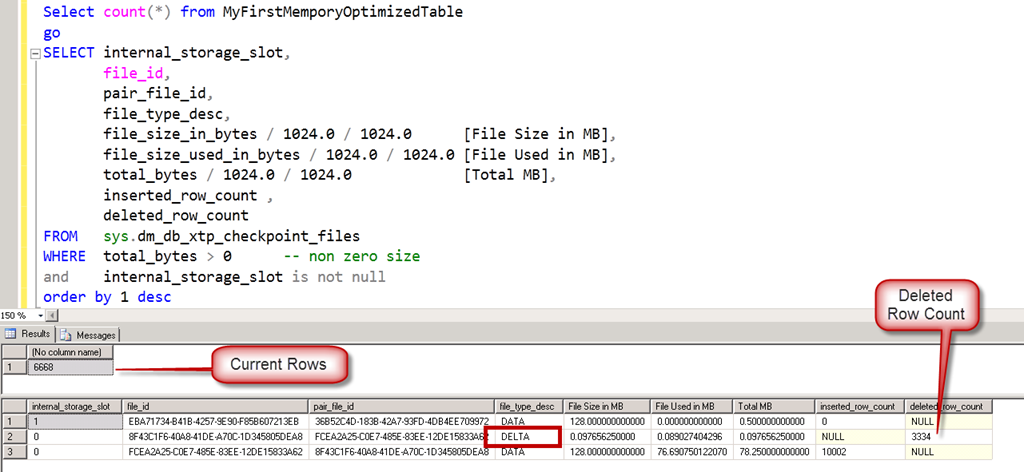
    As we saw earlier each DELTA file is paired with DATA file. I must call out that DATA and DELTA files are not related to a single table but they cover a transaction range (In fact, this was a question asked by one of the reader, Manoj (Blog) in my last post). In in-memory world, when a record is deleted from the table, it’s not removed from the DATA file but a identifier is inserted in DELTA file. This would tell SQL Server that during loading of the data (startup of database), don’t load this particular row in memory as it’s deleted. Now, imagine a situation when we are doing an update to a row.

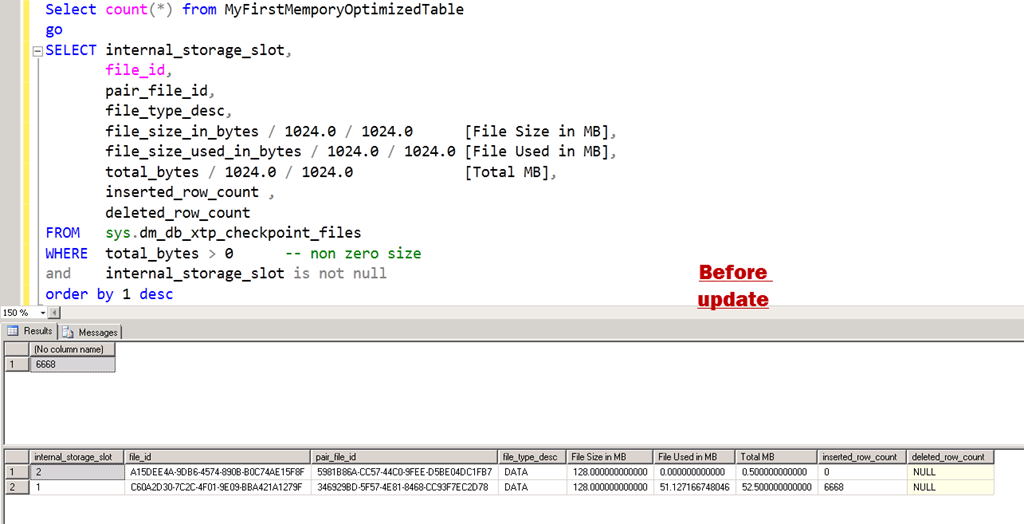
    Let’s see this theory in action. I have used same script to populate the data and here is the position where we left in last blog. Here is the query

    Select count(*) from MyFirstMemporyOptimizedTable
    go
    SELECT internal_storage_slot,
           file_id, 
           pair_file_id,    
           file_type_desc,
           file_size_in_bytes / 1024.0 / 1024.0      [File Size in MB], 
           file_size_used_in_bytes / 1024.0 / 1024.0 [File Used in MB], 
           total_bytes / 1024.0 / 1024.0             [Total MB], 
           inserted_row_count ,
           deleted_row_count
    FROM   sys.dm_db_xtp_checkpoint_files 
    WHERE  total_bytes > 0        -- non zero size
    and       internal_storage_slot is not null 
    order by 1 desc


    image

    Now, I am going to delete one third of the rows and make sure to fire a manual checkpoint.

    Delete from MyFirstMemporyOptimizedTable
    where iID%3 = 0
    go
    checkpoint
    go
    
    ----------------------
    (3334 row(s) affected)

    If we run the old query again.

    image

    Here comes the DELTA files. Note that the internal_slot_id is zero for one pair and one for new DATA file.  After sometime, if we run the exact same query again, we would see a different output.

    image

    If we look at the file_id, its changed from the previous screenshot. It sounds like a checkpoint has fired by itself and has removed the reference of DELTA file. Current DATA file shows 6668 rows which is exact rows in table. There is no need of DELTA file here.

    Now, I am going to fire an update statement and modify all the rows and see the effect.

    update MyFirstMemporyOptimizedTable
    set vFName = 'www.ExtremeExperts.com'
    where vFName = 'ExtremeExperts.com'
    go
    checkpoint
    go


    ——————

    (3334 row(s) affected)

    image

    image

    This matches with the theory that UPDATE is split into DELETE and INSERT. We Updated 3334 rows, which caused append of 3334 rows into DELTA file and append of 3334 rows to DATA file.

    In above, “after update” we can see three DATA files and one DELTA file. Let’s fire one more query to understand the transaction range. Here is the query

    SELECT internal_storage_slot,
           file_id, 
           pair_file_id,    
           file_type_desc,
           inserted_row_count ,
           deleted_row_count,
           transaction_id_lower_bound,
           transaction_id_upper_bound
    FROM   sys.dm_db_xtp_checkpoint_files 
    WHERE  total_bytes > 0        -- non zero size
    and       internal_storage_slot is not null 
    order by 1 desc


    image

    Each internal_storage_slot is for a range of transaction. Lower bound and upper bound are matching for consecutive slots.

    It is important to recall that writing (appending to be precise) to DELTA and DATA file is NOT done by any user transaction but background checkpoint thread. In our tests we are firing manual checkpoint to see the immediate effect to learn which would not be the case in production server. The background thread, scans the log buffers (and if needed, transaction log file) to append to those files. As per Hekaton Whitepaper by Kalen, below are the steps done by checkpoint.

    1. All buffered writes are flushed to the data and delta files.

    2. A checkpoint inventory is constructed that includes descriptors for all files from the previous checkpoint plus any files added by the current checkpoint. The inventory is hardened to the transaction log.

    3. The location of the inventory is stored in the transaction log so that it is available at recovery time.

    Till, I wrote last few lines, another system process happened and here is the final output.

    image

    We would discuss about merge process in later part of the series.

    Hope you have already downloaded SQL Server 2014 CTP2 and learning In-Memory OLTP (a.k.a. Hekaton) with me. If you haven’t yet, be sure to check out the SQL Server 2014 CTP2 so that you can follow this series and get your hands dirty.

  • Cheers,
  • Balmukund Lakhani
  • Twitter @blakhani
  • Author: SQL Server 2012 AlwaysOnPaperback, Kindle
  • Posted in A - Z Series, Hekaton Series, In Memory OLTP, In-Memory OLTP, SQL Server 2014 | Tagged: , , , , , , , , | 3 Comments »

    A-Z of In-Memory OLTP : Checkpoint – Part 1

    Posted by blakhani on December 19, 2013


    In today’s advance world, RAM is still volatile. Once you pull the power plug out, all the content of RAM is flushed. Since we are talking about in-memory tables, what would happen to data in tables? If we have defined a table as durable (SCHEMA_AND_DATA) in SQL Server, durability has to be maintained. During recovery of the database (also known as crash recovery), all the content should come back. To achieve this, SQL Server does logging into transaction log and writes checkpoint for in-memory tables.

    If you are a SQL Server DBA and worked with earlier versions of SQL, checkpoint is definitely known to you. You can read more about earlier version of checkpoint in books online. In short, checkpoint is a process which writes dirty pages from memory to data file. This is done to reduce the recovery time of the database during crash recovery. Checkpoint can be done by system thread based on recovery interval or triggered on demand when system is low on memory, or other operations such as log backup etc.

    “Similar” concept of checkpoint exists for In-Memory tables as well. I quoted similar because mechanism is different than the known checkpoint process for disk-based tables. To maintain durability of data for in-memory tables, SQL Server does logging of changes in transaction log (which is also different than disk based tables) and writes information during checkpoint. In this blog, we would try to understand the various things which happens during checkpoint. We should remember that transaction logging is sufficient to recover the data but if there is no checkpoint then we need to read complete transaction log during crash recovery, which would be inefficient. So, periodically checkpoint is fired and data is dumped into checkpoint files. Now, during recovery, we recover from checkpoint and replay only that portion of transaction log which is after checkpoint.

    Checkpoint files are created into filegroup MEMORY_OPTIMIZED_DATA which is container for these files. During checkpoint, we try to use log buffer in memory to write information into checkpoint files. There are chances that log buffer is not having sufficient log blocks and then we would end-up in reading transaction log file. SQL Server uses FILESTREAM as underlying storage mechanism for checkpoint files. The checkpoint information is written into the disk by checkpoint streams, which comes in two flavors:

    • DATA streams:
      • These file are approximately 128 MB in size.
      • They contain only inserted rows of the table in the given timestamp range.
    • DELTA streams:
      • These are paired (1:1) with DATA files.
      • Size of these file is not constant.
      • Store the deleted rows with IDs.

    Note that both files are “append only” files which means the IO would always be sequential. As soon as table is created, DATA files are pre-allocated with 128 MB size. DATA and DELTA files form a pair for a timestamp range. Once current DATA file becomes full, SQL Server would switch to new DATA file.

    Enough of theory? Let’s see a checkpoint in action.

    For demo purpose, I am creating table in the database which is having wide row. Here is the complete script.

    -- Create database having container C:\IMO_Database\SQLSeverHelp_IMO_dir
    CREATE DATABASE SQLSeverHelp_IMO 
        ON PRIMARY (
        NAME = [SQLSeverHelp_IMO_data]
        ,FILENAME = 'C:\IMO_Database\SQLSeverHelp_IMO.mdf'
        )
        
        ,FILEGROUP [SQLSeverHelp_IMO_FG] CONTAINS MEMORY_OPTIMIZED_DATA ( 
        NAME = [SQLSeverHelp_IMO_dir]
        ,FILENAME = 'C:\IMO_Database\SQLSeverHelp_IMO_dir'
        ) 
        
        LOG ON (
        NAME = [SQLSeverHelp_IMO_log]
        ,Filename = 'C:\IMO_Database\SQLSeverHelp_IMO_log.ldf'
        ) 
    GO
    
    
    -- Create In-Memory table
    Use SQLSeverHelp_IMO
    GO
    CREATE TABLE MyFirstMemporyOptimizedTable
    (
    iID INT NOT NULL PRIMARY KEY NONCLUSTERED HASH WITH (BUCKET_COUNT = 100000),
    vFName CHAR(4000) NOT NULL,
    vLName CHAR(4000) NOT NULL
    ) WITH (MEMORY_OPTIMIZED = ON, DURABILITY = SCHEMA_AND_DATA)
    GO

    As soon as table is created, we would see DATA and DELTA file in the container. We can use DMV sys.dm_db_xtp_checkpoint_files to see the information. Let’s first run a very basic query to understand the files.

    SELECT file_id, 
           pair_file_id, 
           file_type_desc, 
           is_active 
    FROM   sys.dm_db_xtp_checkpoint_files 
    ORDER  BY is_active DESC;   


    Here is the output with some highlights. I have put the same color for the matching file_id with pair_file_id column for clarity.

    image

    As we can see in output, DATA and DELTA files are having pair. I have highlighted only two pairs but if you look carefully, all files are paired. Note that the number of files created is a function of number of CPU cores on the system. My machine has 8 logical CPU so I am seeing 9 pairs. Is_Active column represents whether the files is currently in use or not. Another way to find out paired files is to use column called internal_storage_slot. Only those files which are having not null slot would be used by checkpoint.

    SELECT internal_storage_slot,
           file_id, 
           pair_file_id,    
           file_type_desc
    FROM   sys.dm_db_xtp_checkpoint_files 
    WHERE  internal_storage_slot is NOT NULL

    Here is the output. Two files having same slot form a pair of DATA-DELTA (slot 3 in below screenshot).

    image

    Here is how the physical files on operating system look like:

    image

    Now, you may ask – how would I associate the file in the OS with the file_id and pair_file_Id column in sys.dm_db_xtp_checkpoint_files? Let’s use other columns of DMV to explore that information.

    image

    I have tried to make the picture self-explanatory. Highlight with the same color are the matching texts.

    Now, lets try and check what happens when we insert some rows in the table. As we discussed earlier, DATA file would contain the rows which are inserted and DELTA file would have entries of deleted rows. I have used below script to load ~10K rows into the table.

    DECLARE @counter INT 
    SET @counter = 0 
    WHILE @counter <= 10000 
      BEGIN 
          INSERT INTO myfirstmemporyoptimizedtable 
          VALUES      (@counter, 
                       'SQLServer-Help.com', 
                       'Balmukund Lakhani'), 
                      (@counter + 1, 
                       'ExtremeExperts.com', 
                       'Vinod Kumar M'), 
                      (@counter + 2, 
                       'SQLAuthority.com', 
                       'Pinal Dave') 
    
          SET @counter = @counter + 3 
      END

    Now, Let’s go ahead and query the DMV again to see if we have something interesting! But Wait! We don’t know if checkpoint has automatically fired or not. So before running the query, I fired manual checkpoint via “CHECKPOINT” command in management studio.

    SELECT internal_storage_slot,
           file_id, 
           pair_file_id,    
           file_type_desc,
           file_size_in_bytes / 1024.0 / 1024.0      [File Size in MB], 
           file_size_used_in_bytes / 1024.0 / 1024.0 [File Used in MB], 
           total_bytes / 1024.0 / 1024.0             [Total MB], 
           inserted_row_count 
     FROM   sys.dm_db_xtp_checkpoint_files 
     WHERE  total_bytes > 0        -- non zero size
     and       internal_storage_slot is not null 

    As we can see that at this point only one DATA file is having non-zero size and number of rows shown are 10002, which were inserted earlier.

    image

    As we insert more and more rows, data would be accumulated in DATA file and once its full, next file would be opened used and current file becomes read-only. Please remember that 128 MB is NOT the limit of the checkpoint DATA file. A transaction can’t span across two DATA files, so a bigger transaction could cause a file to go beyond 128 MB size. For demo purposes, instead of 10K rows, I have inserted ~40K rows in one transaction.

    image 

    If you are wondering why we are not seeing any DELTA file in any of the query output then recall that DELTA file would contain the DELETEed rows identifier and so far I have been doing only INSERTs. To give you some time to grasp information in this blog, I would stop here and we would discuss other aspects of checkpoint in next blog for this A-Z series.

    In case you have any question, post them in comment section and I would be happy to answer them.

  • Cheers,
  • Balmukund Lakhani
  • Twitter @blakhani
  • Author: SQL Server 2012 AlwaysOnPaperback, Kindle
  • Posted in Hekaton Series, In Memory OLTP, In-Memory OLTP, SQL Server 2014 | Tagged: , , , , , , , , | 11 Comments »