Help: SQL Server

Sharing my knowlege about SQL Server Troubleshooting Skills

  • Blog Stats

    • 2,153,619 hits
  • Select GETDATE()

    December 2025
    M T W T F S S
    1234567
    891011121314
    15161718192021
    22232425262728
    293031  

Archive for the ‘In Memory OLTP’ Category

A-Z of In-Memory OLTP : Native Compilation

Posted by blakhani on December 17, 2013


Imagine that you are participating in a 400 meters running competition and you are the only one to get discount of 300 meters and allowed to start 100 meters before the finish line. What would be the result? All participants have to run 400 meters and you would run only 100 meters. Of course, You would win!!! (terms and condition apply). In the same way, what would happen in SQL world, if we finish a significant amount of work i.e. compilation of stored procedure during creation phase. Yes, you are correct. The time spent in execution of the stored procedure would be less. In this post we would try to learn internals of native compilation.

In earlier “T-SQL Constructs” post of this series, we have seen syntax of creation of natively compiled stored procedure. Native compilation of the stored procedure causes machine language code (i.e. DLL) to be generated and loaded in SQL Server Memory. Natively compiled stored procedures allows us to execute T-SQL in the fastest way, which includes accessing data in memory-optimized tables. In addition, disk-based tables are not allowed to be accessed at all inside natively compiled stored procedures. If we attempt to create a natively compiled procedure which accesses disk based table, we would get below error. In my test, the table name was DiskBasedTable.

Msg 10775, Level 16, State 1, Procedure InsertName, Line 14
Object ‘dbo.DiskBasedTable’ is not a memory optimized table and cannot be accessed from a natively compiled stored procedure.

The advantages of natively complies stored procedure is that most of the work (permission check, object existence check, query plan generation) is done during compilation/creation of stored procedure. Due to this there are many limitations on the Transact-SQL that is allowed, the data types and collations that can be accessed and processed in natively compiled procedures. SQL Server Product Documentation team has done good amount of work in documenting them (refer Supported Data Types, Unsupported Transact-SQL Constructs)

To get a list of natively complied stored procedures we can use catalog views as shown below. Highlighted below is the new column added to support in-memory OLTP.

SELECT uses_native_compilation, 
       object_id, 
       Object_name(object_id) 
FROM   sys.sql_modules 
WHERE  uses_native_compilation = 1 
go 

SELECT uses_native_compilation, 
       object_id, 
       Object_name(object_id) 
FROM   sys.all_sql_modules 
WHERE  uses_native_compilation = 1 
go


Here is the output in SSMS

image

To convert a stored procedure to DLL, SQL Server engine uses C compiler. Does this mean we need to have C installed on the machine when we install in-memory OLTP? Well, we just need to complie the C code so we just need compiler related files. SQL Server product comes with compiler files. As soon as SQL Engine is installed, these files are installed under <SQL Server Installation Directory>\MSSQL\Binn\Xtp folder. Main compilation files are located under ..\VC\bin folder.

image

Sometimes, we might face stored procedure creation failure due to issues in compilation of the C code. To make our life easier, SQL Server generates intermediate files and they are useful for troubleshooting by members of product support team. Here is the text of .out file.

Microsoft (R) C/C++ Optimizing Compiler Version 17.00.60605.1 for x64

Copyright (C) Microsoft Corporation.  All rights reserved.

xtp_p_8_581577110.c

Microsoft (R) Incremental Linker Version 11.00.60605.1

Copyright (C) Microsoft Corporation.  All rights reserved.

/out:xtp_p_8_581577110.dll

/ltcg

/debug

/dll

/implib:xtp_p_8_581577110.lib

"/LIBPATH:C:\Program Files\Microsoft SQL Server\MSSQL12.MSSQLSERVER\MSSQL\Binn\Xtp\gen\lib"

"/LIBPATH:C:\Program Files\Microsoft SQL Server\MSSQL12.MSSQLSERVER\MSSQL\Binn\Xtp\VC\lib"

/noentry

/nodefaultlib

/incremental:no

/ltcg

/wx

/FUNCTIONPADMIN

xtp_p_8_581577110.obj

hkgenlib.lib

hkruntime.lib

hkengine.lib

hkgenexp.exp

hkcrt.lib

hkk32.lib

hkversion.obj

Generating code

Finished generating code

If you are a C developer, it may be easy for you to understand the switches passed during calling of CL.exe. There is no real need for a DBA to know all these options. In case you are too excited, read here for the parameters.

Before I conclude, I would like you to throw ideas about below error, while creation of natively compiled stored procedure.

image

Here is the text of the message:

Msg 41312, Level 16, State 4, Procedure InsertName1, Line 2

Unable to call into the C compiler. GetLastError = 2.

Of course, I broke something and above is the error I am getting. Can you guess? Go ahead and comment on the post.

Stay Tuned for next part of the series.

Cheers,

Balmukund Lakhani

Twitter @blakhani

Author: SQL Server 2012 AlwaysOnPaperback, Kindle

Posted in A - Z Series, Hekaton Series, In Memory OLTP, In-Memory OLTP | Tagged: , , , , , , | 1 Comment »

A-Z of In-Memory OLTP : Behind the scenes

Posted by blakhani on December 12, 2013


If you have a kid in your life, you probably get inundated every day with questions starting with word “why” and “what”. Why do kids ask why? One of the answers is, that children are naturally curious about the world around them. After all, there’s much to learn, and much to know. We all have a kid inside us who is very curious, that’s why I thought of writing this blog post.

In A-Z Series, we have discussed about T-SQL constructs and SSMS enhancements to create In-Memory objects. In this part, we would discuss “behind the scene” of those commands.

CREATE DATABASE

Once database is created and one (and only one) filegroup with CONTAINS MEMORY_OPTIMIZED_DATA clause, SQL Server would create a folder which is specified in filename parameter for that filegroup. In our sample database SQLSeverHelp_IMO we have added filename = “C:\IMO_Database\SQLSeverHelp_IMO_dir” which would create a folder behind the scene as shown below.

image

If we look inside the folders, the would be empty because there is no in-memory table created so far. We also have MDF and LDF file which are same as earlier version of SQL, nothing new there. We can use catalog view to get details about Memory optimized filegroup

Use SQLSeverHelp_IMO
GO
Select * from sys.data_spaces
Here is the query in SSMS and the output:
image 

CREATE TABLE

Next logical step is to create a In-Memory table in the database. In our last post, we have created table called MyFirstMemporyOptimizedTable. As soon as table is created, SQL Server is going to create few files into the folder which were created during previous step of database creation.

image

Above files are created as soon as I created one table. Don’t worry by seeing so many files as we would discuss about these file later part of the series. All you need to remember that per file is 131072 KB = 128 MB by default. There are files having zero KB size as we have not inserted/updated/deleted any data in the table. In contrast to disk-based tables having 8K size pages in buffer pool, the In-memory tables don’t have pages in buffer pool. Think of this as rows in the memory linked to each other because we have index on table. In-memory data is not stored on data files at all. Instead, its stored as blob data using filestream files, which are shown in picture above. At this point just remember that they are called CheckPoint files which combination is DATA files and DELTA files. We would go deeper into those files once we go into blog about checkpoint for in-memory tables.

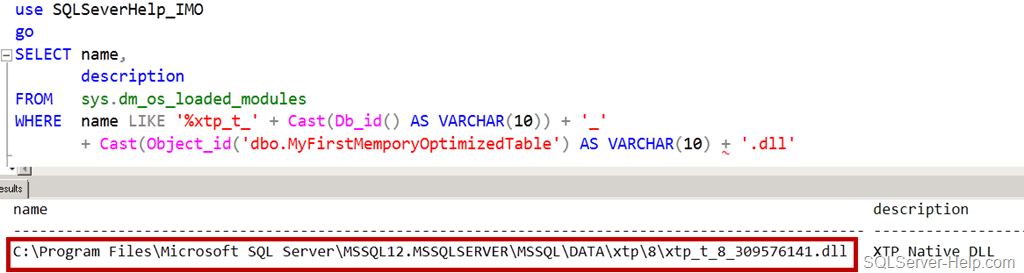
Another thing which has happened behind the scene is to generate the DLL for the table definition and load into SQL Server Memory. Why? Well, In-Memory engine doesn’t have any knowledge about format of data record. It doesn’t know how to access the data which is part of in-memory table. Whenever we create table, a C file is generated which would have all callback functions used by In-Memory Engine. The C file, it’s compiled by C complier and DLL is generated. If you are a developer in C/C++, you can open the file and check the content to get a feeling.

Here is the query

use SQLSeverHelp_IMO
go
SELECT name, 
       description 
FROM   sys.dm_os_loaded_modules 
WHERE  description = 'XTP Native DLL' 
       AND name LIKE '%xtp_t_' + Cast(Db_id() AS VARCHAR(10)) + '_' 
+ Cast(Object_id('dbo.MyFirstMemporyOptimizedTable') AS VARCHAR(10)) + '.dll'
Here is the query in SSMS and the output:

image

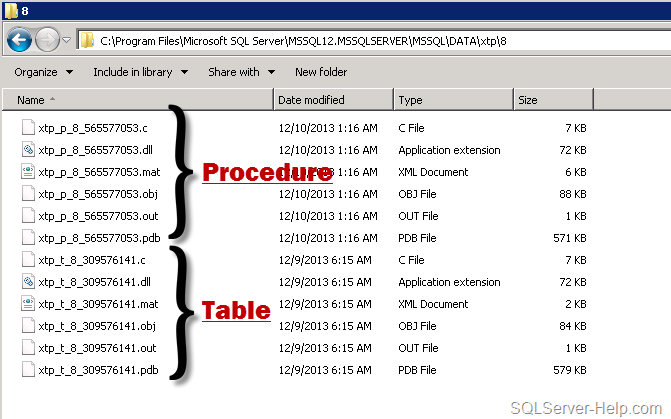
Let’s look at windows explorer and see what we have in that folder. If we look at xtp folder, we would see numbered folders. These are databases IDs which have in-memory objects. Default directory of XTP folder is DATA directory (C:\Program Files\Microsoft SQL Server\MSSQL12.MSSQLSERVER\MSSQL\DATA\). Do you remember what XTP stands for? Go back and read first post.

image

For database SQLSeverHelp_IMO the database_id is 8 (you may have different ID) so let’s go inside the folder 8 and check what we have got there.

image

If you go back and look at the query, which we executed earlier, its easy to understand that DLL (and other files) have name as xtp_t_<DB_ID>_<Object_ID> where t stands for table and rest is self explanatory. Each in-memory table will have one corresponding DLL generated which would be loaded in the memory at all times.The end goal of converting table definition to machine level instruction (using DLL) is to avoid compilation during execution phase. There is no need for a DBA to worry about backup of those files. They would be re-generated as soon as database is opened and recovered. Once SQL Server restarts, it performs recovery of database and table would be loaded into memory again.

CREATE PROCEDURE

Before moving any forward, remember that here we are talking about procedure which are natively compiled. In earlier post, we created stored procedure [InsertName]. During creation time of stored procedure, compiler will convert interpreted T-SQL, query plans and expressions into native code.

Here is the query

use SQLSeverHelp_IMO
go
SELECT name, 
       description 
FROM   sys.dm_os_loaded_modules 
WHERE  name LIKE '%xtp_p_' + Cast(Db_id() AS VARCHAR(10)) + '_'        
       + Cast(Object_id('dbo.InsertName') AS VARCHAR(10)) + '.dll' 
Here is the query in SSMS and the output:

image

Now, lets open the same XTP folder and look at content.

image

As we can see above, now we have new files having “p” in it and they are for stored procedure. The naming standard of those files is is xtp_p_<DB_ID>_<Object_ID>. Native Compilation of stored procedure takes an abstract tree representation of a stored procedure including queries, table and index metadata, and compiles them into native code designed to execute against tables and indexes managed by In-memory engine.

What are the other files (.c, .mat, .obj, .pdb) ? Well, they are intermediate files created by complier. They are used for troubleshooting compilation issues. Here is the quick summary table


File Extension

Usage

.c

C source file generated by In-Memory engine

.dll

Natively compiled DLL to be loaded into SQL Server process

.mat.xml

MAT export file

.obj

Object file generated by C compiler

.out

Compiler output file

.pdb

Symbol file for the dll. Used for debugging code issues.


If you are C++ developer, you can understand those files easily. Since they are not cause of worry for DBAs and Developers, I would not go deeper into explanation.

With this, I would conclude this blog post and hopefully this has given you some insights about inner working of In-Memory object.

Stay tuned for more..

Cheers,

Balmukund Lakhani

Twitter @blakhani

Author: SQL Server 2012 AlwaysOnPaperback, Kindle

Posted in A - Z Series, Hekaton Series, In Memory OLTP, In-Memory OLTP, Internals, SQL Server 2014, SSMS | Tagged: , , , , , , | 7 Comments »

A-Z of In-Memory OLTP : SSMS Enhancements for In-Memory

Posted by blakhani on December 10, 2013


Microsoft believes that everyone in the world is not a developer there are some DBAs as well. Be it Visual Studio, SQL Server or any other programming paradigm – Microsoft makes it easy for developers and DBA alike. In my previous post, you would have read about new T-SQL constructs added to support In-Memory OLTP objects. This blog post shows the SSMS improvements and dialogs introduced with SQL Server 2014 to work with In-Memory OLTP.

CREATE DATABASE

We have learned earlier that we need a new filegroup which would contain memory_optimized_data. This is the key point to understand the flow of actions below..

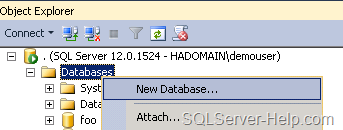
  • Right Click on database folder in SSMS and Choose “New database”. This is the same place where we create regular database.

image

  • Open “New Database” interface, go to “Filegroups” tab. Then click on “Add Filegroup” under “Memory Optimized Data” section.

image

  • I have given name as “SQLSeverHelp_IMO_FG” and then went back to “General” tab.

image

  • Here is the little explanation of numbered steps.
    1. We need to come back to “General” Tab after creating filegroup in earlier step.
    2. Provide “Database name” SQLSeverHelp_IMO
    3. Click on “Add” button and provide details in new row (third row)
    4. We have given SQLSeverHelp_IMO_dir as logical name
    5. Since it is going to contain In-Memory optimized data, we need to use “FILESTREAM Data” in “File Type”
    6. Once we choose drop down in step 5, “Filegroup” would be “SQLSeverHelp_IMO_FG” created in previous screen.
    7. Provide complete physical “Path” where the files/data needs to be stored for In-Memory tables. C:\IMO_Database\SQLSeverHelp_IMO_dir 

Follow sequence given in above image and hit OK.

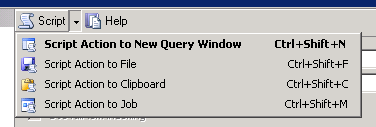
Do you know that I can remember all command by heart? I am joking! If you want to script this action, use the “Script” button (shown in below image). This would give us the same script (with little more setting) which we use in previous part.

image

The “Script” feature is available in almost every user interface of SSMS. Another option is to use predefined template. This is one of under-utilized/less known feature of SSMS. As shown below, go to “View” Menu and click on “Template Explorer” (Ctrl+Alt+T) to access a lot of predefined scripts.

image

  • Once we click on “template explorer”, we would see “template browser” opened within management studio. Over there, we can see many template and one of them of our interest, as of now, is highlighted in below image.

image

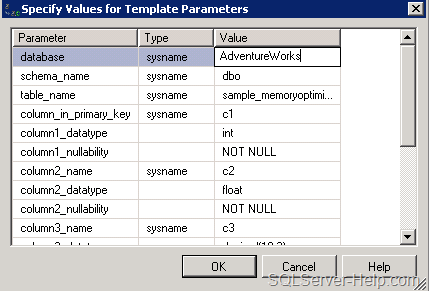
  • Double click would open the template and we need to use “Ctrl+Shift+M” to get window called “Specify Values for Template Parameters”

image

  • We can make changes here and hit OK. We can edit path, name and modify the TSQL as per our requirement.

If you have an existing database then, ALTER DATABASE would be needed. This is because the filegroup for memory_optimized_data might not have been defined. We can go to database properties and add new filegroup and follow same screen with 7 steps.

CREATE TABLE

Next step is to create an In-Memory Optimized table. Note that there is no “table designer” UI to create the In-Memory Optimized table. If you have followed earlier steps, template explorer might be open (else press Ctrl+Alt+T)

Option # 1
In situations where we have an existing database which is not having memory_optimize_data filrgroup defined, we can use template called “Add MEMORY_OPTIMIZED_DATA Filegroup and Create Memory Optimized Table” (shown below)

image

Option # 2
If we have memory optimized filegroup in the database then we can choose “Create Memory Optimized Table”

image

Option # 3
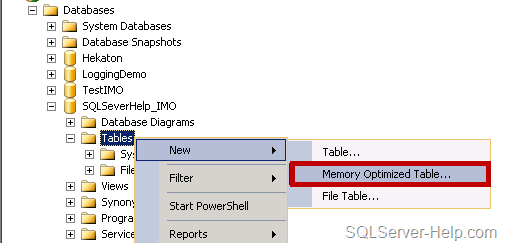
If we go with conventional way of creating table using SSMS then we can Right Click on “Tables” folder under the database SQLSeverHelp_IMO and choose New > Memory Optimized Table

image

All three options would open a query window with the template. (See, I told you earlier – no table designer)

image

In this query windows, we need to use Ctrl+Shift+M and replace the parameter as needed. We can add more columns, indexes and make modifications. As the commented section in above template says, we need to have filegroup defined for memory_optimized_data

image

In a nut-shell, in the absence of UI, you need to have T-SQL syntax knowledge.

CREATE PROCEDURE

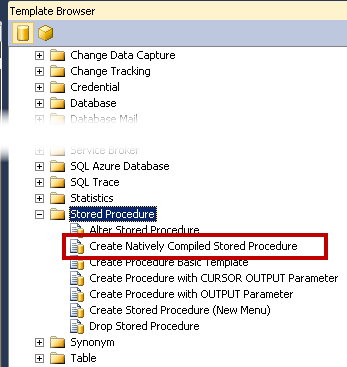
Same as CREATE TABLE, there is no special interface available for natively compiled procedure. We can use either Right Click technique (#1) or template browser (#2) to reach to template.

Option # 1

image

Option # 2

image

Both of the options above are going to open template and then we can write the code there. Remember the shortcut Ctrl+Shift+M for filling template parameter.

image

Till now we have learned how to create objects. In next post, we would see what happens differently (than regular objects) when in-memory tables are in-memory stored procedures are created. Stay tuned!

Missed reading earlier posts? Here is the quick reference:

Stay Tuned!

Cheers,
Balmukund Lakhani
Twitter @blakhani
Author: SQL Server 2012 AlwaysOnPaperback, Kindle

Posted in A - Z Series, Hekaton Series, In Memory OLTP, In-Memory OLTP, Introduction, screen shot, Screenshot, SQL Server 2014, SQL Server Management Studio, SSMS | Tagged: , , , , , , , , | 4 Comments »