Help: SQL Server

Sharing my knowlege about SQL Server Troubleshooting Skills

  • Blog Stats

    • 2,156,102 hits
  • Select GETDATE()

    February 2026
    M T W T F S S
     1
    2345678
    9101112131415
    16171819202122
    232425262728  

Archive for the ‘SSMS’ Category

Troubleshooting: Cannot execute as the database principal and Property Owner is not available for Database

Posted by blakhani on March 4, 2014


No one likes errors in the world. As a part of my work with Microsoft SQL Support Services, I get to see various errors, find cause and provide solution to get rid of them. Today someone reported below error to me.

Cannot execute as the database principal because the principal "dbo" does not exist, this type of principal cannot be impersonated, or you do not have permission.

This error message was caused because SQL Server was not able to find context information for the security logon we were attempting to impersonate. In this case it was “dbo”. Going with common sense, I went ahead to check the owner of the database, which is generally visible in database > right click > properties. As soon as I attempted it, I was welcomed with next error message.

image

TITLE: Microsoft SQL Server Management Studio
——————————
Cannot show requested dialog.
——————————
ADDITIONAL INFORMATION:
Cannot show requested dialog. (SqlMgmt)
——————————
Property Owner is not available for Database ‘[SQLServerHelp]’. This property may not exist for this object, or may not be retrievable due to insufficient access rights.  (Microsoft.SqlServer.Smo)
For help, click: http://go.microsoft.com/fwlink?ProdName=Microsoft+SQL+Server&ProdVer=10.50.1746.0+((KJ_RTM_QFE-CU).101005-1216+)&EvtSrc=Microsoft.SqlServer.Management.Smo.ExceptionTemplates.PropertyCannotBeRetrievedExceptionText&EvtID=Owner&LinkId=20476
——————————
BUTTONS:
OK
—————————— 
 

Okay. This is an interesting message. Notice the exception event source is “PropertyCannotBeRetrievedExceptionText” and exception event id “Owner”. The message means that on SMO, the value of “owner” property is not available. This means something is not right with owner of the database?

Next step was to find out who the current owner (without management studio). There are multiple ways to do it.

  • sp_helpdb

image

  • sp_helpdb ‘DatabaseName’

image

  • T-SQL which is used by sp_helpdb
select name, isnull(suser_sname(sid),'~~UNKNOWN~~'), 
convert(nvarchar(11), crdate),
dbid, cmptlevel from master.dbo.sysdatabases


image

As we can see above, “~~UNKNOWN~~” is not something which is not expected and that’s the reason SSMS was showing exception to get owner property.

How to fix it?

Of course, change the owner of the database so that value of SID column holds valid SID. Since we are not able to use UI, we have to use sp_changedbowner (change db owner with no spaces). This has be to run in the context of the database which has problem, as shown below. I have given sa as an example for my database.

image

Root Cause/Repro of the issue

If a database is owned by a login, we would not be able to drop the login. The possible situation which I can think of are:

  • Database owned by windows login which was part of any Windows Group. And now, windows account was deleted from active directory. 
  • Database was restored and domain controller was not available to resolve the SID to a validate login.

In my repro, I was able to get into same situation by step 1.

Important: I was NOT able to reproduce the “property owner” error in SQL Server 2014 Management Studio. It doesn’t throw exception of owner property and it can be blank in the UI.

image

This also means that owner can be changed via management studio by going to Properties  > Files tab.

image

Hope you have learned something new.

  • Cheers,
  • Balmukund Lakhani
  • Twitter @blakhani
  • Author: SQL Server 2012 AlwaysOnPaperback, Kindle
  • Posted in Error, SQL Server, SSMS | Tagged: , , , , , | Leave a Comment »

    Did you know? You can generate Insert Statement with data using Management Studio!!!

    Posted by blakhani on December 13, 2013


    I must confess that at least I didn’t know about that option till I saw an internal email thread. And my first reaction was – Damn! all these years and never spotted that! Yes, we can get all of the INSERT statements for the data straight out of SSMS. Another hidden feature of SSMS.

    Earlier, I used to search on internet and get some stored procedure to get the insert statements generated for me. Here were few search strings which used to give me proper results “SQL Generate Insert Script”, “SQL Server Generate Insert Script”, "SQL Server Script Insert Statements", "Create Insert Script SQL Server", "Generate Insert Script from Table"

    Now I can avoid all those searches and do that right from the Management Studio. For demo purpose I would create a small database and show that option. Please note that I am using SQL Server 2012 Management Studio (SSMS 2012)

    CREATE DATABASE [myAppDB]
    go
    Use myAppDB
    go
    Create table HelloSQL (iID int, vFname varchar(100), vLName varchar(100))
    go
    insert into HelloSQL values 
    (1, 'Balmukund', 'Lakhani'),
    (2, 'Vinod', 'Kumar M'),
    (3, 'Pinal', 'Dave'),
    (4, 'Sourabh', 'Agarwal'),
    (5, 'Amit', 'Banerjee')
    go
    Select * from HelloSQL
    go


    To achieve our insert statements with script use Object Explorer and connect to an instance of the SQL Server. Expand Databases folder, Choose the database for which we want the script, right click, Tasks > Generate Scripts.

    Once Wizard is launched, its self-explanatory to navigate through screen.

    image

    After welcome screen, we need to choose the object (table HelloSQL in our case) for which we want script to be generated.

    image

    In next screen, we need to choose the destination of script. I have selected “Save to new query window”

    image

    In the same screen, we have a magical button called “Advanced”. That’s where we have many options about scripting.

    image

    I have selected “Schema and Data” under “Type of data to script” and hit OK. Hit Next on previous screen

    image

    hit Next and Finish.

    image

    … and we have what we needed. Schema creation as well as Insert Statement for the data in table.

    image

    There are many other options in advanced tab. Play with them and get the desired script. I have learned this and it was new to me. Hope this is useful to you also. SQL Server generate script with data is a powerful SQL Server tool in order to create SQL script to move data from one database to another database. SQL programmers can export data as sql script by using one of the existing SQL Server tools, SQL Server Generate Script Wizard.


    Cheers,

    Balmukund Lakhani

    Twitter @blakhani

    Author: SQL Server 2012 AlwaysOnPaperback, Kindle

    Posted in Screenshot, SQL Server, SQL Server Management Studio, SSMS, Step by Step | Tagged: , , , , , , , | 10 Comments »

    A-Z of In-Memory OLTP : Behind the scenes

    Posted by blakhani on December 12, 2013


    If you have a kid in your life, you probably get inundated every day with questions starting with word “why” and “what”. Why do kids ask why? One of the answers is, that children are naturally curious about the world around them. After all, there’s much to learn, and much to know. We all have a kid inside us who is very curious, that’s why I thought of writing this blog post.

    In A-Z Series, we have discussed about T-SQL constructs and SSMS enhancements to create In-Memory objects. In this part, we would discuss “behind the scene” of those commands.

    CREATE DATABASE

    Once database is created and one (and only one) filegroup with CONTAINS MEMORY_OPTIMIZED_DATA clause, SQL Server would create a folder which is specified in filename parameter for that filegroup. In our sample database SQLSeverHelp_IMO we have added filename = “C:\IMO_Database\SQLSeverHelp_IMO_dir” which would create a folder behind the scene as shown below.

    image

    If we look inside the folders, the would be empty because there is no in-memory table created so far. We also have MDF and LDF file which are same as earlier version of SQL, nothing new there. We can use catalog view to get details about Memory optimized filegroup

    Use SQLSeverHelp_IMO
    GO
    Select * from sys.data_spaces
    Here is the query in SSMS and the output:
    image 

    CREATE TABLE

    Next logical step is to create a In-Memory table in the database. In our last post, we have created table called MyFirstMemporyOptimizedTable. As soon as table is created, SQL Server is going to create few files into the folder which were created during previous step of database creation.

    image

    Above files are created as soon as I created one table. Don’t worry by seeing so many files as we would discuss about these file later part of the series. All you need to remember that per file is 131072 KB = 128 MB by default. There are files having zero KB size as we have not inserted/updated/deleted any data in the table. In contrast to disk-based tables having 8K size pages in buffer pool, the In-memory tables don’t have pages in buffer pool. Think of this as rows in the memory linked to each other because we have index on table. In-memory data is not stored on data files at all. Instead, its stored as blob data using filestream files, which are shown in picture above. At this point just remember that they are called CheckPoint files which combination is DATA files and DELTA files. We would go deeper into those files once we go into blog about checkpoint for in-memory tables.

    Another thing which has happened behind the scene is to generate the DLL for the table definition and load into SQL Server Memory. Why? Well, In-Memory engine doesn’t have any knowledge about format of data record. It doesn’t know how to access the data which is part of in-memory table. Whenever we create table, a C file is generated which would have all callback functions used by In-Memory Engine. The C file, it’s compiled by C complier and DLL is generated. If you are a developer in C/C++, you can open the file and check the content to get a feeling.

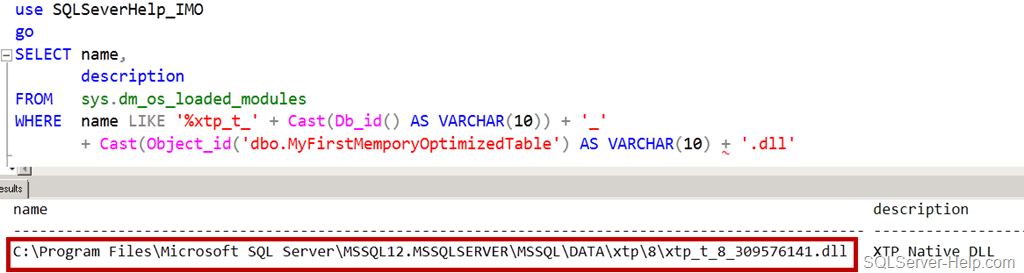
    Here is the query

    use SQLSeverHelp_IMO
    go
    SELECT name, 
           description 
    FROM   sys.dm_os_loaded_modules 
    WHERE  description = 'XTP Native DLL' 
           AND name LIKE '%xtp_t_' + Cast(Db_id() AS VARCHAR(10)) + '_' 
    + Cast(Object_id('dbo.MyFirstMemporyOptimizedTable') AS VARCHAR(10)) + '.dll'
    Here is the query in SSMS and the output:

    image

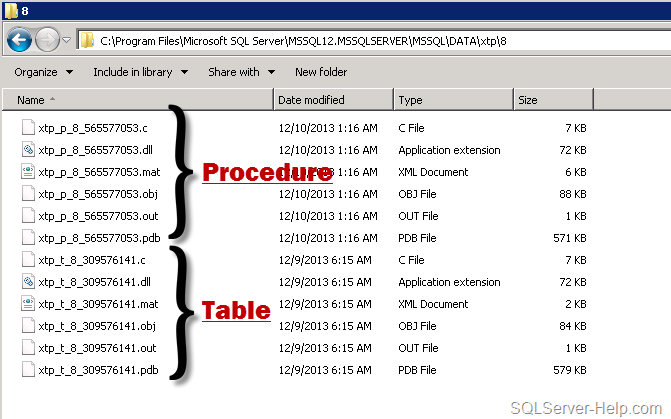
    Let’s look at windows explorer and see what we have in that folder. If we look at xtp folder, we would see numbered folders. These are databases IDs which have in-memory objects. Default directory of XTP folder is DATA directory (C:\Program Files\Microsoft SQL Server\MSSQL12.MSSQLSERVER\MSSQL\DATA\). Do you remember what XTP stands for? Go back and read first post.

    image

    For database SQLSeverHelp_IMO the database_id is 8 (you may have different ID) so let’s go inside the folder 8 and check what we have got there.

    image

    If you go back and look at the query, which we executed earlier, its easy to understand that DLL (and other files) have name as xtp_t_<DB_ID>_<Object_ID> where t stands for table and rest is self explanatory. Each in-memory table will have one corresponding DLL generated which would be loaded in the memory at all times.The end goal of converting table definition to machine level instruction (using DLL) is to avoid compilation during execution phase. There is no need for a DBA to worry about backup of those files. They would be re-generated as soon as database is opened and recovered. Once SQL Server restarts, it performs recovery of database and table would be loaded into memory again.

    CREATE PROCEDURE

    Before moving any forward, remember that here we are talking about procedure which are natively compiled. In earlier post, we created stored procedure [InsertName]. During creation time of stored procedure, compiler will convert interpreted T-SQL, query plans and expressions into native code.

    Here is the query

    use SQLSeverHelp_IMO
    go
    SELECT name, 
           description 
    FROM   sys.dm_os_loaded_modules 
    WHERE  name LIKE '%xtp_p_' + Cast(Db_id() AS VARCHAR(10)) + '_'        
           + Cast(Object_id('dbo.InsertName') AS VARCHAR(10)) + '.dll' 
    Here is the query in SSMS and the output:

    image

    Now, lets open the same XTP folder and look at content.

    image

    As we can see above, now we have new files having “p” in it and they are for stored procedure. The naming standard of those files is is xtp_p_<DB_ID>_<Object_ID>. Native Compilation of stored procedure takes an abstract tree representation of a stored procedure including queries, table and index metadata, and compiles them into native code designed to execute against tables and indexes managed by In-memory engine.

    What are the other files (.c, .mat, .obj, .pdb) ? Well, they are intermediate files created by complier. They are used for troubleshooting compilation issues. Here is the quick summary table


    File Extension

    Usage

    .c

    C source file generated by In-Memory engine

    .dll

    Natively compiled DLL to be loaded into SQL Server process

    .mat.xml

    MAT export file

    .obj

    Object file generated by C compiler

    .out

    Compiler output file

    .pdb

    Symbol file for the dll. Used for debugging code issues.


    If you are C++ developer, you can understand those files easily. Since they are not cause of worry for DBAs and Developers, I would not go deeper into explanation.

    With this, I would conclude this blog post and hopefully this has given you some insights about inner working of In-Memory object.

    Stay tuned for more..

    Cheers,

    Balmukund Lakhani

    Twitter @blakhani

    Author: SQL Server 2012 AlwaysOnPaperback, Kindle

    Posted in A - Z Series, Hekaton Series, In Memory OLTP, In-Memory OLTP, Internals, SQL Server 2014, SSMS | Tagged: , , , , , , | 7 Comments »