Help: SQL Server

Sharing my knowlege about SQL Server Troubleshooting Skills

  • Blog Stats

    • 2,156,920 hits
  • Select GETDATE()

    March 2026
    M T W T F S S
     1
    2345678
    9101112131415
    16171819202122
    23242526272829
    3031  

AlwaysOn : Better Together – Using AlwaysOn Availability Group and Log Shipping

Posted by blakhani on July 3, 2014


In recent past once of my friend came with a requirement where she wanted to use log shipping along with AlwaysOn Availability Group. I asked “are you not happy with 4 secondary replicas in SQL 2012 and 8 secondary replicas in SQL 2014? Do you want more?” and she said that it’s not because of number of secondary replica, its about controlling the data movement and restore delay on secondary database in log-shipping. This made me think broader and here is list of reasons why someone would use AlwaysOn Availability Group and Log Shipping together.

  • Delayed Recovery – In Log-shipping we can have definite delay on secondary database. This would safe guard DBA from “oops!” and “was that the production server?” situations. Log shipping can control the delay of transaction log restore while Asynchronous secondary replica can not.
  • Single DR Server – Single Server can be used as multiple log-shipping pair’s destination.
  • Infrastructure – Server at DR site can’t be a part of current cluster due to infrastructure limitations.
  • Technical – Secondary server is already a part of different windows failover cluster. In availability group, we can’t have overlap of nodes by two windows clusters.

Keeping all of the above in mind, someone might want to use AlwaysOn Availability Group and Log Shipping together.

Here is a typical topology which can be deployed.

image

Number of replicas can be based on your own environment. Few important points to note:

  • We need to configure both servers in availability group as primary for log shipping with same destination. This can be done by script or UI, based on you choice.
  • Log Shipping knows about backup preference and backup priority for availability group. This means that we can offload backups on secondary.
  • Backup should be taken to shared location so that the copy job is always using same location to pick the files even after failover/role change of availability group.

In my next blog, I would show step by step deployment guide of this configuration.

<EDIT 13-April-2017>

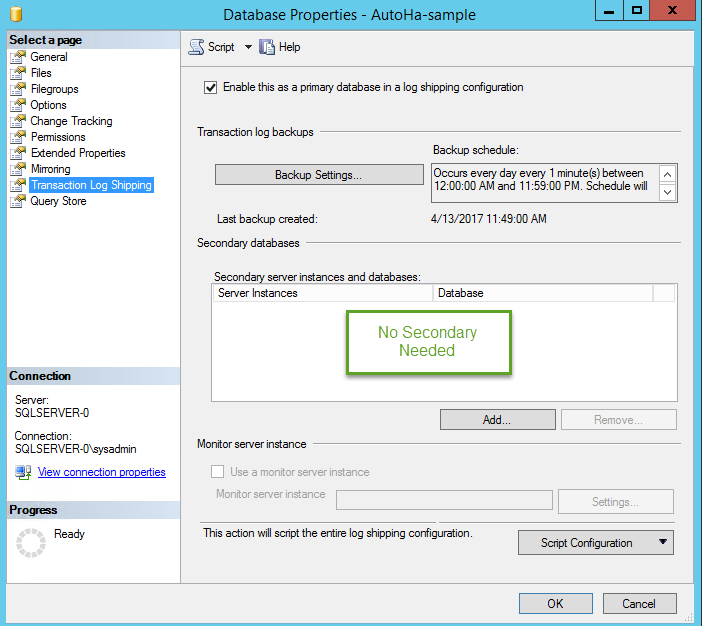
Today, I was trying to follow my own blog and was having trouble. Here are the high level steps.

  1. Configure Log-shipping from Primary replica in AlwaysOn to LogShipping secondary server. No special step needed here.
  2. On Secondary replica, enable only the backups. Don’t add secondary.
image

</EDIT 13-April-2017>

  • Cheers,
  • Balmukund Lakhani
  • Twitter @blakhani
  • Author: SQL Server 2012 AlwaysOnPaperback, Kindle
  • Posted in AlwaysOn | Tagged: , , | 7 Comments »

    Solution : The connection to the primary replica is not active. The command cannot be processed.

    Posted by blakhani on July 1, 2014


    It has been close to a year since I published my first book (SQL Server 2012 AlwaysOnPaperback, Kindle) and since then I have been contacted by many DBA to troubleshoot various issue related to AlwaysOn Availability Groups. One of the most common error which I have seen is as below.

    Msg 35250, Level 16, State 7, Line 1
    The connection to the primary replica is not active. The command cannot be processed.

    This error mostly appears when we try to join the database to availability group. by UI, T-SQL or PowerShell.

    SSMS UI:

    While trying to create new Availability Group, we might received below and “join” step would fail.

    image

    Here is the message in text format.

    TITLE: Microsoft SQL Server Management Studio
    ——————————
    Joining database on secondary replica resulted in an error.  (Microsoft.SqlServer.Management.HadrTasks)
    ——————————
    ADDITIONAL INFORMATION:
    Failed to join the database ‘Production’ to the availability group ‘ProductionAG’ on the availability replica ‘SRV2’. (Microsoft.SqlServer.Smo)
    For help, click: http://go.microsoft.com/fwlink?ProdName=Microsoft+SQL+Server&ProdVer=11.0.2100.60+((SQL11_RTM).120210-1917+)&EvtSrc=Microsoft.SqlServer.Management.Smo.ExceptionTemplates.FailedOperationExceptionText&LinkId=20476
    ——————————
    An exception occurred while executing a Transact-SQL statement or batch. (Microsoft.SqlServer.ConnectionInfo)
    ——————————
    The connection to the primary replica is not active.  The command cannot be processed. (Microsoft SQL Server, Error: 35250)
    For help, click: http://go.microsoft.com/fwlink?ProdName=Microsoft%20SQL%20Server&ProdVer=11.00.2100&EvtSrc=MSSQLServer&EvtID=35250&LinkId=20476
    ——————————
    BUTTONS:
    OK
    ——————————

    T-SQL:

    image

    Msg 35250, Level 16, State 7, Line 1
    The connection to the primary replica is not active. The command cannot be processed.

    PowerShell:

    Add-SqlAvailabilityDatabase -Path "SQLSERVER:\SQL\SRV2\DEFAULT\AvailabilityGroups\ProductionAG" -Database "Production"

    **********************************
    Add-SqlAvailabilityDatabase : The connection to the primary replica is not active.  The command cannot be processed.
    At line:1 char:28
    + Add-SqlAvailabilityDatabase <<<<  -Path "SQLSERVER:\SQL\SRV2\DEFAULT\AvailabilityGroups\ProductionAG" -Database "Production"
         + CategoryInfo          : InvalidOperation: (:) [Add-SqlAvailabilityDatabase], SqlException
         + FullyQualifiedErrorId : ExecutionFailed,Microsoft.SqlServer.Management.PowerShell.Hadr.AddSqlAvailabilityGroupDatabaseCommand
    **********************************

    Solution

    I have always suggested them to start looking at errorlog and check what is the error which most of the DBA have reported.

    2014-06-30 17:29:33.500 Logon        Database Mirroring login attempt by user ‘HADOMAIN\SRV1$.’ failed with error: ‘Connection handshake failed. The login ‘HADOMAIN\SRV1$’ does not have CONNECT permission on the endpoint. State 84.’.  [CLIENT: 192.168.1.11]

    In above message, HADOMAIN is my domain name and SRV1 is the host name of SQL Server hosting primary replica.

    Here is what have solved the issue for them.

    • Change SQL Server service account to a domain account and grant connect permission to the instances. If we are using different domain accounts on each replica then we need to add service accounts of all secondary replicas to primary replica logins.
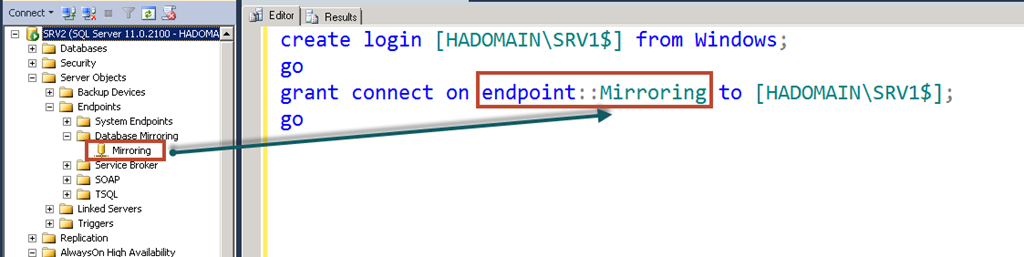
    • If we are using non domain account (like LocalSystem or NT Service\MSSQLServer account) as service account and we can’t change it to domain account then we need to create machine accounts as login and grant connect permission. In our case machine name is SRV1 so machine account is HADOMAIN\SRV1$ (notice that $ at the end is a computer account)


      create login [HADOMAIN\SRV1$] from windows;
      go
      grant connect on endpoint::Mirroring to [HADOMAIN\SRV1$];
      go

    Note: Endpoint Name might be different. We need to pick as per below image: If you have configured via UI earlier, it should be Hadr_endpoint

    image

    If you are running firewall, please make sure that port used by availability group is not blocked. We can easily find port using below command:

    SELECT
    te.port AS [ListenerPort],
    te.is_dynamic_port AS [IsDynamicPort],
    ISNULL(te.ip_address,'''') AS [ListenerIPAddress],
    CAST(case when te.endpoint_id < 65536 then 1 else 0 end AS bit) AS [IsSystemObject]
    FROM
    sys.endpoints AS e
    INNER JOIN sys.tcp_endpoints AS te ON te.endpoint_id=e.endpoint_id
    
    image

    Make sure that you have added exception for the port in firewall.

    This is already documented in books online

    {

    If any server instances that are hosting the availability replicas for an availability group run as different accounts, the login each account must be created in master on the other server instance. Then, that login must be granted CONNECT permissions to connect to the database mirroring endpoint of that server instance.

    }

    Hope this would help you.

  • Cheers,
  • Balmukund Lakhani
  • Twitter @blakhani
  • Author: SQL Server 2012 AlwaysOnPaperback, Kindle
  • Posted in AlwaysOn, Troubleshooting | Tagged: , , | Leave a Comment »

    SQL 2014 Learning Series # 16 – New Feature – Single Partition Online Index Rebuild (SPOIR)

    Posted by blakhani on June 26, 2014


    Till SQL Server 2012, if we want to rebuild a partition table online, the only option available was to rebuild all the partitions of the table. If we want to rebuild only one partition, the option was to do it offline. Not being able to perform online partition rebuilds means application teams have to ultimately decide between index fragmentation or data being un-available while indexes are rebuilt, neither are consistent with an expectation of 24/7 enterprise data platform. Offline rebuild could result in much longer maintenance operations as partition grows. If we attempt to rebuild one partition online, we would be welcomed with below message

    Msg 155, Level 15, State 1, Line 4
    ‘ONLINE’ is not a recognized ALTER INDEX REBUILD PARTITION option.

    In SQL Server 2014, online single partition index operations are supported. The name of the feature “Single Partition Online Index Rebuild “ is mouthful, so some of you may prefer to use SPOIR in your day to day talk. The name of the feature itself is an explanation and you would have understood what it does. Let’s look at few highlights of this feature.

    • Better control on online rebuild by choosing one or more partitions.
    • This would keep the table accessible when rebuild is going on. As explained in earlier blog, short terms locks are taken at beginning and end of index rebuild.
    • We can combine SPOIR with Managed Lock Priority (refer Blog # 13, 14, 15 of this series)
    • Due to all of the above, the availability of the table would increase.
    • CPU, Memory consumption would also reduce due to single partition rebuild.

    Here is the syntax as per Books online: ALTER TABLE and ALTER INDEX

    image

    Let’s see it in action now.

    To have some sample data, we can have download AdventureWorks sample database from: http://msftdbprodsamples.codeplex.com/downloads/get/417885

    I have restored it in SQL Server 2014 and named as AdventureWorks2014. I would be playing around with [AdventureWorks2014].[Production].[TransactionHistoryArchive] table which has transactions from 2005-05-17 to 2007-08-31. I have created yearly partition.

    Use AdventureWorks2014;
    GO
    
    CREATE partition FUNCTION [YearlyDate](datetime) AS range RIGHT FOR VALUES ( 
    N'2005-05-01T00:00:00', N'2006-05-01T00:00:00',  N'2007-05-01T00:00:00'); 
    GO
    
    CREATE partition scheme [TransactionDatePS] AS partition [YearlyDate] TO ( 
    [PRIMARY], [PRIMARY], [PRIMARY], [PRIMARY]);
    GO
    
    
    CREATE TABLE Production.TransactionHistoryArchive_SPOIR(
        TransactionID int NOT NULL,
        ProductID int NOT NULL,
        ReferenceOrderID int NOT NULL,
        ReferenceOrderLineID int NOT NULL, 
        TransactionDate datetime NOT NULL,
        TransactionType nchar(1) NOT NULL,
        Quantity int NOT NULL,
        ActualCost money NOT NULL,
        ModifiedDate datetime NOT NULL)
    ON TransactionDatePS(TransactionDate);
    GO
    
    Create Clustered Index idx_TransactionID on Production.TransactionHistoryArchive_SPOIR (TransactionID)
    go
    

    Let’s populate partitioned table TransactionHistoryArchive_SPOIR from TransactionHistoryArchive

    INSERT INTO Production.TransactionHistoryArchive_SPOIR
    SELECT * FROM Production.TransactionHistoryArchive
    -- (89253 row(s) affected)


    Let’s check how much space is used per page. Since we just created clustered index, all pages would be almost full.

    SELECT partition_number, 
           index_id, 
           avg_page_space_used_in_percent, 
           page_count 
    FROM   sys.Dm_db_index_physical_stats(Db_id(), 
    Object_id('AdventureWorks2014.Production.TransactionHistoryArchive_SPOIR' ), NULL, NULL, 'DETAILED') 


    image

    Let’s delete alternate rows. in 2nd partition.

    Delete from Production.TransactionHistoryArchive_SPOIR
    where TransactionDate >= '2005-05-01T00:00:00' and TransactionDate < '2006-05-01T00:00:00'
    and TransactionID % 2 =  1
    go
    -- (10755 row(s) affected)


    Once we delete, we should see TransactionID as 2, 4, 6.. (even numbers, due to delete)

    image

    Let’s rebuild only Partition # 2 online.

    ALTER INDEX idx_TransactionID on Production.TransactionHistoryArchive_SPOIR
    REBUILD PARTITION = 2 WITH (ONLINE = ON)

    and let’s check the output again.

    image

    This means online index rebuild of single partition is working as expected. In my example I don’t have fragmentation because all pages are next to each other. That’s why I have not shown avg_fragmentation_in_percent column.

    Go Do: If you want to learn, download EVAL version and read other new feature of SQL Server 2014 here.

  • Cheers,
  • Balmukund Lakhani
  • Twitter @blakhani
  • Author: SQL Server 2012 AlwaysOnPaperback, Kindle
  • Posted in SQL 2014 Learning Series, SQL Server 2014 | Tagged: , , , , , , , | 4 Comments »