Help: SQL Server

Sharing my knowlege about SQL Server Troubleshooting Skills

  • Blog Stats

    • 2,153,609 hits
  • Select GETDATE()

    December 2025
    M T W T F S S
    1234567
    891011121314
    15161718192021
    22232425262728
    293031  

Posts Tagged ‘sql server’

Troubleshooting : Slow Delete Database from Management Studio

Posted by blakhani on July 10, 2014


Not very long ago, I had a database on my SQL 2012 Instance which was getting log shipped happily at frequency of 1 minute. Long long ago I have done such configuration for a demo purpose and forgot. Today I had “Memory Recall” when space was getting filled up with log backups. Since the demo was complete, I decided to drop the database. So I broke log shipping and tried dropping the database. What you do as a DBA to drop a database? Right Click > Delete .. huh?

image

When I clicked on “OK” button it was taking a long time. GUI to seem like its hanging. As usual, troubleshooting started! Ran my standard troubleshooting query to find out what is going on.

 SELECT s.session_id
    ,r.STATUS
    ,r.blocking_session_id 'Blk by'
    ,r.wait_type
    ,wait_resource
    ,r.wait_time / (1000.0) 'Wait Sec'
    ,r.cpu_time
    ,r.logical_reads
    ,r.reads
    ,r.writes
    ,r.total_elapsed_time / (1000.0) 'Elaps Sec'
    ,Substring(st.TEXT, (r.statement_start_offset / 2) + 1, (
            (
                CASE r.statement_end_offset
                    WHEN - 1
                        THEN Datalength(st.TEXT)
                    ELSE r.statement_end_offset
                    END - r.statement_start_offset
                ) / 2
            ) + 1) AS statement_text
    ,Coalesce(Quotename(Db_name(st.dbid)) + N'.' + Quotename(Object_schema_name(st.objectid, st.dbid)) + N'.' + Quotename(Object_name(st.objectid, st.dbid)), '') AS command_text
    ,r.command
    ,s.login_name
    ,s.host_name
    ,s.program_name
    ,s.host_process_id
    ,s.last_request_end_time
    ,s.login_time
    ,r.open_transaction_count
FROM sys.dm_exec_sessions AS s
INNER JOIN sys.dm_exec_requests AS r ON r.session_id = s.session_id
CROSS APPLY sys.dm_exec_sql_text(r.sql_handle) AS st
WHERE r.session_id != @@SPID
ORDER BY r.cpu_time DESC
    ,r.STATUS
    ,r.blocking_session_id
    ,s.session_id

Here was the result (I have removed few columns to avoid clutter)

session_id status cpu_time logical_reads writes Elaps Sec statement_text command_text
60 runnable 247734 42732577 29196 545.223 DELETE msdb.dbo.backupmediaset

FROM msdb.dbo.backupmediaset bms

WHERE bms.media_set_id IN (SELECT media_set_id

     FROM @media_set_id)

    AND ((SELECT COUNT(*)

  FROM msdb.dbo.backupset

  WHERE media_set_

[msdb].[dbo].[sp_delete_database_backuphistory]


Why would delete database do that? Well, it’s done by a small little checkbox which we never noticed.

image

That little checkbox executed this command (along with drop database). If we use “Script” button, this is the outcome

EXEC msdb.dbo.sp_delete_database_backuphistory @database_name = N'AdventureWorks2014'
GO
USE [master]
GO
DROP DATABASE [AdventureWorks2014]
GO

Now we know why it’s taking time but can this be made faster? Well, I check msdb database and there are few indexes which have been added in SQL Server 2014 which would help in this situation. Here is the quick comparison.

Select @@version
go
SELECT 
     TableName = t.name,
     IndexName = ind.name,
     ColumnName = col.name
FROM 
     sys.indexes ind 
INNER JOIN 
     sys.index_columns ic ON  ind.object_id = ic.object_id and ind.index_id = ic.index_id 
INNER JOIN 
     sys.columns col ON ic.object_id = col.object_id and ic.column_id = col.column_id 
INNER JOIN 
     sys.tables t ON ind.object_id = t.object_id 
WHERE 
     ind.is_primary_key = 0 
     AND t.is_ms_shipped = 1
     AND t.name in ( 'backupfile', 'backupfilegroup', 'backupmediafamily', 'backupmediaset', 'backupset', 'restorefile', 'restorefilegroup', 
'restorehistory' ) ORDER BY t.name, ind.name, ind.index_id, ic.index_column_id

image

image

If you are facing the same problem which I described on SQL 2008 or SQL 2012, you may want to try creating new indexes as advised on other blogs (search for “msdb performance tuning” in bing/google) but my only suggestion is that it might be unsupported.

If you clean msdb backup history regularly, you might not face the issue though. There is maintenance plan to do that. Try it out!

Hope this helps.

  • Cheers,
  • Balmukund Lakhani
  • Twitter @blakhani
  • Author: SQL Server 2012 AlwaysOnPaperback, Kindle
  • Posted in Troubleshooting | Tagged: , , , , | 4 Comments »

    Solution : The connection to the primary replica is not active. The command cannot be processed.

    Posted by blakhani on July 1, 2014


    It has been close to a year since I published my first book (SQL Server 2012 AlwaysOnPaperback, Kindle) and since then I have been contacted by many DBA to troubleshoot various issue related to AlwaysOn Availability Groups. One of the most common error which I have seen is as below.

    Msg 35250, Level 16, State 7, Line 1
    The connection to the primary replica is not active. The command cannot be processed.

    This error mostly appears when we try to join the database to availability group. by UI, T-SQL or PowerShell.

    SSMS UI:

    While trying to create new Availability Group, we might received below and “join” step would fail.

    image

    Here is the message in text format.

    TITLE: Microsoft SQL Server Management Studio
    ——————————
    Joining database on secondary replica resulted in an error.  (Microsoft.SqlServer.Management.HadrTasks)
    ——————————
    ADDITIONAL INFORMATION:
    Failed to join the database ‘Production’ to the availability group ‘ProductionAG’ on the availability replica ‘SRV2’. (Microsoft.SqlServer.Smo)
    For help, click: http://go.microsoft.com/fwlink?ProdName=Microsoft+SQL+Server&ProdVer=11.0.2100.60+((SQL11_RTM).120210-1917+)&EvtSrc=Microsoft.SqlServer.Management.Smo.ExceptionTemplates.FailedOperationExceptionText&LinkId=20476
    ——————————
    An exception occurred while executing a Transact-SQL statement or batch. (Microsoft.SqlServer.ConnectionInfo)
    ——————————
    The connection to the primary replica is not active.  The command cannot be processed. (Microsoft SQL Server, Error: 35250)
    For help, click: http://go.microsoft.com/fwlink?ProdName=Microsoft%20SQL%20Server&ProdVer=11.00.2100&EvtSrc=MSSQLServer&EvtID=35250&LinkId=20476
    ——————————
    BUTTONS:
    OK
    ——————————

    T-SQL:

    image

    Msg 35250, Level 16, State 7, Line 1
    The connection to the primary replica is not active. The command cannot be processed.

    PowerShell:

    Add-SqlAvailabilityDatabase -Path "SQLSERVER:\SQL\SRV2\DEFAULT\AvailabilityGroups\ProductionAG" -Database "Production"

    **********************************
    Add-SqlAvailabilityDatabase : The connection to the primary replica is not active.  The command cannot be processed.
    At line:1 char:28
    + Add-SqlAvailabilityDatabase <<<<  -Path "SQLSERVER:\SQL\SRV2\DEFAULT\AvailabilityGroups\ProductionAG" -Database "Production"
         + CategoryInfo          : InvalidOperation: (:) [Add-SqlAvailabilityDatabase], SqlException
         + FullyQualifiedErrorId : ExecutionFailed,Microsoft.SqlServer.Management.PowerShell.Hadr.AddSqlAvailabilityGroupDatabaseCommand
    **********************************

    Solution

    I have always suggested them to start looking at errorlog and check what is the error which most of the DBA have reported.

    2014-06-30 17:29:33.500 Logon        Database Mirroring login attempt by user ‘HADOMAIN\SRV1$.’ failed with error: ‘Connection handshake failed. The login ‘HADOMAIN\SRV1$’ does not have CONNECT permission on the endpoint. State 84.’.  [CLIENT: 192.168.1.11]

    In above message, HADOMAIN is my domain name and SRV1 is the host name of SQL Server hosting primary replica.

    Here is what have solved the issue for them.

    • Change SQL Server service account to a domain account and grant connect permission to the instances. If we are using different domain accounts on each replica then we need to add service accounts of all secondary replicas to primary replica logins.
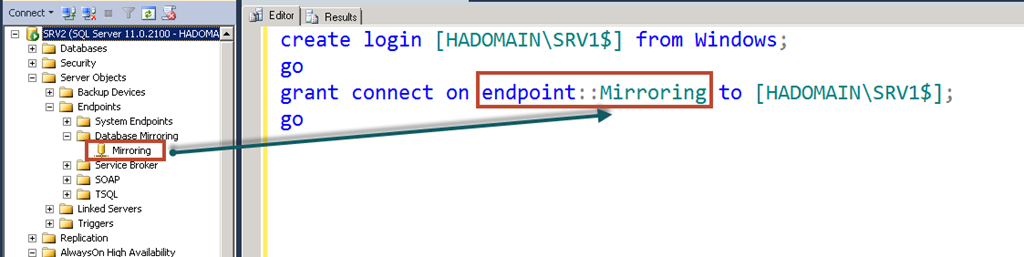
    • If we are using non domain account (like LocalSystem or NT Service\MSSQLServer account) as service account and we can’t change it to domain account then we need to create machine accounts as login and grant connect permission. In our case machine name is SRV1 so machine account is HADOMAIN\SRV1$ (notice that $ at the end is a computer account)


      create login [HADOMAIN\SRV1$] from windows;
      go
      grant connect on endpoint::Mirroring to [HADOMAIN\SRV1$];
      go

    Note: Endpoint Name might be different. We need to pick as per below image: If you have configured via UI earlier, it should be Hadr_endpoint

    image

    If you are running firewall, please make sure that port used by availability group is not blocked. We can easily find port using below command:

    SELECT
    te.port AS [ListenerPort],
    te.is_dynamic_port AS [IsDynamicPort],
    ISNULL(te.ip_address,'''') AS [ListenerIPAddress],
    CAST(case when te.endpoint_id < 65536 then 1 else 0 end AS bit) AS [IsSystemObject]
    FROM
    sys.endpoints AS e
    INNER JOIN sys.tcp_endpoints AS te ON te.endpoint_id=e.endpoint_id
    
    image

    Make sure that you have added exception for the port in firewall.

    This is already documented in books online

    {

    If any server instances that are hosting the availability replicas for an availability group run as different accounts, the login each account must be created in master on the other server instance. Then, that login must be granted CONNECT permissions to connect to the database mirroring endpoint of that server instance.

    }

    Hope this would help you.

  • Cheers,
  • Balmukund Lakhani
  • Twitter @blakhani
  • Author: SQL Server 2012 AlwaysOnPaperback, Kindle
  • Posted in AlwaysOn, Troubleshooting | Tagged: , , | Leave a Comment »

    UDL Test Series – Part 2 – Easiest way to create connection string

    Posted by blakhani on March 20, 2014


    In the last post (part 1) we have discussed about how to create UDL and how a basic connectivity check can be performed. Another cool thing about UDL is that it can help a developer to create connecting string for the selected provider. Here are the steps.

    • Create a blank UDL file (Refer Part 1).
    • On the first tab, choose provider. I have selected “SQL Server Native Client 11.0”

    image

    • Hit Next or move to next tab “Connection” and provide necessary values. I have given server name (SRV3), selected “Use windows NT integrate security” and typed in database name as tempdb.

    image

    • On “Advanced” tab, I have entered timeout as 60 (I have given some random number for demo)

    image

    • On last tab “All”, we can edit rest of the parameter which can be provided in connecting sting. I have used “Application Name” in below screenshot and edited it to Balmukund

    image

    • Once all necessary values are entered. Hit OK.
    • Now, open the file with “notepad” and have a look (this is the key of the trick because double click would open properties again)

    image

    Notice that connection string is ready and can be used in the application code. Interesting? Please comment if it was useful.

  • Cheers,
  • Balmukund Lakhani
  • Twitter @blakhani
  • Author: SQL Server 2012 AlwaysOnPaperback, Kindle
  • Posted in Troubleshooting | Tagged: , , , | Leave a Comment »