Not very long ago, I had a database on my SQL 2012 Instance which was getting log shipped happily at frequency of 1 minute. Long long ago I have done such configuration for a demo purpose and forgot. Today I had “Memory Recall” when space was getting filled up with log backups. Since the demo was complete, I decided to drop the database. So I broke log shipping and tried dropping the database. What you do as a DBA to drop a database? Right Click > Delete .. huh?

When I clicked on “OK” button it was taking a long time. GUI to seem like its hanging. As usual, troubleshooting started! Ran my standard troubleshooting query to find out what is going on.
 SELECT s.session_id
    ,r.STATUS
    ,r.blocking_session_id 'Blk by'
    ,r.wait_type
    ,wait_resource
    ,r.wait_time / (1000.0) 'Wait Sec'
    ,r.cpu_time
    ,r.logical_reads
    ,r.reads
    ,r.writes
    ,r.total_elapsed_time / (1000.0) 'Elaps Sec'
    ,Substring(st.TEXT, (r.statement_start_offset / 2) + 1, (
            (
                CASE r.statement_end_offset
                    WHEN - 1
                        THEN Datalength(st.TEXT)
                    ELSE r.statement_end_offset
                    END - r.statement_start_offset
                ) / 2
            ) + 1) AS statement_text
    ,Coalesce(Quotename(Db_name(st.dbid)) + N'.' + Quotename(Object_schema_name(st.objectid, st.dbid)) + N'.' + Quotename(Object_name(st.objectid, st.dbid)), '') AS command_text
    ,r.command
    ,s.login_name
    ,s.host_name
    ,s.program_name
    ,s.host_process_id
    ,s.last_request_end_time
    ,s.login_time
    ,r.open_transaction_count
FROM sys.dm_exec_sessions AS s
INNER JOIN sys.dm_exec_requests AS r ON r.session_id = s.session_id
CROSS APPLY sys.dm_exec_sql_text(r.sql_handle) AS st
WHERE r.session_id != @@SPID
ORDER BY r.cpu_time DESC
    ,r.STATUS
    ,r.blocking_session_id
    ,s.session_id
Here was the result (I have removed few columns to avoid clutter)
| session_id |
status |
cpu_time |
logical_reads |
writes |
Elaps Sec |
statement_text |
command_text |
| 60 |
runnable |
247734 |
42732577 |
29196 |
545.223 |
DELETE msdb.dbo.backupmediaset
FROM msdb.dbo.backupmediaset bms
WHERE bms.media_set_id IN (SELECT media_set_id
FROM @media_set_id)
AND ((SELECT COUNT(*)
FROM msdb.dbo.backupset
WHERE media_set_
|
[msdb].[dbo].[sp_delete_database_backuphistory]
|
Why would delete database do that? Well, it’s done by a small little checkbox which we never noticed.
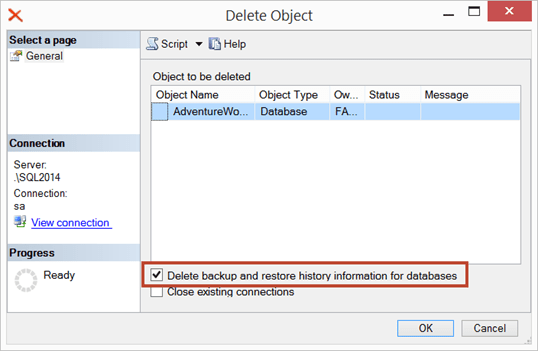
That little checkbox executed this command (along with drop database). If we use “Script” button, this is the outcome
EXEC msdb.dbo.sp_delete_database_backuphistory @database_name = N'AdventureWorks2014'
GO
USE [master]
GO
DROP DATABASE [AdventureWorks2014]
GO
Now we know why it’s taking time but can this be made faster? Well, I check msdb database and there are few indexes which have been added in SQL Server 2014 which would help in this situation. Here is the quick comparison.
Select @@version
go
SELECT
     TableName = t.name,
     IndexName = ind.name,
     ColumnName = col.name
FROM
     sys.indexes ind
INNER JOIN
     sys.index_columns ic ON  ind.object_id = ic.object_id and ind.index_id = ic.index_id
INNER JOIN
     sys.columns col ON ic.object_id = col.object_id and ic.column_id = col.column_id
INNER JOIN
     sys.tables t ON ind.object_id = t.object_id
WHERE
     ind.is_primary_key = 0
     AND t.is_ms_shipped = 1
     AND t.name in ( 'backupfile', 'backupfilegroup', 'backupmediafamily', 'backupmediaset', 'backupset', 'restorefile', 'restorefilegroup',
     'restorehistory' )
ORDER BY
     t.name, ind.name, ind.index_id, ic.index_column_id
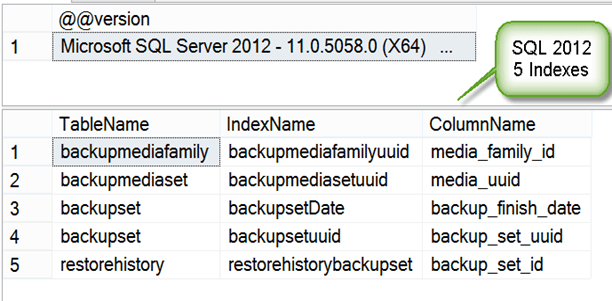

If you are facing the same problem which I described on SQL 2008 or SQL 2012, you may want to try creating new indexes as advised on other blogs (search for “msdb performance tuning” in bing/google) but my only suggestion is that it might be unsupported.
If you clean msdb backup history regularly, you might not face the issue though. There is maintenance plan to do that. Try it out!
Hope this helps.
Cheers,
Balmukund Lakhani
Twitter @blakhani
Author: SQL Server 2012 AlwaysOn – Paperback, Kindle


 Help: SQL Server