Help: SQL Server

Sharing my knowlege about SQL Server Troubleshooting Skills

  • Blog Stats

    • 2,156,099 hits
  • Select GETDATE()

    February 2026
    M T W T F S S
     1
    2345678
    9101112131415
    16171819202122
    232425262728  

Archive for the ‘A – Z Series’ Category

A-Z of In-Memory OLTP : How In-Memory Table is made durable – Transaction Logging Concepts

Posted by blakhani on December 26, 2013


If you ever visit a bank and do some financial transaction, you would notice that bank employee would note the information about the transaction in some format (paper based or electronic based). In the same way for SQL Server logging of transaction is needed. Hence, transaction log (also known as T-Log) file is an integral part of database. For the RDBMS to be durable, logging of transaction is done before making any modification. If an in-memory table is defined as “durable” then logging has to be done for the table. The logging of transaction is done differently for in-memory tables and that’s why I am dedicating a blog post only on this topic in A-Z Series.

There are few major differences between transaction logging of disk based tables versus in-memory tables. I would list them out here:

  • Multiple changes in table are merged into single log record.
  • Log records are not generated for any modification of Index. The index on the table is rebuild during startup of the database.
  • Transaction log records are written only if the transaction on in-memory table is committed. This would mean that no UNDO information would be logged.

Due to all above, the amount of information logged into transaction log is less and also efficient as compared to disk based tables. This makes in-memory OLTP scalable and high performance engine.

Let’s understand each point by demo(s).

Multiple changes in table are merged into single log record

To check this behavior, we could create two identical tables – Disk based and In-Memory table. Here is the script which can be used. This is the same script which you might have seen earlier in this blog.
-- Create database with IMO Filegroup, If exists drop it.
Use Master
go
If db_id('SQLSeverHelp_IMO') is NOT NULL
drop database SQLSeverHelp_IMO
GO
CREATE DATABASE SQLSeverHelp_IMO 
    ON PRIMARY (
    NAME = [SQLSeverHelp_IMO_data]
    ,FILENAME = 'C:\IMO_Database\SQLSeverHelp_IMO.mdf'
    )
    
    ,FILEGROUP [SQLSeverHelp_IMO_FG] CONTAINS MEMORY_OPTIMIZED_DATA ( 
    NAME = [SQLSeverHelp_IMO_dir]
    ,FILENAME = 'C:\IMO_Database\SQLSeverHelp_IMO_dir'
    ) 
    
    LOG ON (
    NAME = [SQLSeverHelp_IMO_log]
    ,Filename = 'C:\IMO_Database\SQLSeverHelp_IMO_log.ldf'
    ,SIZE = 102400KB 
    ) 
GO


-- Create table in database

-- Normal (disk based) table
Use SQLSeverHelp_IMO 
go
CREATE TABLE DiskBasedTable
(
iID INT NOT NULL PRIMARY KEY NONCLUSTERED,
vFName CHAR(20) NOT NULL,
vLName CHAR(20) NOT NULL
)
GO

-- In-Memory table
Use SQLSeverHelp_IMO
GO
CREATE TABLE MyFirstMemporyOptimizedTable
(
iID INT NOT NULL PRIMARY KEY NONCLUSTERED HASH WITH (BUCKET_COUNT = 100000),
vFName CHAR(20) NOT NULL,
vLName CHAR(20) NOT NULL
) WITH (MEMORY_OPTIMIZED = ON, DURABILITY = SCHEMA_AND_DATA)
GO

Now, I am going to insert 100 rows in Disk based table.

-- Insert into Disk Based Table
begin tran
DECLARE @counter INT 
SET @counter = 1 
WHILE @counter <= 100
  BEGIN 
      INSERT INTO DiskBasedTable 
      VALUES      (@counter, 'SQLServer-Help.com','Balmukund Lakhani')
      SET @counter = @counter + 1 
  END
 commit tran

Let’s examine the transaction log by well-known, undocumented (and unsupported command) fn_dblog

SELECT *
FROM sys.fn_dblog(NULL, NULL)
WHERE PartitionId IN (
        SELECT partition_id
        FROM sys.partitions
        WHERE object_id = object_id('DiskBasedTable')
        )
ORDER BY [Current LSN] ASC;
GO

As shown below, we can see 200 rows for our table (DiskBasedTable). LOP_INSERT_ROWS operation is logged for HEAP and INDEX. Since we have inserted 100 rows, it has caused 200 log records i.e. two per row. In Operation column – LOP stands for logical operation.

image

-- Total size of ALL Log Records 
SELECT sum([Log Record Length])
FROM sys.fn_dblog(NULL, NULL)
WHERE PartitionId IN (
        SELECT partition_id
        FROM sys.partitions
        WHERE object_id = object_id('DiskBasedTable')
        )

Above query shows output as 26000= ~25 KB. Now, we will do the same insert operation for in-memory table (MyFirstMemporyOptimizedTable) and look at log records.

begin tran
DECLARE @counter INT 
SET @counter = 1
WHILE @counter <= 100
  BEGIN 
      INSERT INTO MyFirstMemporyOptimizedTable
      VALUES      (@counter, 'SQLServer-Help.com','Balmukund Lakhani')
      SET @counter = @counter + 1 
  END
 commit tran
Let’s examine log records for this operation. I am showing only top 3 records which are relevant for our discussion.
SELECT *
FROM sys.fn_dblog(NULL, NULL)
ORDER BY [Current LSN] ASC
GO
 
image

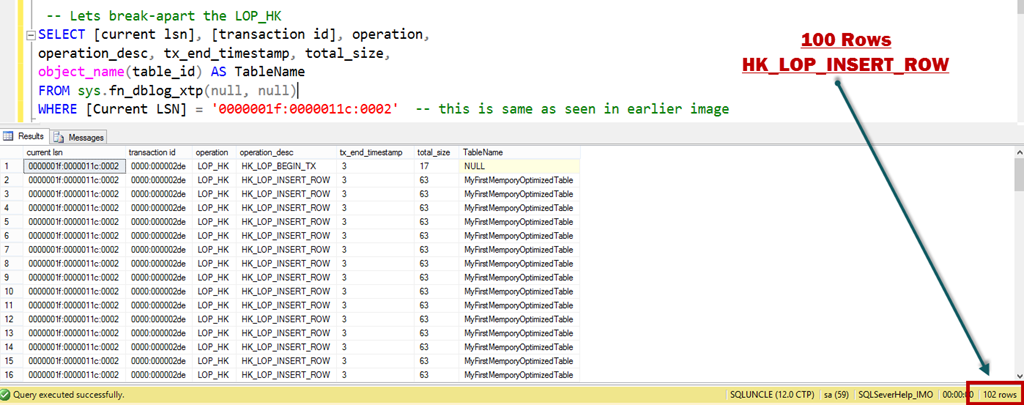
As we can see above that we have total three log records for 100 rows inserted. Have a look at length of the LOP_HK log record, its ~6 KB. We can use another undocumented function fn_dblog_xtp to crack-open that record. HK in the operation column is the artifact of feature’s code name Hekaton.

 -- Lets break-apart the LOP_HK
SELECT [current lsn], [transaction id], operation,
operation_desc, tx_end_timestamp, total_size,
object_name(table_id) AS TableName
FROM sys.fn_dblog_xtp(null, null)
WHERE [Current LSN] = '0000001f:0000011c:0002'  -- this is same as seen in earlier image

Here is the output in SSMS:
image

Top and bottom (Row # 1 and Row # 102) rows are HK_LOP_BEGIN_TX and HK_LOP_COMMIT_TX. HK_LOP_INSERT_ROW is seen 100 times. Above proves the concept that amount of data logged for in-memory table is lesser as compared to disk-based tables.

Log records are not generated for any modification of Index

In last screenshot, we can see that we don’t have any log records which contains information about index modification as oppose to disk-based table where we saw LCK_INDEX_LEAF.

Transaction log records are written only if the transaction on in-memory table is committed

For In-Memory OLTP transactions, log records are generated only at commit time. As oppose to disk-based table, in-memory OLTP doesn’t follow write-ahead logging (WAL) protocol. Not using WAL protocol makes it highly efficient. To prove this point, we would create a transaction and roll it back. We would again use fn_dblog and count the number of rows.

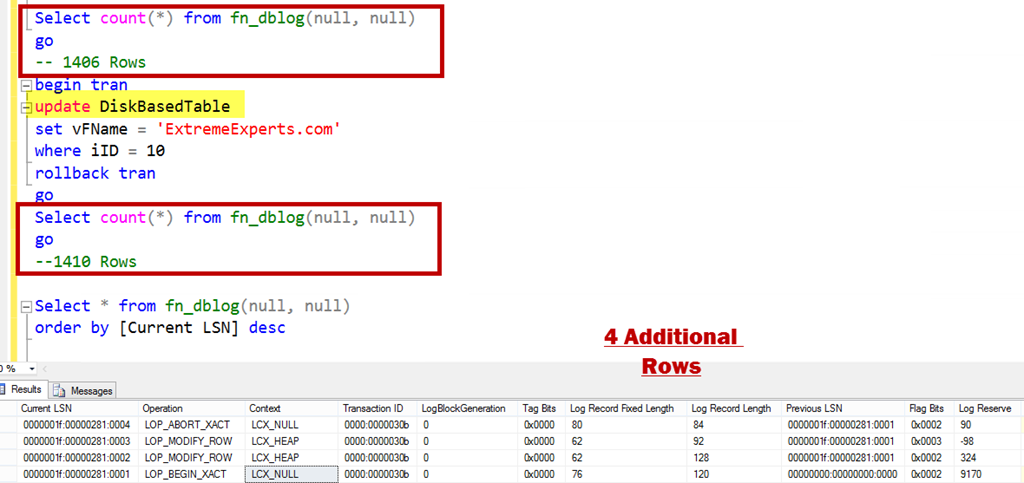
Select count(*) from fn_dblog(null, null)
go
-- 1406 Rows
begin tran
update DiskBasedTable 
set vFName =
'ExtremeExperts.com' where iID = 10 rollback tran go Select count(*) from fn_dblog(null, null) go Select * from fn_dblog(null, null) order by [Current LSN] desc

Below is an update which was rolled back and it has generated 4 log records.
image

LOP_BEGIN_XACT stands for begin transaction and LOP_ABORT_XACT stands for rollback/abort of transaction. Now, let’s do the same operation for in-memory table.
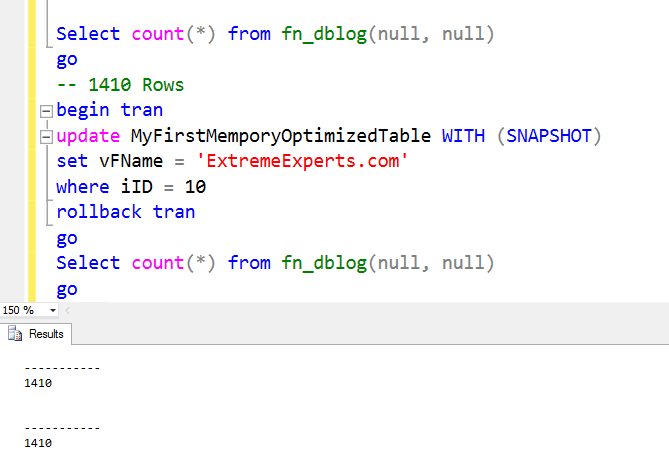
Select count(*) from fn_dblog(null, null)
go
-- 1410 Rows
begin tran
update MyFirstMemporyOptimizedTable WITH (SNAPSHOT)
set vFName = 'ExtremeExperts.com'
where iID = 10
rollback tran
go
Select count(*) from fn_dblog(null, null)
go
--1410 Rows
image

Before and after rows in transaction log file is same (i.e. 1410) which means no additional rows are generated for a uncommitted transaction, if it’s done for in-memory table.

I hope that now you are clear about the difference in logging. In summary, we can say that logging of transaction on in-memory table is much more efficient as compare to disk based table transactions logging. Stay tuned for more on Hekaton.

  • Cheers,
  • Balmukund Lakhani
  • Twitter @blakhani
  • Author: SQL Server 2012 AlwaysOnPaperback, Kindle
  • Posted in A - Z Series, In Memory OLTP, In-Memory OLTP, SQL Server 2014 | Tagged: , , , , , , , , | 13 Comments »

    A-Z of In-Memory OLTP : Checkpoint – Part 2

    Posted by blakhani on December 24, 2013


    If you are reading this post before part 1, I would like you to read part 1 so that you have context of what you are reading. In part 1, we have seen demo and usage of DATA files. In this blog I am going to talk about DELTA files.

    As we saw earlier each DELTA file is paired with DATA file. I must call out that DATA and DELTA files are not related to a single table but they cover a transaction range (In fact, this was a question asked by one of the reader, Manoj (Blog) in my last post). In in-memory world, when a record is deleted from the table, it’s not removed from the DATA file but a identifier is inserted in DELTA file. This would tell SQL Server that during loading of the data (startup of database), don’t load this particular row in memory as it’s deleted. Now, imagine a situation when we are doing an update to a row.

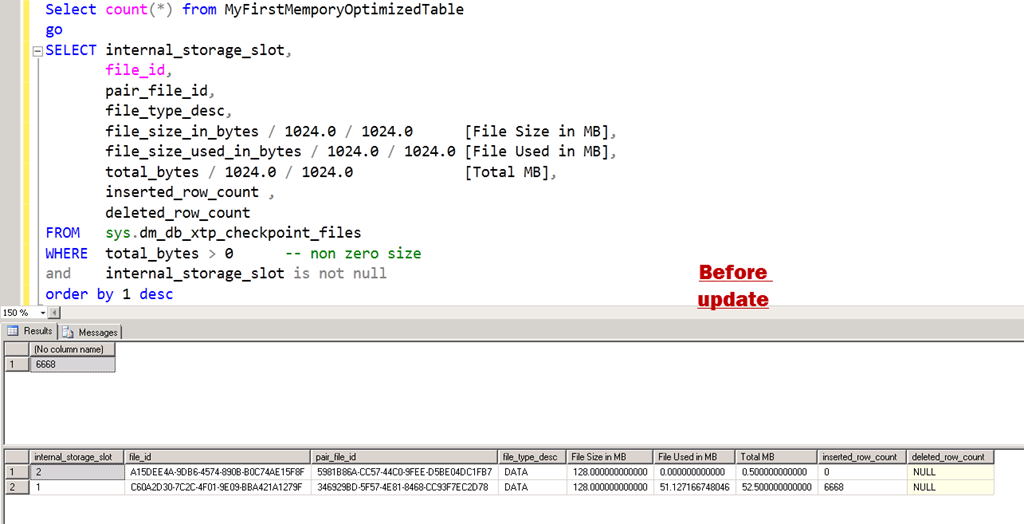
    Let’s see this theory in action. I have used same script to populate the data and here is the position where we left in last blog. Here is the query

    Select count(*) from MyFirstMemporyOptimizedTable
    go
    SELECT internal_storage_slot,
           file_id, 
           pair_file_id,    
           file_type_desc,
           file_size_in_bytes / 1024.0 / 1024.0      [File Size in MB], 
           file_size_used_in_bytes / 1024.0 / 1024.0 [File Used in MB], 
           total_bytes / 1024.0 / 1024.0             [Total MB], 
           inserted_row_count ,
           deleted_row_count
    FROM   sys.dm_db_xtp_checkpoint_files 
    WHERE  total_bytes > 0        -- non zero size
    and       internal_storage_slot is not null 
    order by 1 desc


    image

    Now, I am going to delete one third of the rows and make sure to fire a manual checkpoint.

    Delete from MyFirstMemporyOptimizedTable
    where iID%3 = 0
    go
    checkpoint
    go
    
    ----------------------
    (3334 row(s) affected)

    If we run the old query again.

    image

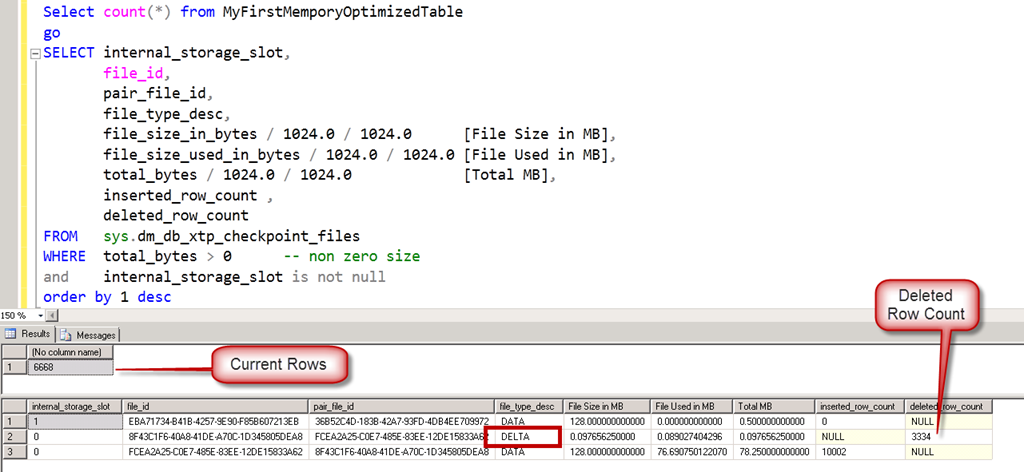
    Here comes the DELTA files. Note that the internal_slot_id is zero for one pair and one for new DATA file.  After sometime, if we run the exact same query again, we would see a different output.

    image

    If we look at the file_id, its changed from the previous screenshot. It sounds like a checkpoint has fired by itself and has removed the reference of DELTA file. Current DATA file shows 6668 rows which is exact rows in table. There is no need of DELTA file here.

    Now, I am going to fire an update statement and modify all the rows and see the effect.

    update MyFirstMemporyOptimizedTable
    set vFName = 'www.ExtremeExperts.com'
    where vFName = 'ExtremeExperts.com'
    go
    checkpoint
    go


    ——————

    (3334 row(s) affected)

    image

    image

    This matches with the theory that UPDATE is split into DELETE and INSERT. We Updated 3334 rows, which caused append of 3334 rows into DELTA file and append of 3334 rows to DATA file.

    In above, “after update” we can see three DATA files and one DELTA file. Let’s fire one more query to understand the transaction range. Here is the query

    SELECT internal_storage_slot,
           file_id, 
           pair_file_id,    
           file_type_desc,
           inserted_row_count ,
           deleted_row_count,
           transaction_id_lower_bound,
           transaction_id_upper_bound
    FROM   sys.dm_db_xtp_checkpoint_files 
    WHERE  total_bytes > 0        -- non zero size
    and       internal_storage_slot is not null 
    order by 1 desc


    image

    Each internal_storage_slot is for a range of transaction. Lower bound and upper bound are matching for consecutive slots.

    It is important to recall that writing (appending to be precise) to DELTA and DATA file is NOT done by any user transaction but background checkpoint thread. In our tests we are firing manual checkpoint to see the immediate effect to learn which would not be the case in production server. The background thread, scans the log buffers (and if needed, transaction log file) to append to those files. As per Hekaton Whitepaper by Kalen, below are the steps done by checkpoint.

    1. All buffered writes are flushed to the data and delta files.

    2. A checkpoint inventory is constructed that includes descriptors for all files from the previous checkpoint plus any files added by the current checkpoint. The inventory is hardened to the transaction log.

    3. The location of the inventory is stored in the transaction log so that it is available at recovery time.

    Till, I wrote last few lines, another system process happened and here is the final output.

    image

    We would discuss about merge process in later part of the series.

    Hope you have already downloaded SQL Server 2014 CTP2 and learning In-Memory OLTP (a.k.a. Hekaton) with me. If you haven’t yet, be sure to check out the SQL Server 2014 CTP2 so that you can follow this series and get your hands dirty.

  • Cheers,
  • Balmukund Lakhani
  • Twitter @blakhani
  • Author: SQL Server 2012 AlwaysOnPaperback, Kindle
  • Posted in A - Z Series, Hekaton Series, In Memory OLTP, In-Memory OLTP, SQL Server 2014 | Tagged: , , , , , , , , | 3 Comments »

    A-Z of In-Memory OLTP : Native Compilation

    Posted by blakhani on December 17, 2013


    Imagine that you are participating in a 400 meters running competition and you are the only one to get discount of 300 meters and allowed to start 100 meters before the finish line. What would be the result? All participants have to run 400 meters and you would run only 100 meters. Of course, You would win!!! (terms and condition apply). In the same way, what would happen in SQL world, if we finish a significant amount of work i.e. compilation of stored procedure during creation phase. Yes, you are correct. The time spent in execution of the stored procedure would be less. In this post we would try to learn internals of native compilation.

    In earlier “T-SQL Constructs” post of this series, we have seen syntax of creation of natively compiled stored procedure. Native compilation of the stored procedure causes machine language code (i.e. DLL) to be generated and loaded in SQL Server Memory. Natively compiled stored procedures allows us to execute T-SQL in the fastest way, which includes accessing data in memory-optimized tables. In addition, disk-based tables are not allowed to be accessed at all inside natively compiled stored procedures. If we attempt to create a natively compiled procedure which accesses disk based table, we would get below error. In my test, the table name was DiskBasedTable.

    Msg 10775, Level 16, State 1, Procedure InsertName, Line 14
    Object ‘dbo.DiskBasedTable’ is not a memory optimized table and cannot be accessed from a natively compiled stored procedure.

    The advantages of natively complies stored procedure is that most of the work (permission check, object existence check, query plan generation) is done during compilation/creation of stored procedure. Due to this there are many limitations on the Transact-SQL that is allowed, the data types and collations that can be accessed and processed in natively compiled procedures. SQL Server Product Documentation team has done good amount of work in documenting them (refer Supported Data Types, Unsupported Transact-SQL Constructs)

    To get a list of natively complied stored procedures we can use catalog views as shown below. Highlighted below is the new column added to support in-memory OLTP.

    SELECT uses_native_compilation, 
           object_id, 
           Object_name(object_id) 
    FROM   sys.sql_modules 
    WHERE  uses_native_compilation = 1 
    go 
    
    SELECT uses_native_compilation, 
           object_id, 
           Object_name(object_id) 
    FROM   sys.all_sql_modules 
    WHERE  uses_native_compilation = 1 
    go


    Here is the output in SSMS

    image

    To convert a stored procedure to DLL, SQL Server engine uses C compiler. Does this mean we need to have C installed on the machine when we install in-memory OLTP? Well, we just need to complie the C code so we just need compiler related files. SQL Server product comes with compiler files. As soon as SQL Engine is installed, these files are installed under <SQL Server Installation Directory>\MSSQL\Binn\Xtp folder. Main compilation files are located under ..\VC\bin folder.

    image

    Sometimes, we might face stored procedure creation failure due to issues in compilation of the C code. To make our life easier, SQL Server generates intermediate files and they are useful for troubleshooting by members of product support team. Here is the text of .out file.

    Microsoft (R) C/C++ Optimizing Compiler Version 17.00.60605.1 for x64

    Copyright (C) Microsoft Corporation.  All rights reserved.

    xtp_p_8_581577110.c

    Microsoft (R) Incremental Linker Version 11.00.60605.1

    Copyright (C) Microsoft Corporation.  All rights reserved.

    /out:xtp_p_8_581577110.dll

    /ltcg

    /debug

    /dll

    /implib:xtp_p_8_581577110.lib

    "/LIBPATH:C:\Program Files\Microsoft SQL Server\MSSQL12.MSSQLSERVER\MSSQL\Binn\Xtp\gen\lib"

    "/LIBPATH:C:\Program Files\Microsoft SQL Server\MSSQL12.MSSQLSERVER\MSSQL\Binn\Xtp\VC\lib"

    /noentry

    /nodefaultlib

    /incremental:no

    /ltcg

    /wx

    /FUNCTIONPADMIN

    xtp_p_8_581577110.obj

    hkgenlib.lib

    hkruntime.lib

    hkengine.lib

    hkgenexp.exp

    hkcrt.lib

    hkk32.lib

    hkversion.obj

    Generating code

    Finished generating code

    If you are a C developer, it may be easy for you to understand the switches passed during calling of CL.exe. There is no real need for a DBA to know all these options. In case you are too excited, read here for the parameters.

    Before I conclude, I would like you to throw ideas about below error, while creation of natively compiled stored procedure.

    image

    Here is the text of the message:

    Msg 41312, Level 16, State 4, Procedure InsertName1, Line 2

    Unable to call into the C compiler. GetLastError = 2.

    Of course, I broke something and above is the error I am getting. Can you guess? Go ahead and comment on the post.

    Stay Tuned for next part of the series.

    Cheers,

    Balmukund Lakhani

    Twitter @blakhani

    Author: SQL Server 2012 AlwaysOnPaperback, Kindle

    Posted in A - Z Series, Hekaton Series, In Memory OLTP, In-Memory OLTP | Tagged: , , , , , , | 1 Comment »