Help: SQL Server

Sharing my knowlege about SQL Server Troubleshooting Skills

  • Blog Stats

    • 2,157,006 hits
  • Select GETDATE()

    March 2026
    M T W T F S S
     1
    2345678
    9101112131415
    16171819202122
    23242526272829
    3031  

SQL 2014 Learning Series # 7–New Feature – Delayed Durability (Part 1)

Posted by blakhani on May 1, 2014


SQL Server 2014 is having a lot of useful feature and some are hidden as well. I was able to learn about “delayed durability” feature while preparing my session at GIDS. Since the session is over now, it’s right time to write about this feature. First, let’s understand durability.

In general, every transaction in relational database should follow ACID properties. Atomicity, Consistency, Isolation and Durability.

image

In SQL Server, durability is maintained by writing log record of modification to transaction log “synchronously”. If write to the disk is slow (or huge data to be written) the total time of transaction would become longer and we would see WRITELOG wait for the SPID. Once log record is hardened to transaction log, client would get commit confirmation.

image

SQL Server 2014 gives DBA and Application team to achieve durability with a delay. Delayed durability may give you some performance gain at the cost of durability factor of a transaction. It is achieved by writing the log record asynchronously. Log record is still generated and kept in memory area called “Log Cache”. Only difference is that it’s written to disk with the delay. So, even if application has received confirmation from SQL about the commit, it’s not actually hardened to disk. This is what is called as “delayed” durability.  If there is a unexpected failure of SQL before the data is written to disk, the data is essentially lost.

image

I must emphasize the fact that if your application can’t afford any data loss, don’t use this feature. (I don’t have option to put red flashing light otherwise I would have done that to stress on the data loss factor). Does this mean that you have no control about the flush of the log records from log cache to disk? No, product team has thought of this and provided a extended stored procedure called sp_flush_log. I would talk more about this later.

Now since you know the fundamentals of delayed durability, let’s see how to implement it. This can be controlled at various level. We can set delayed durability at Database Level, Transaction Level and in-memory stored procedure.

Database Level

We can change the setting using SSMS as below

image

Same options are provided in T-SQL as well.

ALTER DATABASE [AdventureWorks2014]
SET DELAYED_DURABILITY = DISABLED

ALTER DATABASE [AdventureWorks2014]
SET DELAYED_DURABILITY = ALLOWED

ALTER DATABASE [AdventureWorks2014]
SET DELAYED_DURABILITY = FORCED

If we set the value to disabled at database level, it would take highest priority. This means that transaction level setting would not be honored.

Transaction Commit Level

During commit of a transaction we can specify delayed durability option as ON or OFF

COMMIT TRAN [ transaction name | @transaction name variable ] [ WITH ( DELAYED_DURABILITY = { OFF | ON })]

Natively Compiled Stored Procedure Level

To know more about natively compiled procedure, I would like you to read here. While creating natively compiled procedure, we can specify delayed durability as below.

CREATE PROCEDURE SQLServerHelp
WITH NATIVE_COMPILATION, SCHEMABINDING, EXECUTE AS OWNER
AS BEGIN ATOMIC WITH 
(
    DELAYED_DURABILITY = ON,
    TRANSACTION ISOLATION LEVEL = SNAPSHOT,
    LANGUAGE = N'English'
    …
)
END

Here is the quick chart which explains effect of settings done at database level and transaction level.

image

In next part, we would see delayed durability in action.
  • Cheers,
  • Balmukund Lakhani
  • Twitter @blakhani
  • Author: SQL Server 2012 AlwaysOnPaperback, Kindle
  • Posted in SQL 2014 Learning Series, SQL Server 2014 | Tagged: , , | 4 Comments »

    A-Z of In-Memory OLTP : Performance Tip for Placement of Data and Delta Files (Checkpoint Files)

    Posted by blakhani on April 29, 2014


    While preparing my session about In-Memory OLTP for internal audience, I learned something new about placement of checkpoint files. In case you don’t know about checkpoint files, I would like you to read about checkpoint (part 1 and part 2).

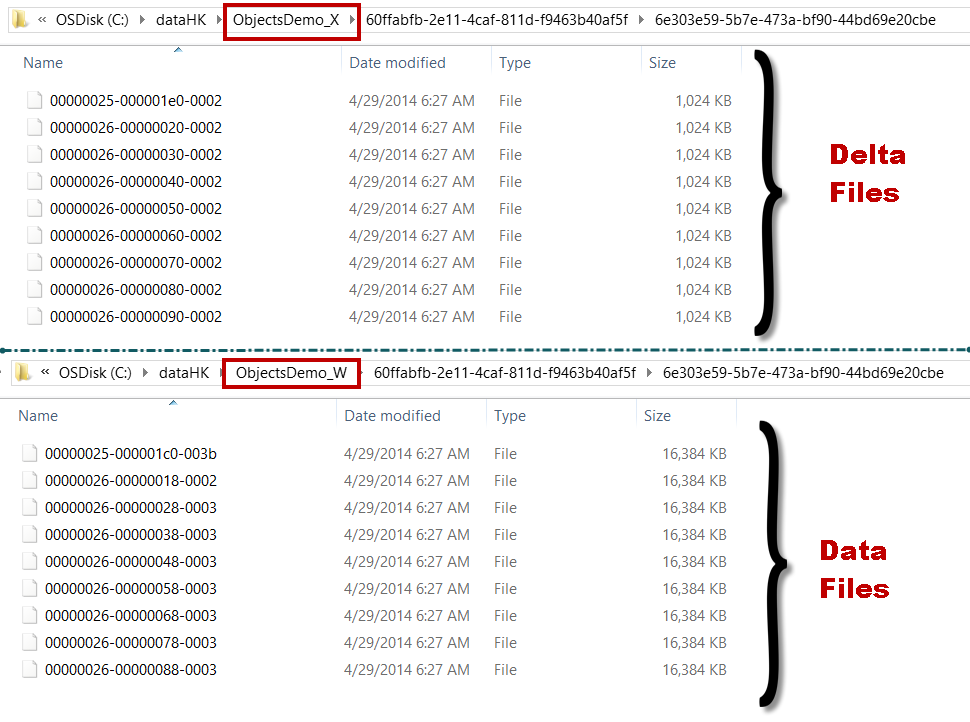
    Data files and Delta files are created in round robin fashion. Let’s assume that we have two drives W and X and we want to distribute the IO load of In-Memory table. In general, for disk based table, what we used to do? Create the file on each drive? Yes, that would work for disk bases table but there is a little behavior which we should know before doing such thing for in-memory tables.

    For demo purpose, I am going to use two folder on same drive to mimic two drives.

    USE master
    GO
    IF EXISTS (
            SELECT *
            FROM sys.databases
            WHERE NAME = 'ObjectsDemo'
            )
        ALTER DATABASE ObjectsDemo SET  SINGLE_USER WITH ROLLBACK IMMEDIATE;
        DROP DATABASE ObjectsDemo
    GO
    
    CREATE DATABASE ObjectsDemo
    GO
    
    ALTER DATABASE ObjectsDemo 
    ADD filegroup ObjectsDemo_mod CONTAINS memory_optimized_data
    GO
    
    -- Add Files 
    ALTER DATABASE ObjectsDemo 
    ADD FILE (
        NAME = 'ObjectsDemo_mod_W'
        ,filename = 'c:\dataHK\ObjectsDemo_W'
        ) TO filegroup ObjectsDemo_mod
    GO
    
    -- Add Files 
    ALTER DATABASE ObjectsDemo 
    ADD FILE (
        NAME = 'ObjectsDemo_mod_X'
        ,filename = 'c:\dataHK\ObjectsDemo_X'
        ) TO filegroup ObjectsDemo_mod
    GO
    
    So, I have two folders “ObjectsDemo_W” and “ObjectsDemo_X” to represent W and X drives. Once we create a in-memory table, we should see checkpoint file pairs (CFP) created. 
    USE ObjectsDemo
    GO
    
    CREATE TABLE dbo.t1 (
        c1 INT NOT NULL PRIMARY KEY NONCLUSTERED
        ,c2 INT
        )
        WITH (memory_optimized = ON)
    GO


    Let’s have a look at folders now.

    image

    One folder (Drive W) contains only data files (pre-created at 16 MB each) and another folder (Drive X) contains only delta file (pre-created at 1 MB each). That would not put uniform load on the both folders. The files are placed in this fashion because data and delta files are created in container into round-robin fashion

    Here is the tip: Since we have even number of drives, we should create two folders on each drive and place files in 4 containers instead of 2 containers. We need to remember that first two containers should be from same drive.

    use master
    go
    IF EXISTS (
            SELECT *
            FROM sys.databases
            WHERE NAME = 'ObjectsDemo'
            )
        ALTER DATABASE ObjectsDemo SET  SINGLE_USER WITH ROLLBACK IMMEDIATE;
        DROP DATABASE ObjectsDemo
    GO
    
    CREATE DATABASE ObjectsDemo
    GO
    
    ALTER DATABASE ObjectsDemo 
    ADD filegroup ObjectsDemo_mod CONTAINS memory_optimized_data
    GO
    
    -- Add Files 
    ALTER DATABASE ObjectsDemo 
    ADD FILE (
        NAME = 'ObjectsDemo_mod_W1'
        ,filename = 'c:\dataHK\ObjectsDemo_W1'
        ) TO filegroup ObjectsDemo_mod
    GO
    
    -- Add Files 
    ALTER DATABASE ObjectsDemo 
    ADD FILE (
        NAME = 'ObjectsDemo_mod_W2'
        ,filename = 'c:\dataHK\ObjectsDemo_W2'
        ) TO filegroup ObjectsDemo_mod
    GO
    
    -- Add Files 
    ALTER DATABASE ObjectsDemo 
    ADD FILE (
        NAME = 'ObjectsDemo_mod_X1'
        ,filename = 'c:\dataHK\ObjectsDemo_X1'
        ) TO filegroup ObjectsDemo_mod
    GO
    
    -- Add Files 
    ALTER DATABASE ObjectsDemo 
    ADD FILE (
        NAME = 'ObjectsDemo_mod_X2'
        ,filename = 'c:\dataHK\ObjectsDemo_X2'
        ) TO filegroup ObjectsDemo_mod
    GO


    W1 and W2 are two container for mimicking two folder on W and same for X as well. Now, if we create a table, due to round robin, we should see below.

    image

    Now we have DATA file distributed and should have better usage of both driver. What you should do if you have ODD number of drives? Well, nothing because of round robin, data and delta files would be distributed automatically. 

    Bottom line: If you have plans to create file stream containers on odd number of drives, create them using trick mentioned above. If you have even number of containers then no special consideration.

    Hope you have learned something new today.

  • Cheers,
  • Balmukund Lakhani
  • Twitter @blakhani
  • Author: SQL Server 2012 AlwaysOnPaperback, Kindle
  • Posted in A - Z Series, Hekaton Series, In Memory OLTP, In-Memory OLTP, SQL Server 2014 | Tagged: , , , , , , , , , , , | 2 Comments »

    Speaking at GIDS 2014 – My Sessions Detail

    Posted by blakhani on April 22, 2014


    As a part of my knowledge sharing passion, this week I would be speaking at The Great Indian Developer Conference (GIDS). With over 25000 attendees benefiting over six game changing editions, GIDS is the gold standard for India’s software developer ecosystem. Here are the details.

    Website: http://www.developermarch.com/developersummit 
    Event Date: April 22-25, 2014 (Tuesday-Friday)
    Event Location: J. N. Tata Auditorium
    National Science Symposium Complex (NSSC)
    Sir C.V.Raman Avenue, Bangalore, India

    The location of the event (IISc, Bangalore) is close to my heart as I have done my M.Tech. (1999 Aerospace batch) from there. I have my sweet memories associated. If I get time, I would go and meet my professors.

    This year, I have two sessions lined up in GIDS DATA & TUTORIALS Day – Friday, April 25th

    Lazy Commit Like NoSQL with SQL Server

    45 mins | GIDS.DATA | Conference | 14:05-14:50 (Apr 25)

    With every release of SQL Server there is something new that gets added into the product that we rarely notice. One of this capability is to differ on commit data to persistent disk. SQL Server has always used the Write Ahead Logging a.k.a WAL for ages together to maintain consistency. With new innovations coming into picture, we wanted to expand on a slightly different behavior which most of the NoSQL databases claim, lazy commit. For highly transactional systems or systems that are getting into a bottleneck because of WAL process at the IO subsystem. this feature will greatly help. There are tons of caveats that come as part of this implementation and in this session we will do a quick tour on how this can be achieved. We will also talk about the capability of having a data on a completely non-durable mode and just into memory based structure. These new capabilities are fun to work with and have unique scenarios which we can enable for modern applications and SQL Server 2014.

    Hidden Secrets and Gems of SQL Server We Bet You Never Knew

    150 mins | GIDS.Tutorials | Conference |  15:00-17:45 (Apr 25)

    It really amazes us every time when someone says SQL Server is an easy tool to handle and work with. Microsoft has done an amazing work in making working with complex relational database a breeze for developers and administrators alike. Though it looks like child’s play for some, the realities are far away from this notion. The basics and fundamentals though are simple and uniform across databases, the behavior and understanding the nuts and bolts of SQL Server is something we need to master over a period of time. With a collective experience of more than 30+ years amongst the speakers on databases, we will try to take a unique tour of various aspects of SQL Server and bring to you life lessons learnt from working with SQL Server. We will share some of the trade secrets of performance, configuration, new features, tuning, behaviors, T-SQL practices, common pitfalls, productivity tips on tools and more.
    This is a highly demo filled session for practical use if you are a SQL Server developer or Administrator. The speakers will be able to stump you and give you answers on almost everything inside the Relational database called SQL Server.

    Above is the first session done by Pinal, Vinod and myself on the stage! I am really excited about that.

    Along with me, my dear friends Pinal (b|t) and Vinod (b|t) would also be speaking at GIDS. Here is the list of sessions by them on their blog.
    Vinod – http://blogs.extremeexperts.com/2014/04/21/gids-2014-5-tech-session-scheduled
    Pinal http://blog.sqlauthority.com/2014/04/21/sql-server-presenting-4-technology-sessions-at-great-indian-developer-2014-contest

    If you are coming to event, find me and don’t hesitate to say hello.

    Cheers,
    Balmukund

    Posted in Events | Tagged: , | 1 Comment »